
Participating Frequently
February 29, 2024
Question

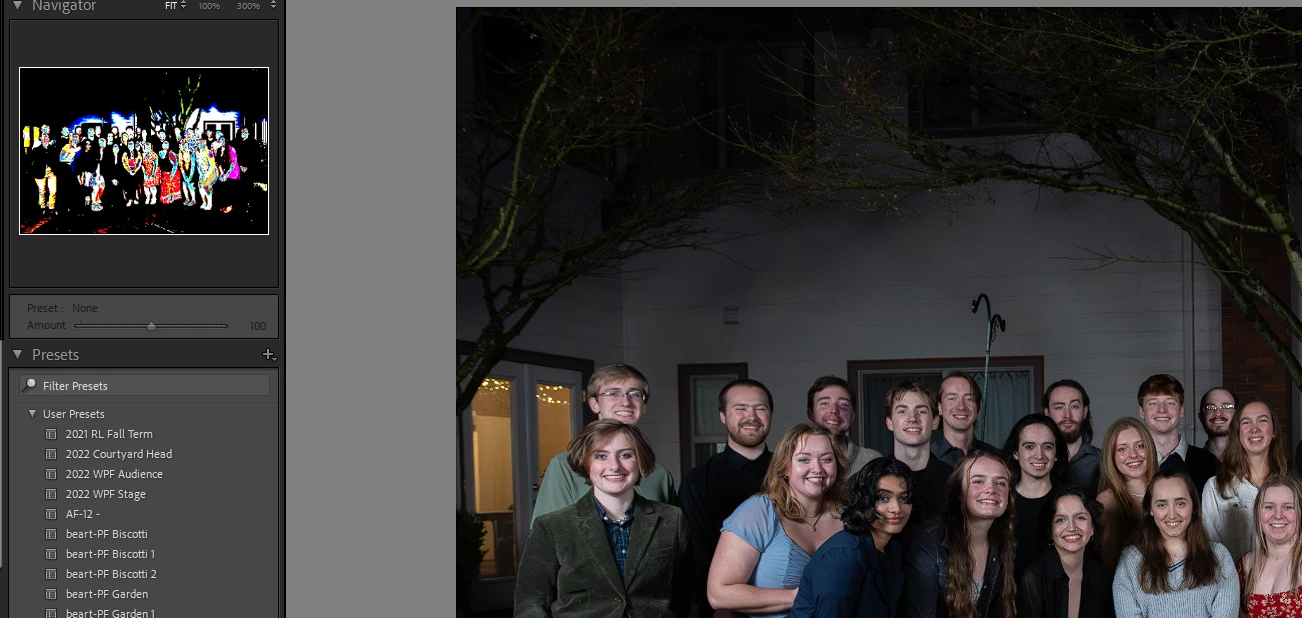
Weird Preview Image in Navigator Pane

  • February 29, 2024
  • 1 reply
  • 172 views

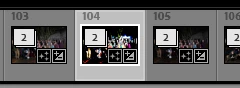
Hi yall! I recently built a new PC. I've updated all my drivers and such, but when I edit photos, the preview pane in the navigator looks really odd. Any thoughts on what's going on? I get the same issue on the bottom loupe as well


This topic has been closed for replies.

1 reply

GoldingD
Legend
February 29, 2024

Please post your System Information as Lightroom Classic (LrC) reports it. In LrC click on Help, then System Info, then Copy. Paste that information into a reply. Please present all information from first line down to and including Plug-in Info. Info after Plug-in info can be cut out as that is just so much dead space to us non-Techs and it takes up vast amounts of scroll space making the reply less readable and less likely that others will bother with your post.

Dave SoAuthor
Participating Frequently
February 29, 2024

Lightroom Classic version: 13.2 [ 202402141005-bf1aeb84 ]
License: Creative Cloud
Language setting: en
Operating system: Windows 11 - Home Premium Edition
Version: 11.0.22631
Application architecture: x64
System architecture: x64
Logical processor count: 20
Processor speed: 3.4GHz
SqLite Version: 3.36.0
CPU Utilisation: 0.0%
Built-in memory: 32525.1 MB
Dedicated GPU memory used by Lightroom: 2759.1MB / 16337.2MB (16%)
Real memory available to Lightroom: 32525.1 MB
Real memory used by Lightroom: 1732.0 MB (5.3%)
Virtual memory used by Lightroom: 5104.6 MB
GDI objects count: 799
USER objects count: 2691
Process handles count: 2944
Memory cache size: 24.1MB
Internal Camera Raw version: 16.2 [ 1763 ]
Maximum thread count used by Camera Raw: 5
Camera Raw SIMD optimization: SSE2,AVX,AVX2
Camera Raw virtual memory: 402MB / 16262MB (2%)
Camera Raw real memory: 492MB / 32525MB (1%)

Cache1:
Preview1- RAM:25.0MB, VRAM:174.0MB, DSC_2857.NEF
Preview2- RAM:22.0MB, VRAM:0.0MB, DSC_2868.NEF
NT- RAM:47.0MB, VRAM:174.0MB, Combined:221.0MB

Cache2:
final1- RAM:165.0MB, VRAM:0.0MB, DSC_2868.NEF
final2- RAM:182.0MB, VRAM:1073.0MB, DSC_2857.NEF
T- RAM:347.0MB, VRAM:1073.0MB, Combined:1420.0MB

Cache3:
m:24.1MB, n:75.2MB

U-main: 85.0MB

System DPI setting: 96 DPI
Desktop composition enabled: Yes
Standard Preview Size: 2560 pixels
Displays: 1) 2560x1440, 2) 2560x1440
Input types: Multitouch: No, Integrated touch: No, Integrated pen: No, External touch: No, External pen: No, Keyboard: No

Graphics Processor Info:
DirectX: AMD Radeon RX 6800 (31.0.24019.1006)
Init State: GPU for Export supported by default
User Preference: Auto

Application folder: C:\Program Files\Adobe\Adobe Lightroom Classic
Library Path: C:\Users\dmso\OneDrive - C\Pictures\Lightroom\Lightroom Catalog.lrcat
Settings Folder: C:\Users\dmso\AppData\Roaming\Adobe\Lightroom

Installed Plugins:
1) AdobeStock
2) Flickr
3) Nikon Tether Plugin

johnrellis
Legend
February 29, 2024

"DirectX: AMD Radeon RX 6800 (31.0.24019.1006)"


That's AMD version 24.2.1 (the most recent). There have been several reports here of problems with recent AMD drivers. Next troubleshooting steps:


1. Set Preferences > Performance > Use Graphics Processor to Off. Does the problem go away?


2. Try rolling back to 24.1.1, 23.12.1, or 23.8.2:

https://www.amd.com/en/support/previous-drivers/graphics/amd-radeon-6000-series/amd-radeon-6800-series/amd-radeon-rx-6800