
Copy link to clipboard
Copied
I think that in this case the screenshot kind of speaks for itself. Yes, this is using Lightroom Alignment (Transform) tool, vertical in this case (but I'm pretty sure I've seen it with others). Quite simply, what's going on here? Obviously, this does not improve the image! Thanks.
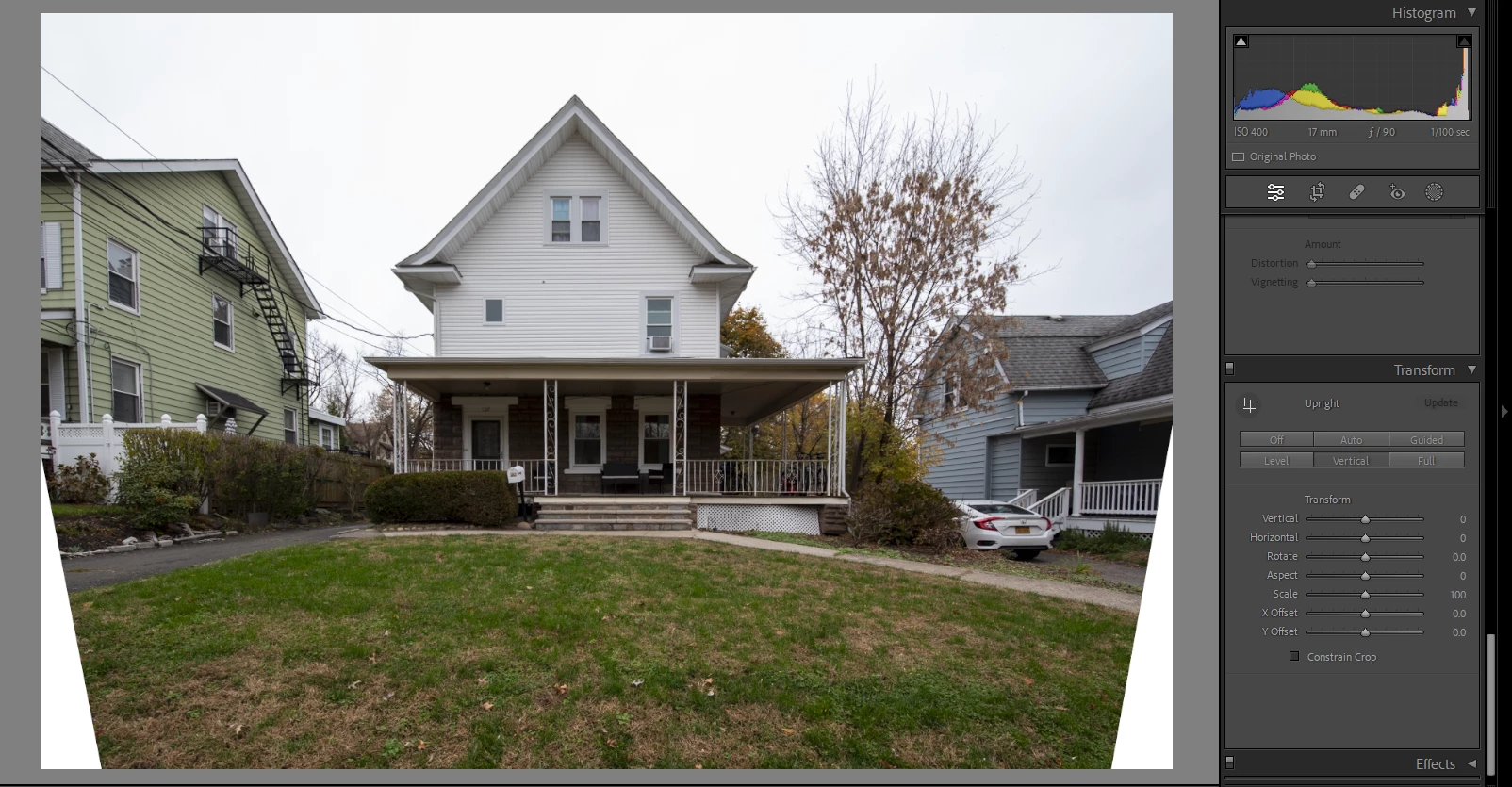
If the white edges are what you're concerned about, just check the "constrain crop" box. I'm not sure if that's what you're asking though. Please be more specific.
Copy link to clipboard
Copied
What specifically are you seeing that is "weird"?
Copy link to clipboard
Copied
Looks pretty vertical to me
Copy link to clipboard
Copied
If the white edges are what you're concerned about, just check the "constrain crop" box. I'm not sure if that's what you're asking though. Please be more specific.
Copy link to clipboard
Copied
Replying to Tomcat20 specifically, YES, it's absolutely the white edges! It's like it turns the image into kind of a trapazoid! I guess it's not as obvious as I thought.
Regardless, yes, "constrain crop" did the trick. Still, just for my own learning, why did that happen in the first place (to that image, but not others)? And, when would I NOT want to use that? Otherwise stated, considering those white edges, how could Constain Crop NOT be beneficial? Thanks.
Copy link to clipboard
Copied
Still, just for my own learning, why did that happen in the first place (to that image, but not others)? And, when would I NOT want to use that? Otherwise stated, considering those white edges, how could Constain Crop NOT be beneficial? Thanks.
By @Jordan26437343lemp
Those are good questions. In the demo below, the first thing I do is reduce the Scale just so you can more clearly see what happens around the edges during a Transform correction. With the image reduced, you can see that if you want the tilted verticals in the subject to become perfectly vertical, to make that happen, the whole image rectangle must be tilted in the opposite direction.
In other words, the building in the original looked like a trapezoid, so to reverse that out, the image is tilted, making the image border a trapezoid in the opposite direction, canceling out the distortion and then the building looks rectilinear. I used to do this in the chemical darkroom: Tilt the easel under the enlarger, to correct the perspective on the photo paper. The “virtual tilting” in Lightroom Classic is a lot easier!
Now, about why you would want Constrain Crop off: There are a lot of images, like ones where I composed too tightly in the camera viewfinder, not leaving enough room around the edges to account for straightening. Later, when editing, the correction tilt does not leave enough margin along the bottom, so if I want any space around the bottom of the subject, Constrain Crop would cut off too much of the image. Sometimes what I will do about that is disable Constrain Crop to leave the white corners, then kick it over to Photoshop and fill in the blank space with cloning, Content-Aware Fill, or now, Generative Fill.
Copy link to clipboard
Copied
Thanks so much, Conrad! I'll try to process all of that!
Copy link to clipboard
Copied
What was your goal, and how did this not meet it?
Did you want to correct keystoning, so that vertical lines are vertical?
Sometimes this type of correction can look weird, because the top looks weirdly large. Well, that’s expected, because in the real scene you were standing in when you took the photo, the top of the house really was farther than the bottom and it should be smaller. But you can’t have that and also vertical correction. You have to choose between one reality or the other.
If that’s not the weirdness you’re seeing, you do need to be more specific about what is weird, because right now what you are showing is what we all expect from a Vertical correction.
Copy link to clipboard
Copied
Conrad, I just stated this in my reply to Tomcat20, but just to reiterate, since you asked, it's those white triangles on the sides of the image, which is apparently cured by the Constrain Crop tool.
Get ready! An upgraded Adobe Community experience is coming in January.
Learn more