
Answered
what happened to file naming in lightroom classic
file namingin the latest version of lightroom changed and I don't understand it. I can only use a filename template editor, all the other options are gone.

file namingin the latest version of lightroom changed and I don't understand it. I can only use a filename template editor, all the other options are gone.
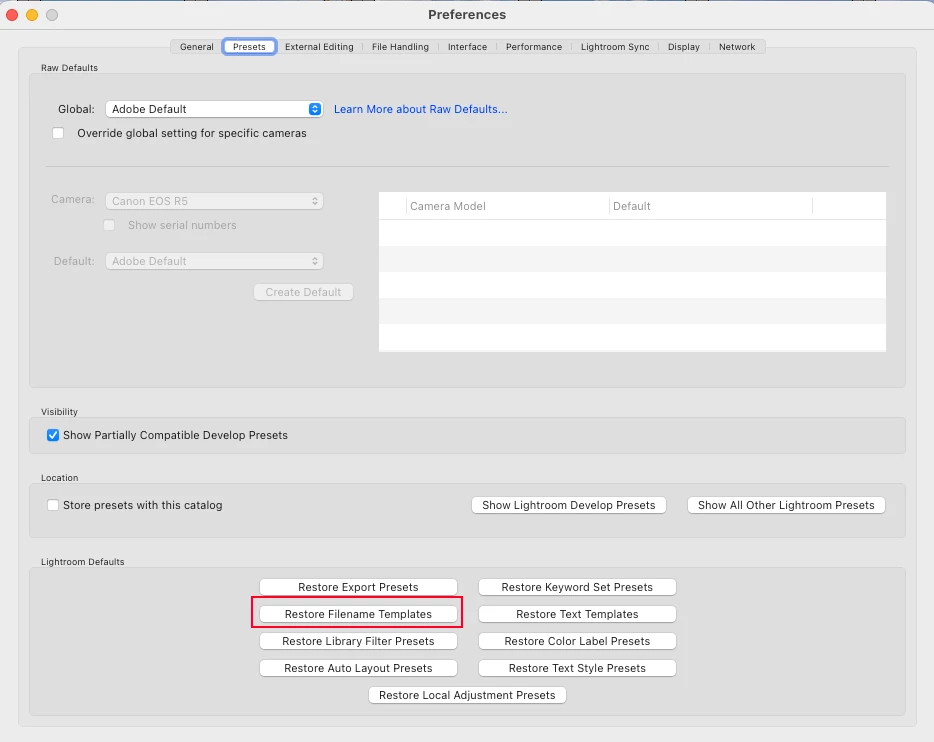
I'm not sure why the templates would have disappeared, but they should be easy to restore. To do so, open the LrC Preferences, then choose the 'Presets' tab. At bottom of this tab you should see a batch of options for restoring various presets/tempaltes etc. You should click on 'Restore Filename Templates' as shown in attached screenshot.
Already have an account? Login
Enter your E-mail address. We'll send you an e-mail with instructions to reset your password.
 AdChoices