
Inspiring
May 25, 2018
Answered

What happened to the LightRoom General Presets???

  • May 25, 2018
  • 2 replies
  • 4538 views

In one of the latest updates to LR Classic CC, I lost my Lightroom General Presets. There were about 5 of them in there, including "Punch", "Medium Contrast", etc.

All of the presets I have purchased over the years came through the conversion fine, but not those old original lightroom presets. I used them almost all of the time. Anyone know what happened to them? Are they hidden somewhere?

Thanks,

Jim
Correct answer johnrellis

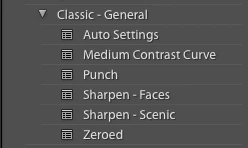
Punch and Medium Contrast Curve are now in the Classic - General group (a "group" is what LR now calls a folder of presets):

2 replies

Known Participant
August 25, 2018

I just received an answer with the solution, and it works. "The legacy presets were hidden by default in 7.5, but can be brought back in the Manage Presets dialog."

Click the plus sign to the right of "Presets." Then click on "Manage Presets" and put checkmarks in as many of the Classic Presets as you want to see.

compactcook
Participant
August 26, 2018

Thank you so much for sharing this .... I have just wasted hours on this! Been tearing my hair out.

johnrellis
johnrellisCorrect answer
Legend
May 25, 2018

Punch and Medium Contrast Curve are now in the Classic - General group (a "group" is what LR now calls a folder of presets):

intelligent_listener5D55
Participant
August 24, 2018

Hi, I need some help pls.... I have LR classic CC...  not sure if this is the right place to ask but my  'general pre-sets' have disappeared .  I don't even have a 'classic - general' group anymore. Any advice welcome... thanks in advance - Simon

Known Participant
August 25, 2018

I have the same issue. The PUNCH preset is one that I use a lot, but when I "upgraded" to the newest version of Lightroom Classic CC (7.5 release) it disappeared. There are no more general presets, and no "classic - general" group. They need to be brought back.