Answered
White Balance filter
After most recent update in LRC I can't find in white balance the fluorescent or candestine filter? are they permanently removed?

After most recent update in LRC I can't find in white balance the fluorescent or candestine filter? are they permanently removed?
[This post contains formatting and embedded images that don't appear in email. View the post in your Web browser.]
"what I'm looking for is the preset drop downs, presently I only see "as shot", "Auto" and "Custom" there use to be more presets, Fluorescent and flash and a few more. they are no longer there."
To build on GoldingD's question, which you didn't answer yet:
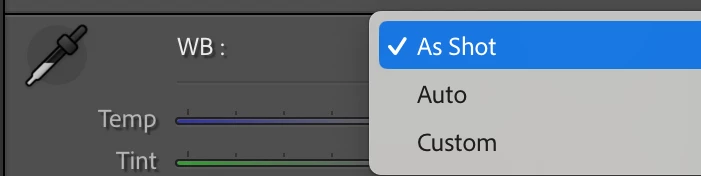
When editing a JPEG, there are just three options, As Shot, Auto, and Custom:
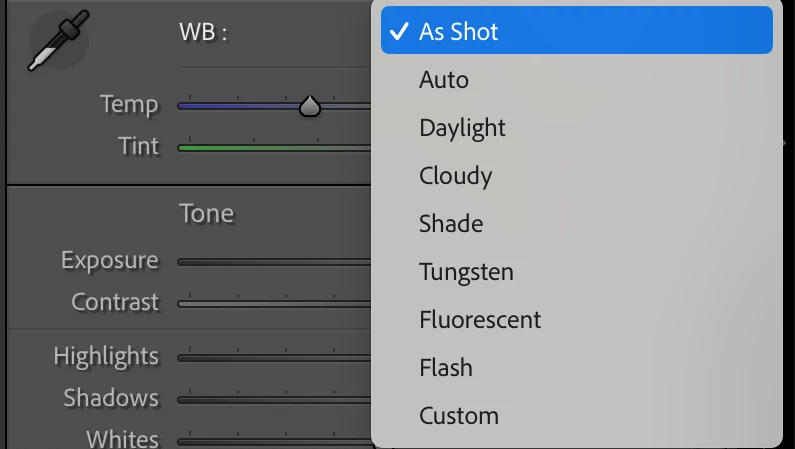
When editing a raw, there are many more options:
You can double-check which type of photo you're editing by typing "i" to show the file name in the info overlay in the upper-left corner.
Already have an account? Login
Enter your E-mail address. We'll send you an e-mail with instructions to reset your password.
 AdChoices