
Participant
January 17, 2020
Question

Why does the colour of my image change after applying a preset?

  • January 17, 2020
  • 6 replies
  • 5119 views

Hi all, 


This is driving me crazy!! 

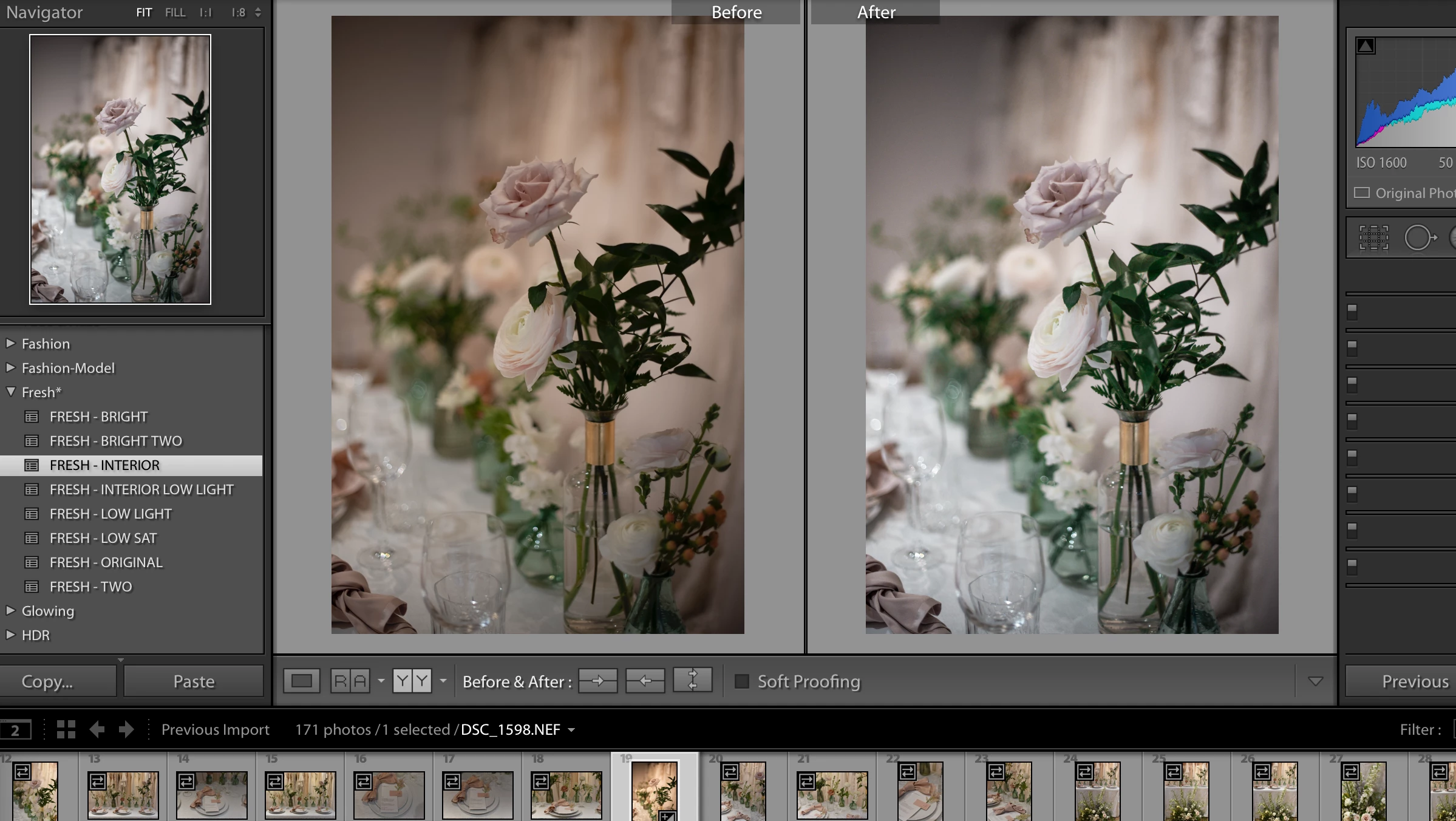
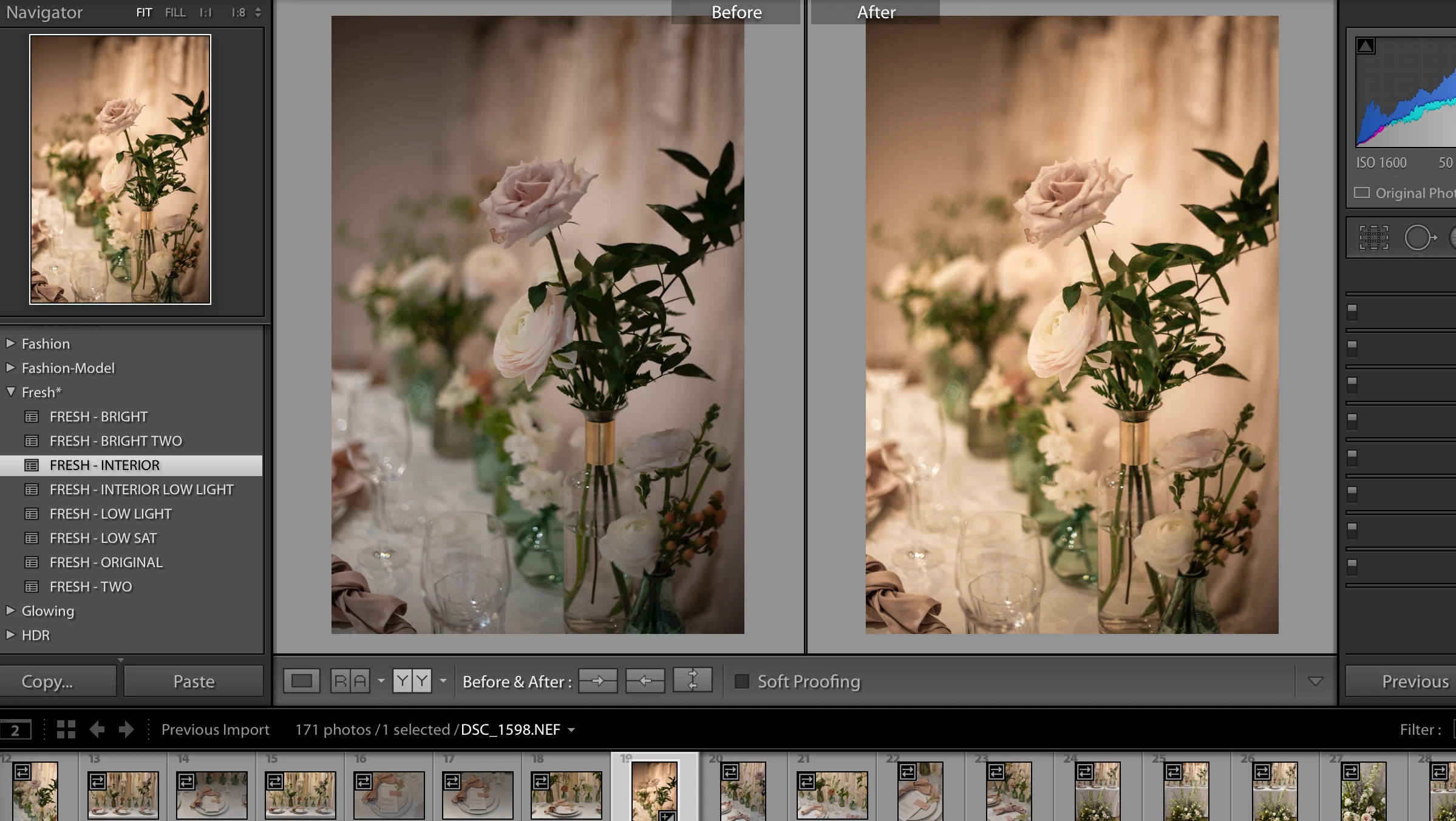
I've imported my image into Lightroom, it looks fine. I start editing and use a preset. While my cursor is on the preset the image looks how I would expect it to with these setting. The preset is selected. I then move my cursor off the preset and the colour of the image changes with an orange hue. 

It doesn't happen on all presets but on quite a few. 


During the first screenshot my cursor is over the preset "Fresh-Interior" which is selected. Then once I move my cursor the colour changes.
This topic has been closed for replies.

6 replies

Participating Frequently
October 28, 2021

Happens to me sometimes too. 

Working with 2 monitors here. 

When I move lightroom from one to another it happens. 
None of the above 'solutions' worked for me. But this one does:


Dragging Lightroom to the different monitor then close it completely. Open it again and i can edit normally. 
If I drag Lightroom into the other monitor again I have the same colourshifting. 

Mac Mini M1. 

Participant
January 27, 2021

Hi everyone . I am mohamed from Egypt . I recently discover that you can only fix your preset by make the temperature auto or here is the powerful solution is to add 2000 k on the temperature panel .....or 1250 k 

Thank you all . I hope it works with you.

Known Participant
April 8, 2020

this keeps happening to me to and I just spent over an hour trying to fix it and getting very frustrated. Thank you for posting this I hope to see a resolution soon from adobe 🙂

Participant
June 16, 2020

 I had this problem and all I did was switch the profile to other options and back. This solved it instantly.

Known Participant
June 26, 2020
What do you mean by that? what are the other options? please let me know
thank you
Participant
January 28, 2020

I have the same problem. Did you find a solution? Thanks

Participant
January 28, 2020

Guys, I think I found a solution for this case.


Go to Preferences/ Performance / Develop / Uncheck this option >>  Enable hover preview of presets in loupe

It works for me. 


I'm using iOs Catalina 10.15.2 / Lightroom Classic 9.1


Please test and let me know if works for you. 

Participant
January 8, 2021

It's working. Thank you

Todd Shaner
Legend
January 17, 2020

This is  a bug Adobe has acknowledged that remains to be fixed. Please add your 'Me To vote' and 'Follow' at the below report.

https://console.getsatisfaction.com/photoshop_family/conversations/lightroom-preset-hover-preview-incorrect-for-incremental-temperature-tint?reply_id=20323357

Known Participant
April 8, 2020

i tired opening this link and it wasnt working. 

Rob_Cullen
Community Expert
Community Expert
April 8, 2020
Regards. My System: Windows-11, Lightroom-Classic 15.1.1, Photoshop 27.3.1, ACR 18.1.1, Lightroom 9.0, Lr-iOS 10.4.0, Bridge 16.0.2 .
ManiacJoe
Inspiring
January 17, 2020

That happens to me at times, often because I drag the mouse diagonally off the preset list, causing the preview of a near-by preset to be displayed but not removed after the mouse leaves the preset list. To correct the display, I just click the current-1 and current edit steps in the edit history panel.


This is most likely a UI bug, but I have never bothered to report it.


Me: Win 10.1809 and LR 9.1