
davidw79644767
Participant
January 6, 2017
Answered

Why is Lightroom changing file names when exporting? How I can I stop it?

  • January 6, 2017
  • 2 replies
  • 1753 views

Ok.. So I am still new to LR CC & 6 but have used 2.7 for a while now. I just noticed that when I am exporting jpegs (to a new folder inside the original folder) LR adds an under score "_" at the end of each file now. I have the existing file option set "as overwrite w/o warning" but have also tried "ask what to do"  (but LR is creating the folder anyway so there aren't any duplicates). This doesn't happen in 2.7 and I would really like to figure out how to stop it from doing this, since I use these adjusted jpegs to overwrite the originals and now I can't just move them into the original folder since they are now all different. I am a printer and use LR a lot to re-size images in bulk so they load faster in other programs (I don't need the larger files for quality). Any help would be appreciated!   
This topic has been closed for replies.
Correct answer Just Shoot Me

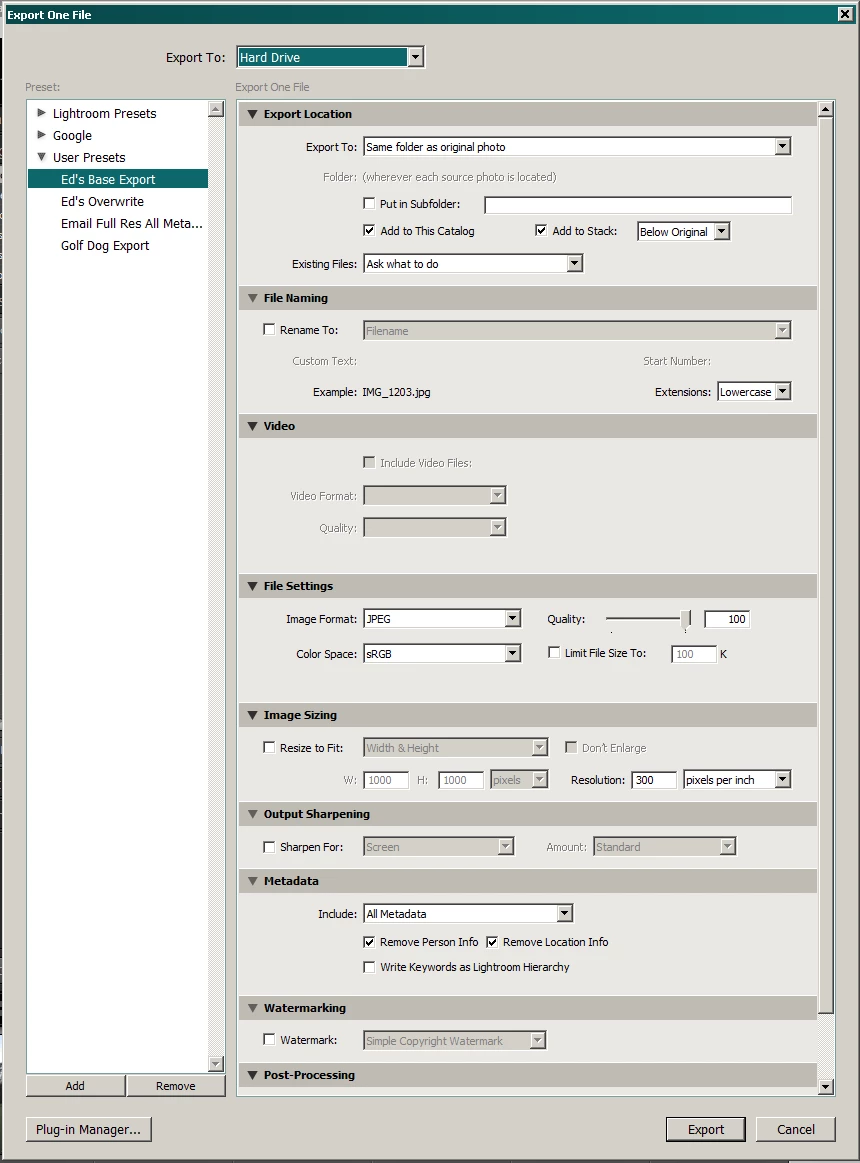
Please post a screen shot of the whole Export dialog window with all sections expanded.

Like this.

2 replies

Just Shoot Me
Just Shoot MeCorrect answer
Legend
January 6, 2017

Please post a screen shot of the whole Export dialog window with all sections expanded.

Like this.

davidw79644767
Participant
January 26, 2017

Thank you for the tips and info, Lightroom seems to be working fine and it was just doing that with one folder so I have just re-imported those pics and all is fine now!

Thank you again for the suggestions!

ManiacJoe
Inspiring
January 6, 2017

In the Export dialog, check to see if you have the "rename" option turned on.

davidw79644767
Participant
January 6, 2017

No, the rename box is un-checked. Thanks for the suggestion though!