
2Charlie
Inspiring
June 1, 2023
Answered

Why is my color profile in Photoshop show ProPhoto coming from LRC?

  • June 1, 2023
  • 4 replies
  • 3670 views

When I edit in Photoshp from Lightroom Classic, it shows ProPhoto RGB as the color Profile.
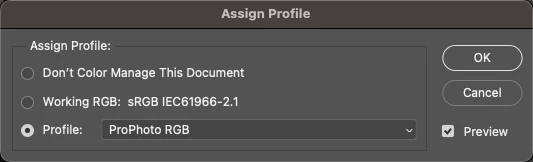
I do not want this color profile. From Lightroom Classic Edit In Photoshop, how do I get it to show Working RGB?
Correct answer Conrad_C

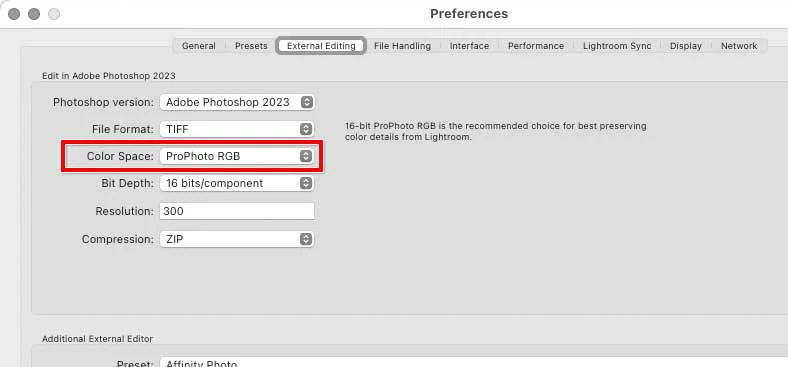
If the file opens in Photoshop with ProPhoto RGB, that’s because your Lightroom Classic is set to save Edit in Photoshop files in ProPhoto RGB in Preferencees, External Editing. If you want Lightroom Classic to send images to Photoshop using a different profile, change that Lightroom Classic setting. According to your screen shot, the Photoshop RGB working space is currently set to sRGB, so select sRGB in Lightroom Classic. (The term “Working RGB” does not appear in Lightroom Classic.)


4 replies

Per Berntsen
Community Expert
Community Expert
June 1, 2023

You can set up the color profile for images you send to Photoshop in the External editing tab of LrC's preferences.

The color profile does not have to match the RGB working space in Photoshop, color management will make sure that the image displays correctly.

My recommendation is to set the profile for external editing to Adobe RGB.

For more information, see https://community.adobe.com/t5/photoshop-ecosystem-discussions/which-color-space-should-i-use-locked/td-p/13020753


If you want to change the color profile for an image in Photoshop, use Convert to Profile, which changes the RGB numbers, so that colors will display correctly with the new profile.

Assign profile will keep the numbers, and there will be a color change. It should only be used for untagged images (that don't have an embedded profile), or if the image has a wrong profile embedded.

Known Participant
January 30, 2025

I've got some images with sRgb and some others with another color space profile attached (not proPhoto RGB).
Why Lightroom doesnt respect the already attached color space profile and force another mismatched color profile ?

Why does lightroom assume a 16 bit color depth instead of keeping the existing one?


thx.


D Fosse
Community Expert
Community Expert
January 30, 2025

@Milko con la elle 

You set all this in Lightroom Preferences.


There is no such thing as "mismatched" profiles as long as there is one, and it's a standard profile. Profiles don't need to match, that's the whole point of a color managed application. Any embedded profile will be correctly treated.


Rob_Cullen
Community Expert
Community Expert
June 1, 2023

As I understand the process-  Lightroom-Classic always works in ProPhoto (or a near equivalent that @TheDigitalDog could explain!), you cannot change that.

You can follow the detailed suggestion from @TheDigitalDog 

Or in Photoshop I believe you can-

1) set the working space in Color Settings- For RGB set your desired working space,

2) Change the Color Management Policies for RGB to 'Convert to Working RGB'

3) If you want to be asked about the change- Check an appropriate box-

If you click the > on the line below the image window you can set the info to display the Document Profile-

My Nikon NEF image came from LrC and is set to Adobe-RGB working space.


Regards. My System: Windows-11, Lightroom-Classic 15.1.1, Photoshop 27.3.1, ACR 18.1.1, Lightroom 9.0, Lr-iOS 10.4.0, Bridge 16.0.2 .
2Charlie
2CharlieAuthor
Inspiring
June 1, 2023

Perfect! Thank you for all the help. I got it working now.

TheDigitalDog
Inspiring
June 1, 2023

Keep this in mind too (same for Lightroom Classic as Adobe Camera Raw):

You may want that color profile initially. 

Author “Color Management for Photographers" & "Photoshop CC Color Management/pluralsight"
Conrad_C
Community Expert
Conrad_CCommunity ExpertCorrect answer
Community Expert
June 1, 2023

If the file opens in Photoshop with ProPhoto RGB, that’s because your Lightroom Classic is set to save Edit in Photoshop files in ProPhoto RGB in Preferencees, External Editing. If you want Lightroom Classic to send images to Photoshop using a different profile, change that Lightroom Classic setting. According to your screen shot, the Photoshop RGB working space is currently set to sRGB, so select sRGB in Lightroom Classic. (The term “Working RGB” does not appear in Lightroom Classic.)