
Participant
November 25, 2012
Answered

Why won't Lightroom save my edits when I export them?

  • November 25, 2012
  • 5 replies
  • 82656 views

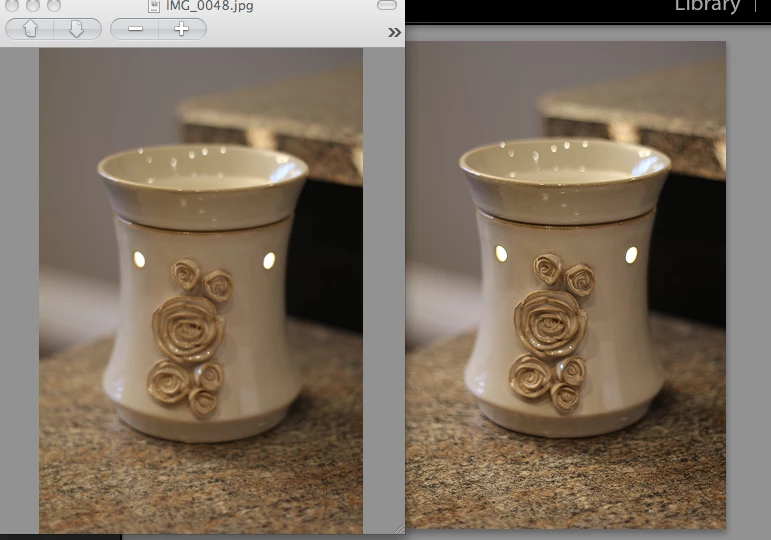
When I export my photos as JPEGs, the changes that I've made aren't saved. I open the exported photo but it looks just like the original with no changes made to it. I am using the trial version right now as I am waiting for the software in the mail. Could this be why? HELP! Below: the left picture is the exported photo and the right picture is what it should look like!
Correct answer britbrit8

Wow it works now that I changed the image sizing options. Weird.

5 replies

Participant
October 30, 2023

Had the same problem. 

To solve, I right-clicked on the picture I wanted to export (while in development mode) and I selected Metadata--> Save metadata in file, and then exported normally. 

My lightroom is in french so I translated but it should be similir phrasing.


Participant
October 30, 2023

Correction* --> The source of my problem actually is the HDR editing activated i just found out... When I export a picture with HDR edit enabled, it doesn't save any changes. 

Rikk Flohr_Photography
Community Manager
October 30, 2023

You’ve posted to an ancient thread. It is highly unlikely that the issue described in this thread, though not impossible, is the same one you are currently experiencing. Rather than resurrect an old thread that is seemingly similar, you are better off posting to a new thread with fresh, complete information, including system information, a complete description of the problem, and step-by-step instructions for reproduction. 


If the issue is the same, we will merge you back into the appropriate location. 


Thank you!


Rikk Flohr: Adobe Photography Org
Participant
January 2, 2018

I found that when I exported to a specific sub folder as a jpg, lightroom would not enact my changes. But when I exported the photo without a specific folder, it did enact my changes.

Participant
October 23, 2017

I am having the same issue. Been using it all day and it was just fine. Stopped went to see a movie, came home to continue and BAM not saving. Ive been fighting with it for over 3 hours now. Ready to pull out all my hair. OH and Im not using the trial..I paid for this

web-weaver
Inspiring
November 25, 2012

No, the trial version is a full version of Lr with all features enabled.

Did you select <Original> in the Export Dialog / File Settings section?

<Original> means that you export the file in its original state, before you did any editing.

If you want your edits included in the exported image you have to select one of the file formats other than <Original>.

See Screen shot:

britbrit8Author
Participant
November 25, 2012

Yes I did save them as JPEGs. I tried every image format but nothing would work.

dj_paige
Legend
June 7, 2017

I set Image Format to JPEG, I restarted LR, I rebooted, I tried to set image to DNG to see what happened, I tried to export a different photo, not sure what is the issue???


This is unclear ... are you saying that you exported the photo as DNG?

If so, you will NOT see any edits in the exported photo when you view it outside of Lightroom. This is normal behavior.

Are you saying you exported as JPG and don't see the edits? Please clarify.

Rikk Flohr: Inactive
Participating Frequently
November 25, 2012

If your originals are JPEGs and you aren't seeing edits, it is likely you are choosing Original in the export menu as the file type. This will revert your file to Original. Choose another format from this list.

Participant
September 13, 2018

Thank You so much , I was sitting like a d*mb *ss exporting thousand times same stuff over and over again.

Participant
September 5, 2022

I spent 4 hours exporting a photo just to find out I was just brainless.