
Why wont a subfolder show on the library in LRC
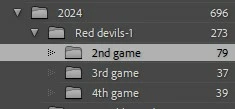
How do I get LRC 24 to show a subfolder already created in the parent folder? Yes, I have ticked and unticked the "show subfolders" option, I have tried to "Synchronized" folder etc. etc. Nothing seems to work. I can see the folder in question in Bridge but not in LRC. The other subfolders show with their pictures. Not one. What's up with that?
* For those who need to know. I'm using windows 11, the latest LRC version update, same for the other Adobe suite programs, the folder is in an external drive, (Seagate 4tb Red -yes it is connected). I have chosend for LR to backup when rebooting (5 times), changed the view to dark and back to day on desktop, cursed a bunch of times, watched Terry White videos in search of answer, prayed a few more times too. I hope I haven't forgotten something that someone may ask in order to help me with this topic.
Thank you in advance!
!
 AdChoices