
Participating Frequently
August 13, 2023
Question

(Windows) Lightroom Classic v12 One catalog at a time?

  • August 13, 2023
  • 1 reply
  • 274 views

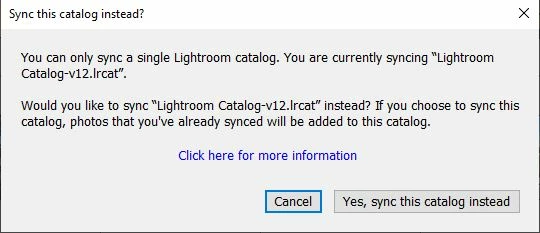
This has been happening for a while, now. I open Lightroom Classic and I’m greeted with a pop-up dialog box that says “You can only sync one catalog at a time, do you wish to sync this catalog instead?”

Interesting, as I only have one catalog, and have never had more than one catalog.  

These two catalogs have the exact same name, what gives? 

Thanks.


{Thread title updated by moderator}

This topic has been closed for replies.

1 reply

Sameer K
Community Manager
Community Manager
August 14, 2023

Hey, @mikeb83217113. I'll need more info to help you figure this out. Please share the system info of Lightroom Classic from Help > System info > Copy & paste into a text document > Upload and share with us here.


Where do you keep your Lightroom Classic catalog? Are the catalog or related files synced with OneDrive or other backup services?


Lightroom Classic's sync tends to remember the catalog accurately & changes to the catalog or supported files can cause a disconnect, as you see. Please share more details about how your catalog is stored.


Awaiting your response. Thanks!
Sameer K

Participating Frequently
August 24, 2023

Hi, Sameer.

Here is a text file.

My catalog is kept in its default Windows location. I'ts on the same system drive as LRC.

I have nothing synced with Onedrive.