
bellevue scott
Inspiring
July 12, 2023
Answered

(Windows) LrC 12.4 is very sluggish, going into full screen, doing very funny things. no menus

  • July 12, 2023
  • 2 replies
  • 812 views

LRC 12.4 on Windows 10 today is being super super sluggish. And It goes into full screen with no menus. If I click on the icon in the task bar, then I'll get my menus back for a minute and then it goes wonky again with just one image, no film strip, no menus... 



{Thread title updated by moderator}
This topic has been closed for replies.
Correct answer bellevue scott

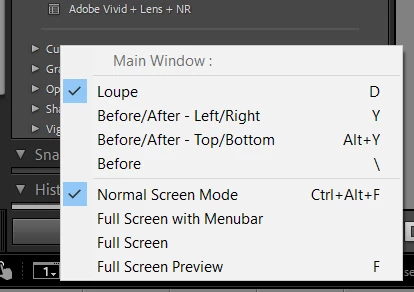
It may be due to LRC going into different screen modes. I've got dual monitors and the main monitor is going into full screen mode or full screen mode with menus, but when I set it to normal it behaves well. I still cant' figure out why it's going into full screen mode though... 


2 replies

Gabor Lenart
Known Participant
July 12, 2023

LR 12.4 is sadly very very slow, I don't know what happened but performance is really really bad. Hope they fix it very soon because it's almost unusable.

Sameer K
Community Manager
Community Manager
July 12, 2023

Hey @Gabor Lenart. Welcome to the Lightroom Classic community. Like the post above, I'll need the system info of your Lightroom Classic. What troubleshooting steps have you tried already? Does it slow down after a specific set of steps? Is there a noticeable pattern to this behavior?


Besides Lightroom getting slow, check the Processes in the Task Manager for unexpected read/write operations.

To begin troubleshooting, test some variables like:

  • Unplug any external peripherals & use wired input devices.
  • Unplug external drives.
  • Temporarily, unplug extra displays & only keep one active at a time.
  • Disable GPU usage following the steps I've shared above.


Let me know how it goes. Thanks!
Sameer K

Gabor Lenart
Known Participant
July 12, 2023

If I disable GPU usage, LR works really really bad. If I check on custom, and turn off some of the boxes, just keep "gpu for display", it is the same speed of full acceleration, nothing really changes. Now I keep it on Auto.

It is slow without any external peripherals too :S I only use an external SSD, my catalog is on it so as the files I'm working on.


Lightroom Classic version: 12.4 [ 202306052221-b70c0975 ]
License: Creative Cloud
Language setting: en-GB
Operating system: Mac OS 11
Version: 11.7.7 [20G1345]
Application architecture: x64
Logical processor count: 8
Processor speed: 4,2GHz
SqLite Version: 3.36.0
Built-in memory: 24 576,0 MB
Real memory available to Lightroom: 24 576,0 MB
Real memory used by Lightroom: 1 981,3 MB (8,0%)
Virtual memory used by Lightroom: 9 328,4 MB
Memory cache size: 290,4MB
Internal Camera Raw version: 15.4 [ 1508 ]
Maximum thread count used by Camera Raw: 5
Camera Raw SIMD optimization: SSE2,AVX,AVX2
Camera Raw virtual memory: 407MB / 12287MB (3%)
Camera Raw real memory: 410MB / 24576MB (1%)
Standard Preview Size: 5120 pixels
Displays: 1) 5120x2880

Graphics Processor Info:
Metal: AMD Radeon Pro 580
Init State: GPU for Export supported by default
User Preference: Auto

bellevue scott
bellevue scottAuthorCorrect answer
Inspiring
July 12, 2023

It may be due to LRC going into different screen modes. I've got dual monitors and the main monitor is going into full screen mode or full screen mode with menus, but when I set it to normal it behaves well. I still cant' figure out why it's going into full screen mode though... 


Sameer K
Community Manager
Community Manager
July 12, 2023

Hey, @bellevue scott. I'll need more info to help you figure this out. Please share the system info of Lightroom from Help > System info > Copy & paste into a text document > Upload and share with us here. 


What troubleshooting steps have you tried?

For now, try these:


Looking forward to hearing back from you. Thanks!
Sameer K

bellevue scott
Inspiring
July 13, 2023

Device name XX
Processor AMD Ryzen 9 5950X 16-Core Processor 3.40 GHz
Installed RAM 128 GB
Device ID 7B0C736D-FAB4-4F65-A7D0-39BE98AA28C2
Product ID 00330-71458-41090-AAOEM
System type 64-bit operating system, x64-based processor
Pen and touch Pen and touch support with 10 touch points


It seems to have resolved itself. I think the slowness was Windows, not LRC. And the screen issue I resolved below. It was stuck, but after cycling through different screen modes a few times it started behaving in Normal Screen Mode.