



Exporting 4K video
Update 11/20/2023: I just released the Any Video Preset plugin, which adds presets for exporting videos and slideshows in 2K and 4K resolutions, 30 and 60 frames per second, landscape and portrait. You can also add your own presets. (Slideshow presets work on Mac only.)
So the workaround below is no longer required.
------------------------------------------------
Though many have asked for the ability to export 4K video from LR, Adobe has never implemented it. Here's a fairly simple procedure for "persuading" LR to export 4K video, based on the observation that LR uses Adobe Media Encoder presets.
1. Download and unzip these four presets (ending in .epr):
https://www.dropbox.com/s/327kra417p5prhj/4k-video-presets.2023.03.22.zip?dl=0
2. Copy the files into the following folder:
Mac: /Applications/Adobe Lightroom Classic/Adobe Lightroom Classic.app/Contents/Support/Video Export Presets
Windows: C:\Program Files\Adobe\Adobe Lightroom Classic\Support\Video Export Presets
3. Rename the four files, replacing the existing 480x270 presets:
3840x2160-24-44mbps.epr => L-480x270-24.epr
3840x2160-25-44mbps.epr => L-480x270-25.epr
3840x2160-2997-44mbps.epr => L-480x270-2997.epr
3840x2160-30-44mbps.epr => L-480x270-30.epr
(You may wish to save copies of the overwritten 480x270 presets.)
4. Restart LR.
5. To export as 4K video, in the Export Settings > Video section, select Format: H.264 and Quality: Low, ignoring what's displayed for the target dimensions and bit rate:
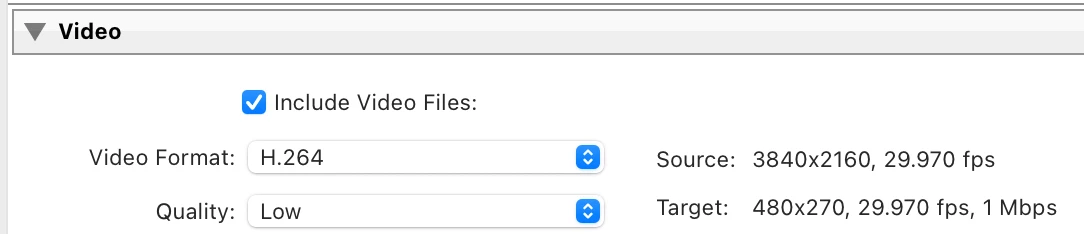
If you want a different bit rate, edit the .epr files in a text editor and replace "44." with, say, "88.".
If Adobe Media Encoder is included in your subscription, you can experiment with using other preset parameters, which may or may not work. I tried using format HEVC (H.265) instead of H.264, but the export just hung (perhaps because the media library included in LR is an older or stripped down version of the media library in Adobe Media Encoder?).
When I selected the 480 x 270 size for exporting a slideshow video, the exported .mp4 was 4K. Unfortunately, LR rendered the photos in the slideshow at 480 x 270, defeating the whole point of exporting the video at 4K.
 AdChoices