
Participating Frequently
July 27, 2020
Question

Workflow optimization: How to rate JPEG and RAW at the same time?

  • July 27, 2020
  • 7 replies
  • 4235 views

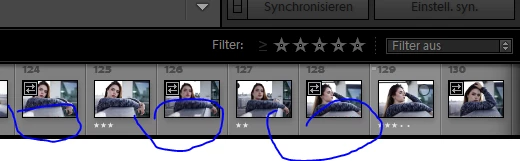
Hey, im usually rating my JPEGs in Adobe Bridge after a Shooting, so i can easily look at them in the Windows Explorer aswell. If im in Lightroom, i cant use the filter option, because it would show me the rated JPEGs only. And im using the RAWS to edit. Is there a way to rate both at the same time?
 

This topic has been closed for replies.

7 replies

Participant
August 13, 2021

Hey, I have the same question: I work with Bridge and wonder how to sync the ratings of jpgs and raw files. Did you get a solution by now?

Participant
August 13, 2021

I found a solution, installing a script:

https://community.adobe.com/t5/bridge/how-to-view-raw-and-jpg-as-stacked-automatically/td-p/11423095

Works fine! 
Poor Adobe progress...

Participant
January 2, 2022

Is the script work if my rating is on jpeg only?  Want to transfer the rating from jpeg to RAW  file without doing it manually. 

ps.  have tried running the script  byt nothing happened.

Participant
December 27, 2020

perfect question..

kevink30777614
Participating Frequently
July 31, 2020

edit: this wasn't supposed to go here.

DdeGannes
Community Expert
Community Expert
July 28, 2020

There is a fundamental difference between Lightroom and Bridge. Lightroom is a non-destructive editor, i.e it does not write to the file by default, it stores every function you perform in the Lightroom Catalog file. When you work with a file in Lightroom it is always reading and writing to the Catalog file, the info is in the Catalog file!!!!.

The only time Lightroom will read metadata from an xmp file automatically would be at the initial import.

There is an option in Lightroom to write info to the file so that the info is available to ACR/Bridge. Lightroom does not read from the file automatically. This is performed as a background function.


Bridge, is a file browser and cannot read or write to the Lightroom Catalog file. ACR is a plugin for Photoshop which only reads and writes to the file and has no access to the Lightroom Catalog file. So as far as Bridge and ACR are concerned the info is in the file.


Regards, Denis: iMac 27” mid-2015, macOS 11.7.10 Big Sur; 2TB SSD, 24 GB Ram, GPU 2 GB; LrC 12.5,; Lr 6.5, PS 24.7,; ACR 15.5,; (also Laptop Win 11, ver 24H2, LrC 15.0.1, PS 27.0; ) Camera Oly OM-D E-M1.
Participant
July 28, 2020
I am trying to send a reply to you. Tried twice but I think I did in the wrong place. As you probably know I got confused and didn’t know what wAS expected of me. I am sorry I messed so bad . All I want to do is make photos look better. Please let me continue with. It. I will try to do better and not get confused. If you could send me helpful ideas I would appreciate it. The photos I want to do keeps me happy. I will try very hard not to screw up again. I won’t delete emails any more until try do what am supposed to do. by the way. There is no one else involved, it is all my mistakes. Again I apologize. Sincerely. Lee L. Deane
GoldingD
Legend
July 27, 2020

Assuming you shoot RAW, then later export to JPEG, I would suggest an alteration of when you rate. 


Specifically I would rate the RAW photos before any editing, this will be a preliminary rate.


Later, after editing, revisit the rating of the RAW


Later when you export to JPEG, make sure the ratings export in the files.


Revisit the JPEG files, reconsider the ratings, scratch your head if you change some.


Participating Frequently
July 27, 2020

Yes, i get JPEG and RAW files.


For you aswell my workflow a bit more detailed.

My old Workflow after a shooting:

-rate JPEGs to be able to look at the best pictures without any software in the Windows Explorer

-if i wanted to select i high rated image, i sorted in the Folder and then opened the RAW with the same number in Photoshop

-also im separating RAW and JPEG into 2 Folders, because sorting in Windows takes too long if they are both in the same folder. Its way quicker to just sort in a folder with only JPEGs.


My idea:

-rate both JPEG and RAW in any software (Bridge or Lightroom if possible) and be able to sort in Lightroom by star rating

-like that i can quickly check the JPEGs outside of any software and can quickly sort the high rated images in Lightroom and start editing from there.

 
Participating Frequently
July 27, 2020

OK, considering that you can review all of your images in LR-C, and do rating, and do any enhancments, all in the same package at the same time, why add extra time, storage space, and energy into this double-workload.


Why not just import into LR and go to work there? It does work, I do it all of the time.


Just some thoughts


Imagine you are moving to a new pc and had like 10.000 + images imported in Lightroom. Wouldnt that cause trouble to move to a new setup?


GoldingD
Legend
July 27, 2020

Your workflow will not make a lot of sense to many. Mostly, why the heck are you going into Bridge.


LrC is a Data Management app, it is a database, you do bot need Bridge for file sorting, file management, for anything.


You may be either sorting oddly or filtering erroneously.


If the RAW and the JPEG are in the same Folder, then you should be able to view both while in that folder.


If they are in different folders, then you could view them in the All Photographs collection.


Participating Frequently
July 27, 2020

Ok maybe i need to make it more clear:

My old Workflow after a shooting:

-rate JPEGs to be able to look at the best pictures without any software in the Windows Explorer

-if i wanted to select i high rated image, i sorted in the Folder and then opened the RAW with the same number in Photoshop

-also im separating RAW and JPEG into 2 Folders, because sorting in Windows takes too long if they are both in the same folder. Its way quicker to just sort in a folder with only JPEGs.


My idea:

-rate both JPEG and RAW in any software (Bridge or Lightroom if possible) and be able to sort in Lightroom by star rating

-like that i can quickly check the JPEGs outside of any software and can quickly sort the high rated images in Lightroom and start editing from there.

gary_sc
Community Expert
Community Expert
July 27, 2020

I'm sorry but I completely do not understand your workflow. Why have both?


Also, I cannot see any reason to be using Bridge to look at your jpgs and LR-C to look at your raw images. If you wish to adjust and then send out a bunch or few of your images to you clients via jpg, then export them from LR and bypass Bridge alltogether. 


Maybe I'm missing something so please help me understand.

Participating Frequently
July 27, 2020

But how to rate both RAW and JPEG?


For you aswell my workflow a bit more detailed.

My old Workflow after a shooting:

-rate JPEGs to be able to look at the best pictures without any software in the Windows Explorer

-if i wanted to select i high rated image, i sorted in the Folder and then opened the RAW with the same number in Photoshop

-also im separating RAW and JPEG into 2 Folders, because sorting in Windows takes too long if they are both in the same folder. Its way quicker to just sort in a folder with only JPEGs.


My idea:

-rate both JPEG and RAW in any software (Bridge or Lightroom if possible) and be able to sort in Lightroom by star rating

-like that i can quickly check the JPEGs outside of any software and can quickly sort the high rated images in Lightroom and start editing from there.