
Inspiring
May 6, 2017
Answered

Wrong lens profile in LR CC

  • May 6, 2017
  • 1 reply
  • 1447 views

I recently acquired a Tamron 24-70 2.8 lens.

The lens correction panel for that lens shows always the Sigma 24-70.

So I have to manually select Tamron and then only can I click on the 24-70 for the Tamron lens.

It is just a bit annoying. It would be nice if LR found the Tamron lens automatically.

Reynold Jaquet
    This topic has been closed for replies.
    Correct answer Todd Shaner

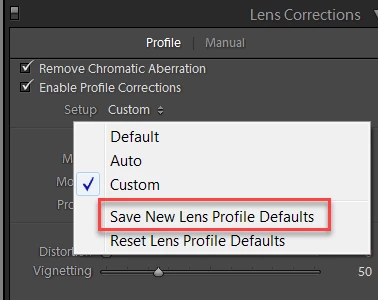
    Select the correct lens profile, click on 'Setup,' and then select 'Save New Lens Profile Defaults.' The correct lens profile will now be assigned to all new import files.

    1 reply

    Todd Shaner
    Todd ShanerCorrect answer
    Legend
    May 6, 2017

    Select the correct lens profile, click on 'Setup,' and then select 'Save New Lens Profile Defaults.' The correct lens profile will now be assigned to all new import files.

    Ecran rjAuthor
    Inspiring
    May 6, 2017

    Works allright.

    Thank you.

    Reynold Jaquet