
Yellow bars next to folder names in Library after moving Catalog to a different external drive
The situation is pretty much as the subject header lays out.
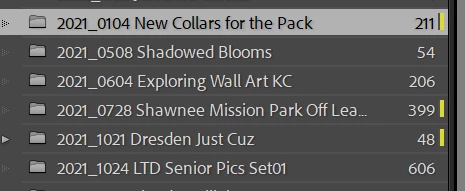
I am in the process of moving to a new PC, and for several reasons my best option for the moment was to move my catalog and related resources to an external HDD for acess on multiple computers. After moving, I have several of these yellow bars (see snip) that appear next to folder names as LRC spins up. The bars are not there on initial start of the program; they appear incrementally as the program runs through loading functions. They are only next to certain folders, the same folders each time; other folders on the same drive do not have these bars as shown.
Running LRC 14.0.1, Windows 11, catalog currently on one of 2 externals that house my pics (yes, I know this is a vulnerability but it is for the moment what I need to do, drives are continuously backed up by Backblaze). I've googled this over and again and evidently am not hitting on the right search terms.
 AdChoices