
Participant
July 19, 2021
Answered

Bilder von LR APP in LRC importieren

  • July 19, 2021
  • 1 reply
  • 692 views

Hallo zusammen,

mit meinem Handy nutze ich für Fotos die LR-App.

Was muss ich machen, damit ich diese Bilder automatisch oder mit geringem Aufwand in meine LRC-Desktop Lösung importieren kann.

Ziel ist es, dass die Bilder in meinem Katalog in einem bestimmten Ordner landen.

Lieben Dank für Eure Hilfe und viele Grüße.

Björn
Correct answer Rob_Cullen

"What do I have to do so that I can import these images automatically or with little effort into my LRC desktop solution?"

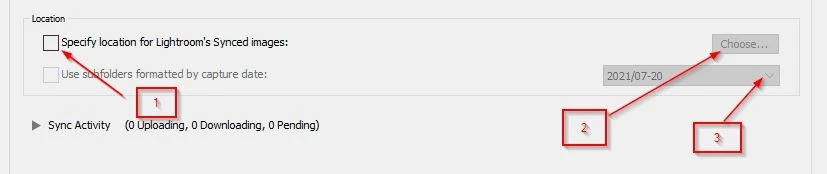
First open the Classic Preferences>Lightroom Sync tab,

1) Check the box, Specify location for Lightroom's synced images.

2) Choose a Folder Location

3) Set a date-based subfolder structure.


Second, Set up Lr-Classic to Sync-

Click on the cloud icon, top right of the Classic window and click on Start Sync.


Classic will start downloading all the cloud-based images and add them to the Lr-Classic catalog.

https://helpx.adobe.com/lightroom-classic/help/lightroom-mobile-desktop-features.html


1 reply

Rob_Cullen
Community Expert
Rob_CullenCommunity ExpertCorrect answer
Community Expert
July 19, 2021

"What do I have to do so that I can import these images automatically or with little effort into my LRC desktop solution?"

First open the Classic Preferences>Lightroom Sync tab,

1) Check the box, Specify location for Lightroom's synced images.

2) Choose a Folder Location

3) Set a date-based subfolder structure.


Second, Set up Lr-Classic to Sync-

Click on the cloud icon, top right of the Classic window and click on Start Sync.


Classic will start downloading all the cloud-based images and add them to the Lr-Classic catalog.

https://helpx.adobe.com/lightroom-classic/help/lightroom-mobile-desktop-features.html


Regards. My System: Windows-11, Lightroom-Classic 15.3, Photoshop 27.5, ACR 18.3, Lightroom 9.3, Lr-iOS 10.4.0, Bridge 16.0.3 .