
Participant
July 30, 2019
Question

Can't set Velvet Fine Art Paper in Media Type - Lightroom Classic 8.3.1 macOS

  • July 30, 2019
  • 10 replies
  • 4086 views

Hi,

need your help in proper Print setting.

use OSX, Lr 8.3.1, color management be Canson ICC profile.

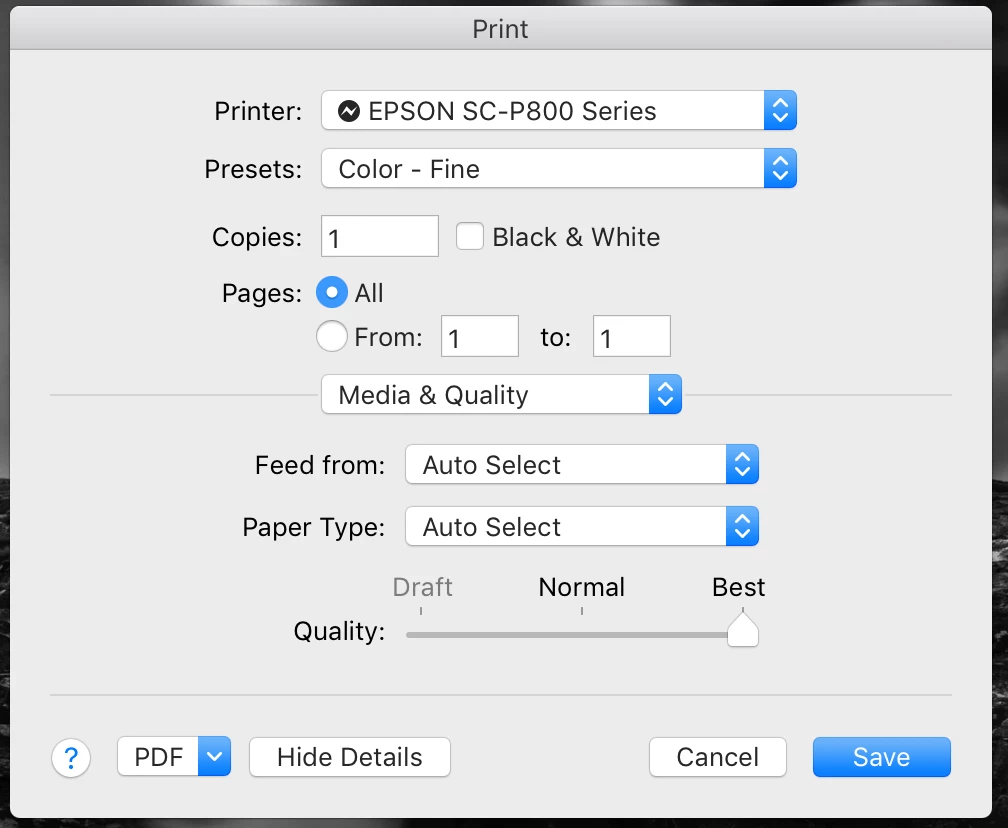
I'd like to use Canson Velin Museum Paper that needs to set up as Media Type: Velvet Fine Art Paper. BUT the Print Setting box can give me such option. Actually the Print Setting window (screen below) looks different that many "How to's" video on YouTube.

Appreciate very much your help.

Thank you,

Tomek
Message was edited by: Sahil Chawla

    This topic has been closed for replies.

    10 replies

    Participant
    March 30, 2020

    UPDATE: Saw the answer.

    Hi, Were you able to fix it? I'm having the same problem.

    TheDigitalDog
    Inspiring
    March 30, 2020

    The problem is using the Apple Airprint driver. NEVER do that. Use the drivers directly provided by EPSON. 

    Author “Color Management for Photographers" & "Photoshop CC Color Management/pluralsight"
    GoldingD
    Legend
    July 31, 2019

    Ahh, you do mean Canson Velin Museum Paper, not Canon. Brand I am not familiar with.

    This paper?: http://www.canson-infinity.com/en/products/velin-museum-rag

    I see that site has icc profiles

    Oh various printer mfg, various models, including yours I think

    http://www.canson-infinity.com/en/icc-profiles

    and some nice video tutorials

    By the way, when adding that icc profile, one issue that can trip people up. Library folder, not the one in user folder, it is the one for the system. If you follow the tutorial at the canon website, you should be ok.

    GoldingD
    Legend
    July 31, 2019

    By the way, talking about the print setup button, probably conflated everything. Typically you do not want the printer controlling color management, you want that via the ice profile

    GoldingD
    Legend
    July 31, 2019

    On your MAC  bring up System Preferences, click on the Printers & Scanners presences, click on the + symbol to add a printer. their may be additional Epson SC-P800 entry’s,, one for directly connected, one for IP connected, one for Airprint (Bonjour?) connected, or perhaps just two if no. wifi on that printer.

    These drivers have different options.

    As for the feed, have no idea on that

    Now I do not have your printer, I have a nice Stylus Pro 3880, and a cheap WF 4730. Lots of icy profiles for the first, none other than a generic ink jet ice profile for the second. The ice profiles for the 3880 are printer specific

    ICC profiles, unless very simple, very limited are printer make and model specific, paper specific, and ink specific. A ice profile for Velvet Fine Art Paper, for the 3880 may not work for another printer not even same brand. First issue being ink type used, number of cartridges used, and how the printer deploys that ink.

    Some paper manufacturers may let you know that an ice profile from your print mfg may work with paper not by the printer mfg Canon paper in an Epson),

    Some paper company’s (actual paper mfg as opposed to a printer mfg) might provide icy profiles for their paper for various printers (Red Paper for example, Ilford for another)

    And some photo web sites (third party’s) might have icy profiles they built fir various printers/paper (I do not have an example)

    If you cannot find a icc profile for your printer/paper combo at Epson, or Canon (unlikely fir non Canon printers), the perhaps at some third party.

    Participant
    July 31, 2019

    Hi, you're ROCK man! You gave the perfect solution. I was needed to instal EPSON printer and connect the printer via USB instead of AirPrint. All paper selections, fine art paper loading ... all back :-)

    THANK YOU ! you are the best

    cheers,

    Conrad_C
    Community Expert
    Community Expert
    July 31, 2019

    The AirPrint driver was the problem, probably. With the full driver installed, you should be able to print with the paper choices you want through USB, wifi, or Ethernet (using regular IP network printing for the last two, not AirPrint).

    GoldingD
    Legend
    July 31, 2019

    You are probably going to have and talk to a rep at Epson

    GoldingD
    Legend
    July 31, 2019

    And read this forum, pay attention to downloading print driver (as in not the AirPrint one)

    https://forum.luminous-landscape.com/index.php?topic=102792.0

    GoldingD
    Legend
    July 31, 2019

    By the way, check that you do not have an additional printer to select, same make and model, but slightly different, then see if for that printer, when you clcik on that Media & Quality button, that Color Matching is or is not available.  OR Settings. Heck, double check that the one you posted has or has not a color matching option.

    typically you will want ColorSync, and select other

    GoldingD
    Legend
    July 31, 2019

    That particular ICC profile may not beavailable for yur particular printer. At leaset at Epson. Typically you would go to the Epson Page supporting your printer, and look at downloads, then ICC profiles. Now unless that particular profile somehow magically comes along for the ride when you install the print driver, You may be having an issue finding it, at least at Epson

    For example: Epson SureColor P800 | SureColor Series | Professional Imaging Printers | Printers | Support | Epson US

    In the ICC section, just some basic ones.

    Followup, at the Epson page for the paper (perhaps) it sttates profile is provided with standard Epson driver, so perhaps.

    Epson Velvet Fine Art Paper, 8.5" x 11", 20 sheets | Product Exclusion | Epson US

    GoldingD
    Legend
    July 31, 2019

    TomekBroda  wrote

    So, in your screenshot I see a Print Srttings Dialog.

    In the Lightroom Classic Print Module, over on the right, in the Print Job Panel, for Color Management, are yu slecting "Other" (Corect) for Profile, or did you leave it at "Managed By Printer"? (wrong)

    After selecting "Other" a dialog should appear to select the printer/Paper

    Oh, and you might need to visit Epson for the ICC profile (that particular paper might have been included in your driver install, it might not)

    THIS

    NOT THIS

    Sahil.Chawla
    Adobe Employee
    Adobe Employee
    July 30, 2019

    Hi Tomek,

    As you're not able to select Velvet Fine Art Paper in Lightroom, could you please select Sheet as Feed?

    Also, you first have to visit the Page Setup box and choose Rear Feed.

    Regards,
    Sahil

    Participant
    July 31, 2019

    Hi, Thank you of the answers.

    few things:

    #1:

    I previously chose ICC specific profile for paper and printer (pls see the screenshot below). I print on Canson papers and got the ICCs from there. So this step I have done. But still according to the different video guides, people both setting Colour Management by ICC profile and setting media Type for Velvet Fine Art Paper (or other if this is a case, but I need Velvet)

    #2:

    In Print Retting, under the "Media and Quality" there is no "Colour Matching" option (screen below). Also checked this before as on the guides I sow the you can select different media type, including Velvet. Actually this option also gone :-(

    #3:

    In Page Setup, there is no option to choose Real Feed. Actually in Page setup it is only option to choose size and orientation. But In Print Setting there is option to choose "Feed From" (screen below) but there is no "Rear Feed" option. But I used Auto Select and feed the paper in the correct way for fine art papers.

    Please let me know if you have any other ideas how to find the Media Type option to select variants for different fine art papers like for example Velvet Fine Art Paper.

    Thank you very much.