
Participant
June 29, 2017
Question

CANON 80D - NOISE REDUCTION ISSUE - HELP

  • June 29, 2017
  • 6 replies
  • 5631 views

Recently I bought a Canon 80D to replace my 40D. The 80D can deal with much higher ISO settings.

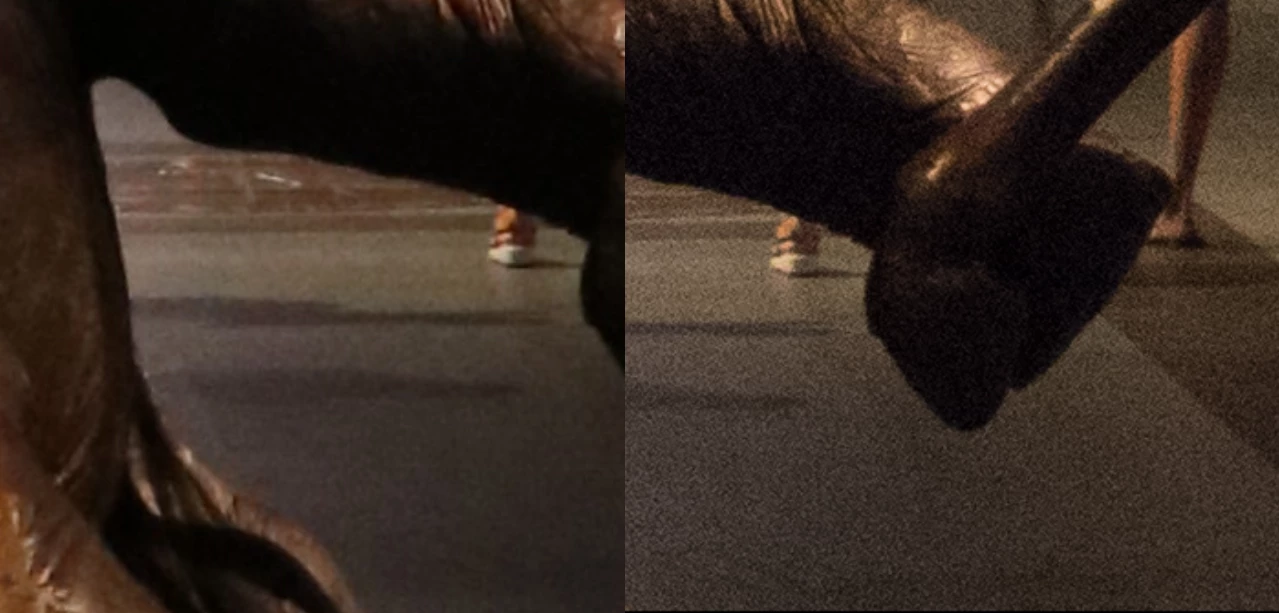
Now the problem is this: when I open RAW files shot at a higher ISO the colour noise automatically gets replaced by a grayscale noise which is most annoying - as you can see in the pictures below. In my opinion the right picture is simply not acceptable.
Anyone who encountered this problem? I'm quite desperate. Never had problems like this before.@
    This topic has been closed for replies.

    6 replies

    Participant
    January 14, 2019

    I too have noticed this noise issue with my new 80D. My 40D has very little noise at 100 ISO, yet the 80D seems to have a lot more noise at all ISO settings - Very disappointing!! Yes, the 80D seems to handle noise at higher ISO's a bit better, but the 40D has much less noise at 100!!! I have all of my camera settings at neutral or standard for both the 40D and the 80D. So unfortunately, unless you are shooting at higher ISO's, I cannot recommend switching to the 80D and since I am a real estate photographer, and always use a tripod, I also only shoot at 100 ISO - even indoors! I just let the camera set the Exposure Time. Seems like even 5 or 6 seconds with the 40D produces less noise than the 80D... How can this be??? VERY Disappointed with this purchase since I waited over 10 years to "Upgrade" It appears that the old "more mega Pixels isn't always better" claim is true!!!

    Per Berntsen
    Community Expert
    Community Expert
    January 14, 2019

    The 40D has 10 megapixels, the 80D has 24 megapixels on the same size sensor.

    Although current sensors have better noise performance than the one in the 40D (released 2007), the difference between 10 and 24 megapixels is big, and the individual pixels in the 80D are much smaller than in the 40D. This means higher pixel density, which again means more noise.

    I use Nikon, and am not familiar with Canon cameras, but you should not see noise at all in a properly exposed image at ISO 100, even with a 5 second exposure.

    If you underexpose, and have to increase Exposure and/or Shadows significantly in Lightroom, noise may appear.

    Sharpening also plays a part here – the combination of underexposure and/or over sharpening and leaving the Masking slider at zero will accentuate any noise in the image.

    Also, evaluating noise (and sharpening) must be done at 1:1, any other magnification will be inaccurate and misleading because the image has been scaled. At 1:1, one image pixel is represented by one screen pixel, and this is the only magnification that gives you a true representation of the image.

    Participant
    July 10, 2017

    Hi Marie Hélène,

    I also bought recently a 80D and I've been experienced this same problem.  Did you get a solution for it?

    I've been trying to find something more conclusive but haven't succeed yet.

    Thanks,

    Ana   

    P.S.:  Are you from Belgium?

    Per Berntsen
    Community Expert
    Community Expert
    July 10, 2017

    Pernioca  wrote

    I also bought recently a 80D and I've been experienced this same problem.  Did you get a solution for it?

    The files provided by Marie Hélène were perfectly normal.

    As mentioned above in post #8, Lightroom ignores most in-camera settings, and you have to apply noise reduction in Lightroom yourself.

    Legend
    June 30, 2017

    Whoops my bad, LR is not PS - thanks!

    Legend
    June 30, 2017

    For fun, I went here: Canon EOS 80D Noise Test Results and played with high ISO RAW vs jpg.  The UI is a little quirky, but I think you can see similar results to what you're showing us. I think Per is right, that the Microsoft viewer uses the jpg embedded by Canon.  I think the real question is whether you can get RAW results close to what (I assume) is the 80D's aggressive Noise Reduction in the jpg by using LR's noise reduction tools. This link Canon 80D colour noise reduction from RAW  addresses some issues similar to, but not the same as yours. Note the discussion regarding Adobe Standard vs Canon emulation camera profiles for RAW processing - that Adobe Standard appears more aggressive. I don't think you have a problem, but that you're seeing an aggressive NR applied to a jpg as opposed to little applied to the RAW.  I took your 0700 RAW image and made no adjustment other than NR detail = 100 and Luminance = 40 and got results very similar to what I saw in the third jpg image. So to my mind, you're seeing high-ISO RAW with high noise because there's very little NR applied - which is to be expected. When you add NR in LR it looks much better.

    Legend
    June 29, 2017

    If you could upload the image to Dropbox or similar, others might be able to see what you're doing. Also, LR version number. As per Per <g> suspicion that switching cameras and an unfamiliarity might be be an issue - it looks like something is over sharpened.

    Per Berntsen
    Community Expert
    Community Expert
    June 29, 2017

    Please provide more details.

    Where does the image on the left come from? Are you viewing the raw file in some application that only shows you the embedded jpg preview? If so, it could be noise redcuction set in the camera, which has no effect on the raw file.

    And can you post a screenshot of the Detail panel in Develop for the image on the right, inlcuding part of the image at 1:1 view?

    Participant
    June 30, 2017

    Left image: RAW file opened with Windows 10 Photo Viewer

    Right image: after conversion with Lightroom

    LR standard features as far as noise reduction is concerned:

    LInk: Microsoft OneDrive - Access files anywhere. Create docs with free Office Online.

    Just Shoot Me
    Legend
    June 30, 2017

    The image you posted in your first post is not the images you uploaded to One Drive.

    One of the images you link to on One Drive was shot at ISO 12800. What were you expecting?