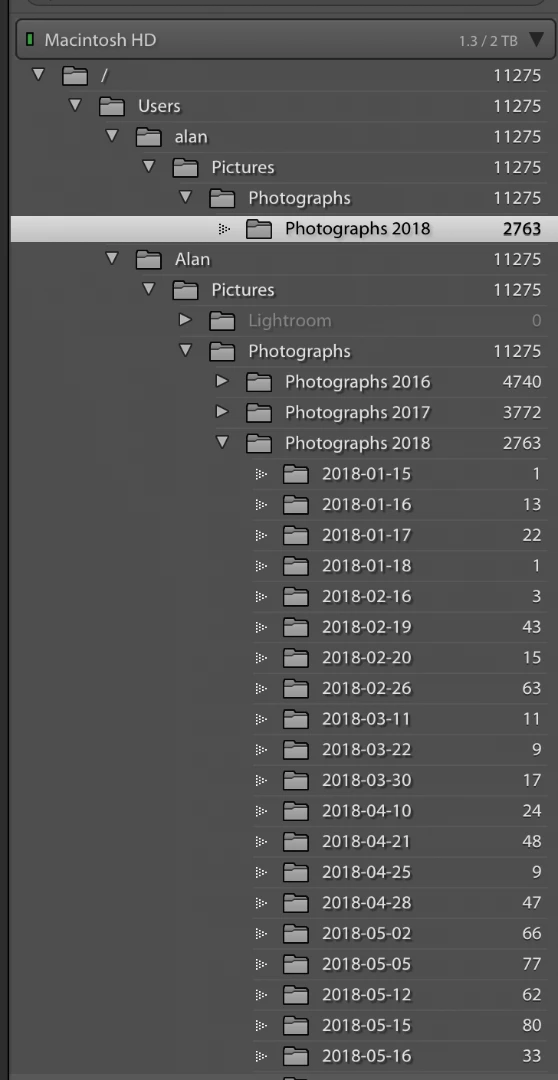
This is a well-known problem, called the 'Capitalisation problem'. Basically, what happens is that you have two different user folders, one called 'Alan' and the other one called 'alan'. In other words, the names are the same, except for the capitalisation. Because MacOS is case-insensitive, it sees those two folders as one and the same folder and so it deals with this without you even being aware of it. But Lightroom is case-sensitive, so Lightroom does see two different folders.
Most likely, your 'real' user folder (the one you see in the Finder) is 'Alan', so you have to merge the other one (but check this first). Here's how to do that:
1. Backup your catalog.
2. In the MacOS Finder, not in Lightroom, create a folder directly on Macintosh HD. Call it whatever you want, say "Capitals Fix".
3. In Lightroom, right-click on the "alan" folder in the Lightroom Folders Panel and select "Update Folder Location". In the file browser that then opens, browse to and select the "Capitals Fix" folder.
4. Don't be alarmed as the 'alan' folder will disappear from the Folders Panel, "Capitals Fix" will appear but all the sub-folders that were listed under 'alan' will now have "?" marks.
5. Now right-click on "Capitals Fix" in the Folders Panel, and again choose "Update Folder Location". This time browse to and select the "Alan" folder. You may get a "Merge" dialog box, select "Merge" and everything should resolve itself.




 AdChoices