Participant
Dec 18, 2016 10:18 PM UTC
Answered

Color management in "Print"

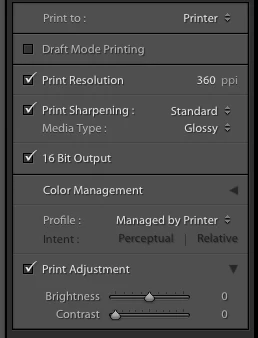
Lightroom on i-mac to epson 3880 printer I have always printed using icc profiles for each paper type which pop up under color management; profile All of a sudden profile says "managed by printer" and I have not found a way to get back to my list of papers.

How do I get back to the paper profiles in color management?

Thanks

    This topic is closed to new replies. Start a new post to keep the conversation going.
    JoeKostoss
    JoeKostossCorrect answer
    Community Expert
    Dec 18, 2016 10:35 PM UTC

    Are you referring to "Color Management" in the Printer Panel on the right side of the screen?  Click on the 2 up/down arrows to the right of "Managed by Printer" to select the ICC Profile for the paper/printer combination.

    7 replies

    WLSPHOTOAuthor
    Participant
    Dec 19, 2016 4:56 AM UTC

    That is what I have always done in the past but now when I click on the  arrows I do not get printer paper options I get a list of " profiles" like pal/secam,rgb ,iflux etc. I have never seen any of these before. and they do not directly relate to paper choice.

    Thanks for your help

    Translate
    arjunhaarith
    Adobe Employee
    Adobe Employee
    Dec 19, 2016 8:14 AM UTC

    Hi ,

    Please check if by any chance the printer driver might have been uninstalled / needs updated.

    Under the Color management -> Profile , Click 'Other' and see if you are seeing the intended profile.

    Please let me know your observations.

    Thanks,

    Arjun

    Translate
    WLSPHOTOAuthor
    Participant
    Dec 19, 2016 1:48 PM UTC

    That was what used to happen. Now when I click other I get 15 options ( name and then long string ) that seem to be related to color space but none relate to printer paper combinations.  I can't remember how the paper options were originally loaded. I will try to reload the printer drivers?

    Thanks

    Translate
    JoeKostoss
    Community Expert
    JoeKostossCommunity ExpertCorrect answer
    Community Expert
    Dec 18, 2016 10:35 PM UTC

    Are you referring to "Color Management" in the Printer Panel on the right side of the screen?  Click on the 2 up/down arrows to the right of "Managed by Printer" to select the ICC Profile for the paper/printer combination.

    Translate