
CR2 files from Canon EOS 60D
Need clarification: trying to understand why I can't import my CR2 from memory cards, but can shoot tethered and CR2 works fine
In LR CC 2015.10 Camera Raw 9.10, shooting with 60D, tethered. In preferences, in the naming section, it indicates that the files will be .dng. I can't change that setting, just the naming of file...
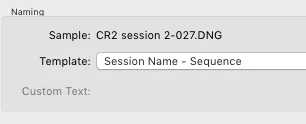
LR captures just fine and adds to a specified collection. File info indicates SHOT-001.CR2 and not SHOT-001.DNG. I can fully manipulate the image within LR without problems. Feels like RAW to me.
I then try to use the "Import" function for the same files I just shot with the tether (that LR was OK with using) by pointing to the destination used in tethering mode, but the images are grayed out and I cannot import them.
Using EOS Utility 2, I capture images via tether to a destination folder. I can point to that folder in LR, and import those images to LR without problems. They are the same CR2 format files as my memory card. I then use the Utility to download images to a folder XYZ. In LR, I can import all those images just fine... In Digital Photo Pro 4 (Canon app), I can import the images but can only convert to TIFF (not desired).
So what's the deal here...? is there some kind on DNG "invisible overlay" that allows LR to see CR2 files if they are ingested via some utility, but when I insert my memory card and try a direct route, LR cannot understand the file format...? Is the format on the internal card somehow different? How do I do this? ... the USB direct from camera does work, but it is considerably slower (USB2 vs USB3) than using a card reader... ergo the headache
Appreciate the insight.
 AdChoices