
richardf99071959
Participant
August 20, 2019
Question

Exporting from LR to jpeg - Colour shift problem

  • August 20, 2019
  • 1 reply
  • 393 views

Hello All,

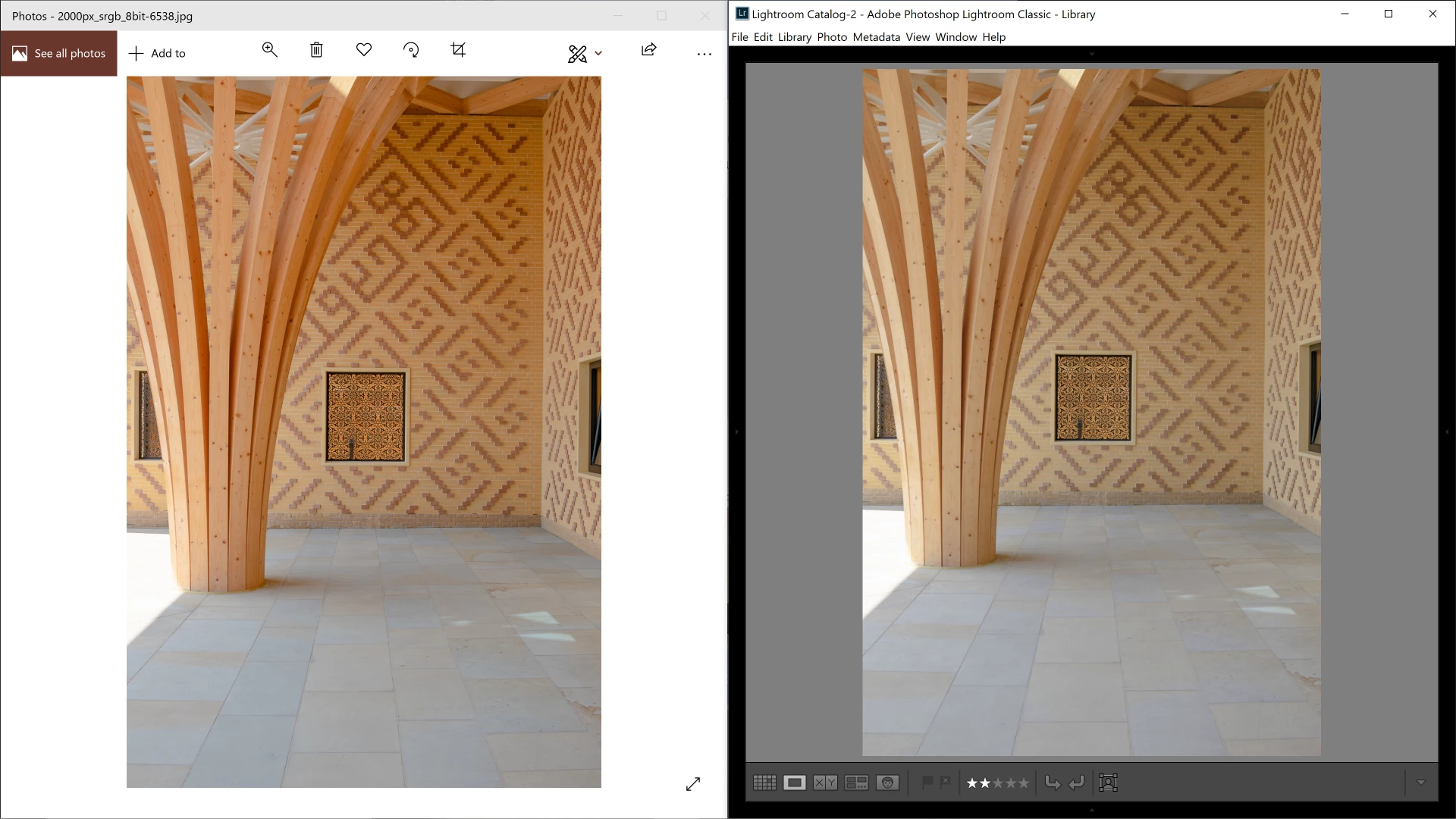
I've never had any issues which can't be solved but this is really puzzling me now so thought I'd see if anyone else has seen/heard of this issue. I've just updated to a new computer and have loaded my LR and PS onto it. When I export from LR (from a RAW/TIFF to a JPEG) my colours change in the resulting jpeg. They are far more saturated when exported than in both my LR and PS screens. It's as if something is happening to the colour profile / way it's being read after export. I've looked to see what it could be on the current discussions but had no joy with finding what this could be.

I am exporting from my workspace colour profile - ProPhoto, 16 bit to jpeg in sRGB. Below is an example of the colour shift I am getting (Lightroom on right, jpeg after export on left). Any suggestions or help much appreciated.

Many thanks,

R.
This topic has been closed for replies.

1 reply

Per Berntsen
Community Expert
Community Expert
August 20, 2019

It seems that your new computer came with a wide gamut monitor.

With this kind of monitor, you have to use color managed applications to view your work.

Lightroom and Photoshop are color managed, and will display correct colors by converting the colors from the document profile to the monitor profile. Applications without color management (like Photos) do not do this conversion, and will display over saturated colors on wide gamut monitors.

The only native color managed application on Windows is the Windows Photo Viewer.

But a better solution is to use the FastStone image viewer, which is free for personal use.

Make sure to enable color management under Settings. (both boxes must be checked)

richardf99071959
Participant
August 20, 2019

Thanks, Per.

That's very useful. So, based on your advice, it is better to continue editing as I have been in LR and PS even if the photo viewer makes it look more saturated?

My laptop is probably a wide gamut, yes.

R.

Per Berntsen
Community Expert
Community Expert
August 20, 2019

Yes, LR and PS will display correct colors, as long as you have a sound and correct monitor profile.

The best way to achieve this is by calibrating the monitor with a hardware calibrator, which will also create and install a custom monitor profile that accurately describes the characteristics of your monitor.

The Photos app will inevitably display wrong colors, and there's nothing you can do about it, other than using a color managed image viewer instead.

Also stay away from Internet Explorer and the Edge browser, they are not color managed.

Most other browsers, like Firefox, Chrome and Opera are color managed.