
Participating Frequently
September 10, 2018
Answered

External hard drive dies and need files back on LR via DropBox?

  • September 10, 2018
  • 3 replies
  • 2328 views

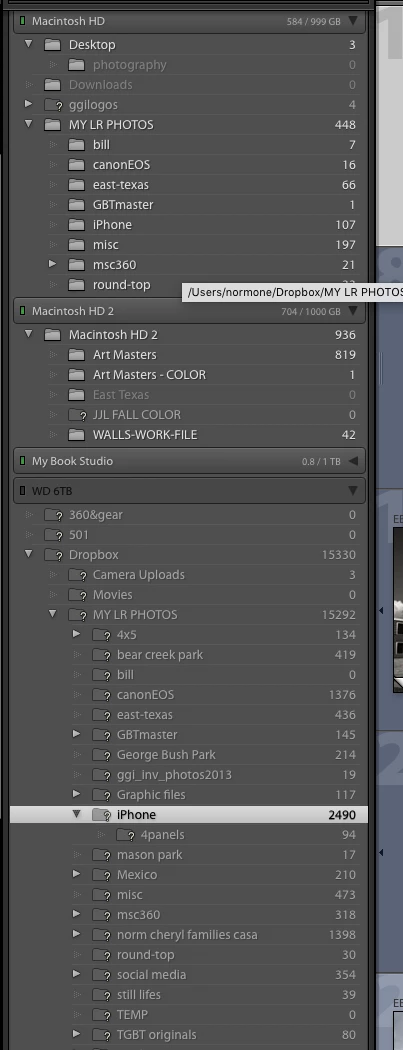
I have thousands of photos on a WD MY Book drive that has just given up. It won't open even on another computer. All the files are in DropBox but I don't know how to put them back into LR. It looks like I have to import them and I wonder if they then are treated as virgin files and will not have all the work done on them and stored in the LR catalog. I know I'm supposed to handle all files through LR but since the drive doesn't exist, I can't grab the folders from WD 6TB and move them to one of the other drives. Please tell me importing will match them back to the catalog or there is another way.
This topic has been closed for replies.
Correct answer Just Shoot Me

If you don't store those downloaded files in the same folder structure, not to mention drive letter, you will have a hard time reconnecting them.

Whenever something like this happens it is best to first replace the failed drive. Then restore the folder structure and then copy the image files back over to the correct folder they were originally stored in.

Not that is can't be done when the folder structure changes, it can. But it is more time consuming.

3 replies

JohanElzenga
Community Expert
Community Expert
September 10, 2018

I wonder if your images are really in Dropbox. Dropbox normally creates a ‘Dropbox’ folder inside your user folder. Anything in that folder will be synced. You did place the ‘My LR Photos’ folder shown on your internal hard disk in Dropbox, so those 448 photos are indeed synced. But was the ‘Dropbox’ folder on your now broken external hard disk (containing 15330 photos) also synced? If so, how? Just calling a folder ‘Dropbox’ doesn’t sync it, so you would have to do this with a so-called symbolic link. Did you indeed set this up like that? AFAIK, the Dropbox app does not offer any other way to create multiple ‘Dropbox’ folders on different disks...

-- Johan W. Elzenga
Participating Frequently
September 10, 2018

The only LR drive that was synced to DB was the external WD 6TB. The other drives get backed up periodically but are not currently synced. I have been experimenting with ways to speed up the lackluster LR performance and working without DB link was a test. I see all 15,330 files on Drop Box and am in the process of downloading them to main HD - will take forever. Question is will they reappear where it currently says 448 in MY LR PHOTOs without having to do anything?

Participating Frequently
September 10, 2018

Thanks everyone, my head is spinning with fear but I think I'm on the right track. I just need to wait for DB to stop downloading into the MY LIGHTROOM FILES on my main hard drive then I will redirect LR to where they are. I'm not marking this solved yet because I am only half sure about what I am doing. Appreciate the help and will check back soon.

dj_paige
Legend
September 10, 2018

DO NOT IMPORT. This is extremely important, importing is not the solution. In fact, importing will make the problem worse.

Once you download the photos/folders to some working HD, then you need to open Lightroom and reconnect Lightroom to the photos. Just Shoot Me​ has provided instructions; here is another explanation of how to do this: Adobe Lightroom - Find moved or missing files and folders

Just Shoot Me
Legend
September 10, 2018

You don't put them back into LR.

First you need to COPY, Download, all those images from your Drop box online storage to a Drive connected to your computer.

Be VERY CAREFUL with this. I am not familiar with DB and the steps needed to get files from DB to a drive connected to your computer after the drive that was linked to DB has failed.

Once they are on a hard drive connected to your computer you can then Reconnect them to the LR database file, the Catalog file.

See this page for instructions on doing the Reconnecting.

http://www.lightroomqueen.com/lightroom-photos-missing-fix/