
Forcing Lightroom to delete plugins
Lightroom CC 2015.10.1, Normal PC, Windows 10, 64-bit.
I have a plugin in here for Helicon Focus. I've had plugins in Lightroom about since I started using Helicon Focus. They've never worked well so I generally ignore them. BUT, it WOULD (possibly) make life simpler if I could actually USE HF from Lightroom....
In the Plugin Manager (in theory, I've attached a picture) I HAVE a plugin called "HeliconFocus". It's red, and says "Installed but not working". The Status: is "plug-in is malfunctioning and can not be used" and the Last message says "Info.lua: bad header in precompiled chunk"
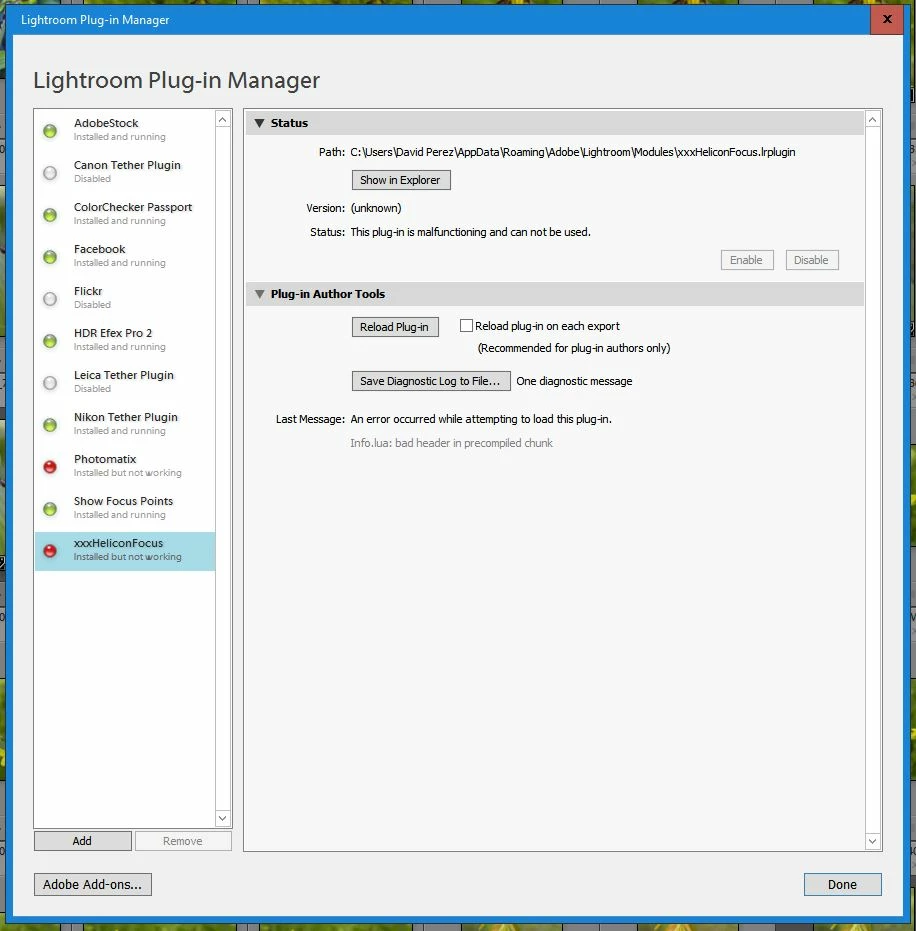
I can go over the Helicon and complain that there's a problem with their plugin, but I'm 100% positive they're just gonna tell me it's not them, its Lightroom. SO, HOW do I get Lightroom to remove this thing and make like it's NEVER been there so I can try to reinstall it and see if it continues to pule all over it's feet?
 AdChoices