


Help! Errors migrating from Aperture to Lightroom Classic CC
I know, I know... I'm the last guy on the Aperture boat and I'm finally jumping off from this Titanic and trying to swim to safety (Lightroom). I saw you guys waving from the life boats and I'm sorry I didn't heed your calls and jump sooner. My Aperture library is just so big and so I was reluctant to jump and well, here we are.
Set-Up:
MacBook Pro.
~1TB Aperture Library, years of photos on an older (800 firewire baby!) external hard drive, w/ its own power cord. Managed (*not* referenced).
Another external HD, newer (USB-C let's goooo!) with more space, bus powered.
Idea: I'll migrate my Aperture library to Lightroom, and at the same time, have Lightroom copy the photos onto my newer, larger external HD as it imports, so they'll be copied over to the new external HD *and* imported/organized for Lightroom. Genius.
haha
What Happened: I followed the migration guidelines/tips from the official Adobe page about it and this guide I found. I didn't have any "offline" files since my Aperture library was managed, not referenced, so I just made high quality previews of my important photos like the guide suggested, used Lightroom's built-in plug-in for importing from Aperture and clicked start.
Fast forward 161 hours later... (That's six, full 24-hour days and 17 hours)...
I deeply regret having the settings ticked so that it pings everytime a photo is imported. But more importantly, Lightroom notifies me it's done, and asks do I want an error log. Sure, I want an error log, save it as a txt file... if I were to print it, it would be 356 pages long, single-spaced. Literally.
Problem: It seems that about 30 GB of random photos failed to import. By random, I mean random. It does not appear to have a rhyme or reason (or be organized in any coherent manner... see the picture of the log below)
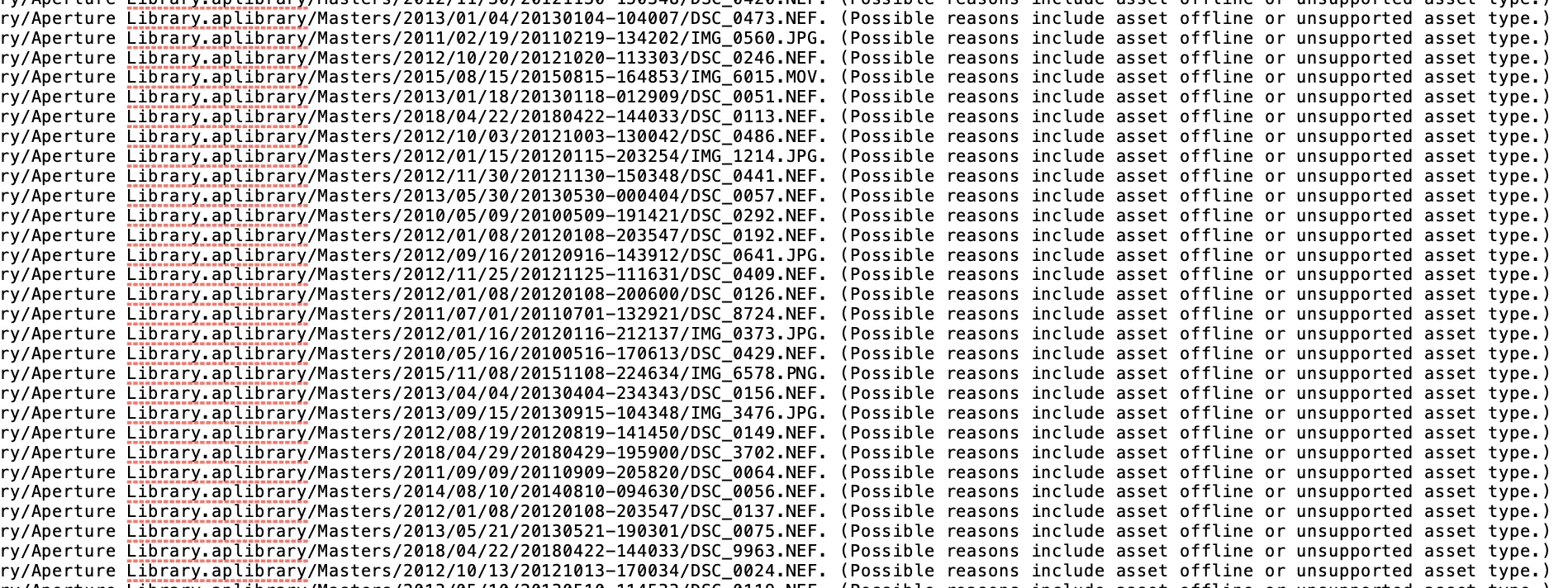
The vast majority are all normal, RAW (.NEF) files or JPGs or PNGs, plus a handful of .AVIs or .MOVs. the error log states "Possible reasons include asset offline or unsupported asset type." I know it is not because the file is "offline" - My Aperture library is managed, not referenced and I double checked that before starting the import. I filtered for any offline files and of course, Aperture found none. And I know Lightroom supports images, so the filetype isn't the issue.
The only other thing I can think of, is the power cut out for just a couple of seconds one night while I was away (enough to force my router to reboot but not enough for my 1997 Philips stereo clock to need to be reset?). But when I returned, Lightroom was still pinging and showing it was importing files as if it hadn't missed a beat.
My question to you: Oh ye wise ones, who made the journey to the Lightroom years ago, I beg thee to share your knowledge and experience and help me understand where I went wrong...
- How can I get those 30GB of photos properly migrated/imported?
- Should I try erasing the new drive (where Lightroom imported/copied the photos to) and do the whole import anew and hope there's not another storm that might cut out the power for a second? (spoiler alert: it's going to storm again at some point in the next 7 days, I'm sure).
- Should I try, in Aperture, converting from a "managed library" to a "referenced library" first, and then try, in Lightroom, importing everything anew?
- Should I try breaking down my Aperture library into smaller libraries (perhaps by year?) and import into Lightroom, one at a time, anew?
- Should I bribe Shantanu Narayen to handle the import process for me? Or blackmail Tim Cook into doing it since his team decided to dump Aperture by the side of the road? (These are jokes, people).
I just ask because if you're like me, your photos are important to you and you want to make sure they're safe, acessible and organized. And I just don't have the patience to waste literally 7 full days on the wrong strategy. I want to get this done and get it done right.
I appreciate any suggestions and advice you have and I especially appreciate you reading all the way through. I tried to add a little humor to spice it up for you.
 AdChoices