
Inspiring
August 3, 2021
Answered

Import / Anzeige von jpg-Dateien nicht möglich

  • August 3, 2021
  • 3 replies
  • 610 views

Hallo zusammen, nachdem ich in Bridge einen Ordner umbenannte und in LR dummerweise Synchronisiert hab anstatt den Speicherort zu aktualisieren werden in LR im entsprechenden Ordner keine jpg´s mehr angezeigt. Im Explorer + Bridge sind die Bilder zu sehen. Es handelt sich zuvor mit LR Exportierte Fotos. Den Ordner hab ich bereits aus der Bibliothek entfernt und neu Importiert. Hat jemand eine Lösung für das Phänomen?
This topic has been closed for replies.
Correct answer DdeGannes

If you use your operating system and check the folder are there RAW files and jpeg files in the folder?

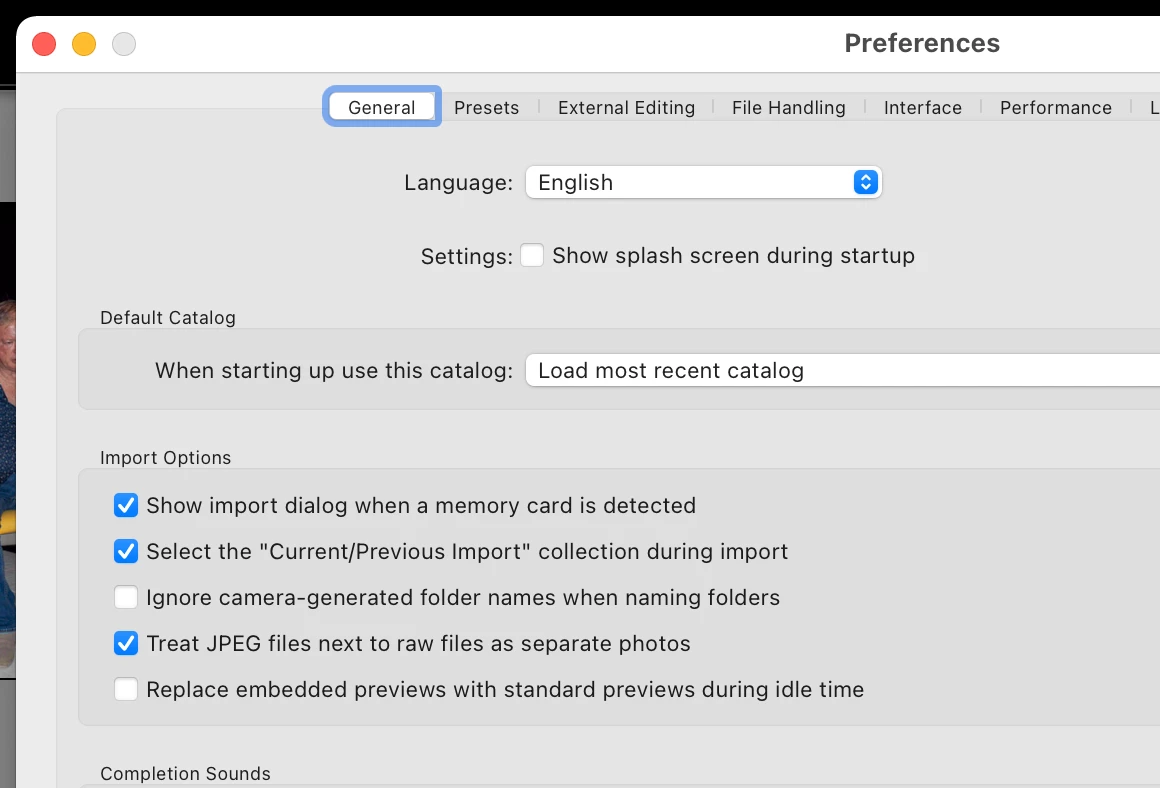
In Lightroom Classic Preferences> General Tab> do you have "Treat jpeg files next to raw files as separate photos" selected?


3 replies

DiddiboAuthor
Inspiring
August 4, 2021

THAT IT IS!! :))

Thank you verry much!!!

DiddiboAuthor
Inspiring
August 3, 2021

Hi Denis


thanks for answering

but I don’t found a solution. I already deleted the folder in the LR library and reimported – but the jpeg– files still missing. I also copied the folder to another drive > renamed it and tried a new import with LR > the same result: LR just shows the RAW files.

DdeGannes
Community Expert
DdeGannesCommunity ExpertCorrect answer
Community Expert
August 3, 2021

If you use your operating system and check the folder are there RAW files and jpeg files in the folder?

In Lightroom Classic Preferences> General Tab> do you have "Treat jpeg files next to raw files as separate photos" selected?


Regards, Denis: iMac 27” mid-2015, macOS 11.7.10 Big Sur; 2TB SSD, 24 GB Ram, GPU 2 GB; LrC 12.5,; Lr 6.5, PS 24.7,; ACR 15.5,; (also Laptop Win 11, ver 24H2, LrC 15.0.1, PS 27.0; ) Camera Oly OM-D E-M1.
DdeGannes
Community Expert
Community Expert
August 3, 2021

You stated “ I renamed a folder in Bridge “

Lightroom will know nothing about what you did in Bridge. The folder in Lightroom (with the prior name) would have lost contact with the images in the renamed folder.

See the attached link for info to assist reconnecting.

https://www.lightroomqueen.com/lightroom-photos-missing-fix/


Regards, Denis: iMac 27” mid-2015, macOS 11.7.10 Big Sur; 2TB SSD, 24 GB Ram, GPU 2 GB; LrC 12.5,; Lr 6.5, PS 24.7,; ACR 15.5,; (also Laptop Win 11, ver 24H2, LrC 15.0.1, PS 27.0; ) Camera Oly OM-D E-M1.