
Participant
January 8, 2018
Answered

Lightroom cc presets

  • January 8, 2018
  • 2 replies
  • 608 views

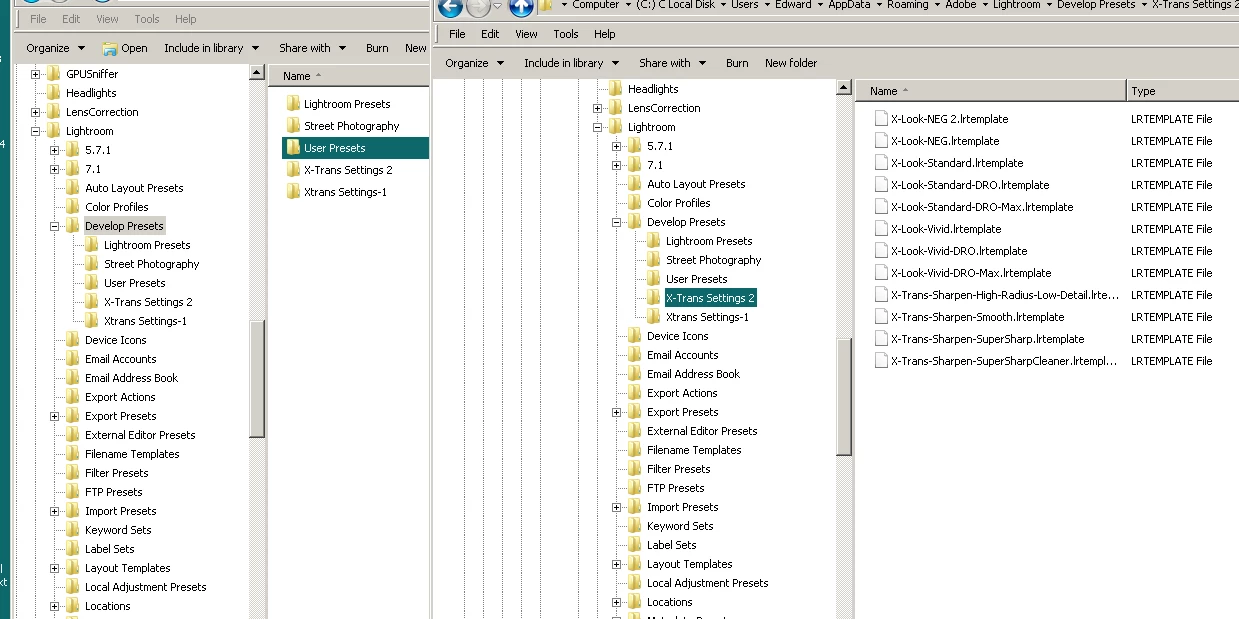
I have installed presets into my develop file by going to edit,  Preferences, show lightroom presets, lightroomcc, develop presets.  I have unzip the files and now they are LRtemp files.  The preset are there but now showing up when I open lightroom.  What am I doing wrong.
    This topic has been closed for replies.
    Correct answer Just Shoot Me

    For what module, function are these presets?

    If you are adding presets they have to be in one of the Subfolders for the module or function, importing/exporting, you want to use them in and in a Sub-Subfolder called User Presets or another Sub-subfolder that you name. They can't be in the folder called "Lightroom Presets".

    2 replies

    Just Shoot Me
    Just Shoot MeCorrect answer
    Legend
    January 9, 2018

    For what module, function are these presets?

    If you are adding presets they have to be in one of the Subfolders for the module or function, importing/exporting, you want to use them in and in a Sub-Subfolder called User Presets or another Sub-subfolder that you name. They can't be in the folder called "Lightroom Presets".

    dj_paige
    Legend
    January 8, 2018

    The preset are there

    The presets are where?

    Are you referring to Lightroom CC or Lightroom Classic CC?

    winlow48Author
    Participant
    January 8, 2018

    The preset are in the develop presets folder and I'm using Lightroom

    Classic CC. I copied the presets and placed them into the develop preset

    folder.