
Participating Frequently
April 4, 2018
Answered

Lightroom Classic CC 7.3 - Can't create preset folder

  • April 4, 2018
  • 4 replies
  • 7387 views

I imported some new presets into Lightroom, and tried to create a new preset folder, Menu: Develop, New Preset Folder..., after typing in a preset name and pressing Create, nothing happened.
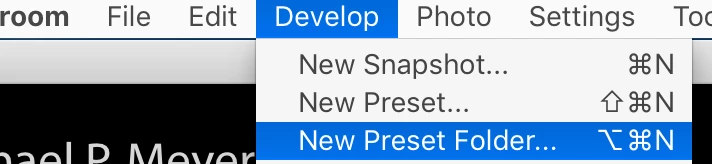
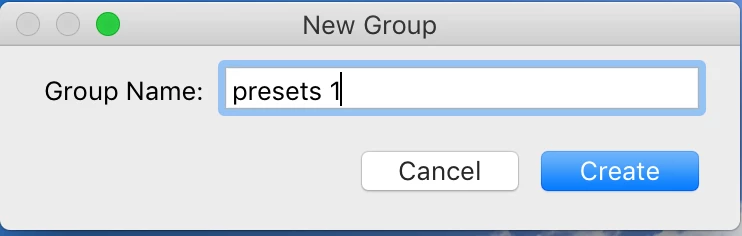
No folder anywhere by that name.   The menu is there but is the functionality active ?

Thanks,

    This topic has been closed for replies.
    Correct answer Rob_Sylvan

    I think what happens is that empty folders are removed automatically, so when you create a new (empty) folder it can't ever display.

    The workaround for now is to create a new preset, and then in the New Preset dialog, click the Group drop-down menu and create the folder from there. Yes, you have to create a preset of some sort to make this work. No, it is not ideal.

    Once you have the new folder, you can drag /drop presets into it. Once you have other presets in that folder you can right-click the temp one you made.

    4 replies

    Participating Frequently
    June 3, 2018

    I followed the workaround as described but no luck - any suggestions? Help!

    Rob_Cullen
    Community Expert
    Community Expert
    June 3, 2018

    williambazlinton  wrote

    I followed the workaround as described but no luck - any suggestions? Help!

    "no luck" with what?

    Did you follow the method given in the correct answer above?

    Namely-

    1. create a new preset,   - Click the + icon. (you can use any adjustment settings you want, make it useful!)

    2. In the New Preset dialog, name your preset, then click the Group drop-down menu

    3. Create the folder (Group) from there. (Enter a name for your new Group folder)

    Yes, you have to create a preset of some sort to make this work

    And your Lr version number is ?

    Regards. My System: Windows-11, Lightroom-Classic 15.1.1, Photoshop 27.3.1, ACR 18.1.1, Lightroom 9.0, Lr-iOS 10.4.0, Bridge 16.0.2 .
    Participating Frequently
    June 4, 2018

    Thanks for responding.

    I should have been clearer.

    Yes, I followed the method given in the correct answer exactly.

    I created a new preset and created a a new folder in the 'Group’ drop down in the New Preset Dialogue box.

    No new folder appeared in the Presets area with the new preset in it.

    I notice in the file structure I have two different locations for develop presets

    The path that appears when I right click on a current individual 'user preset’ in the preset panel is:

    This PC > Windows (C:) > Users > user > AppData > Roaming > Adobe > CameraRaw > Settings > User Preset

    My current user presets appear here as XMP files

    I’ve also tried manually adding a ‘NEW USER PRESETS’ folder here and copying an existing preset into it then restarting Lightroom.

    The folder doesn’t show up on restart.

    There is another path to Develop Presets which are .lrtemplate files:

    This PC > Windows (C:) > Users > user > AppData > Roaming > Adobe > Lightroom > Develop Presets

    This is the path that shows up in the ‘Show Lightroom Presets Folder…’ in Preferences.

    I’m not sure what I’m missing here..

    Participating Frequently
    April 4, 2018

    Thanks, that work-around allowed me to create a folder/group.  I could then move my other presets to there.

    And if I deleted that 'new preset' the folder disappears from the panel, but the folder remains on my disk.

    andrewm35673472
    Participant
    April 13, 2018

    What an obvious bug!  Thanks for the work around.  :-)

    DSeim
    Inspiring
    April 4, 2018

    Blown away that Adobe launched is the official release that so obviously buggy.

    Presets are changed to XLM without asking. New folder don't work anymore. Presets are randomly out of order inside their folders. The "Show Lightroom Presets" button in preferences still goes to the old presets folder but those presets no longer show up in Lightroom and there's no option to convert new presets that use the .lrpreset format after the initial conversion that sometimes fails?

    I know that they were sent bug reports on the preset mess before release and they pushed the update anyways.

    Rob_Sylvan
    Community Expert
    Rob_SylvanCommunity ExpertCorrect answer
    Community Expert
    April 4, 2018

    I think what happens is that empty folders are removed automatically, so when you create a new (empty) folder it can't ever display.

    The workaround for now is to create a new preset, and then in the New Preset dialog, click the Group drop-down menu and create the folder from there. Yes, you have to create a preset of some sort to make this work. No, it is not ideal.

    Once you have the new folder, you can drag /drop presets into it. Once you have other presets in that folder you can right-click the temp one you made.