


Participating Frequently
January 16, 2019
Answered

Lightroom Classic CC "Sorry, something went wrong" on startup

  • January 16, 2019
  • 5 replies
  • 8430 views

I had a Windows 10 Pro 64-bit reinstall after SDD failure, so had to re-install all applications. LR now starts, then shows a blank window (so no idea what is happening) with a spinning icon, then after a few minutes throws a "Sorry, Something went wrong" error and after I click [Dismiss] LR shuts down. This occurs every time.
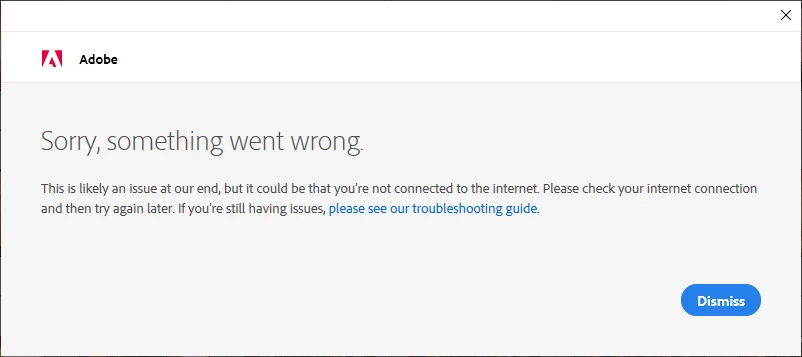
I have uninstalled through the CC Panel and re-installed: no change --- I get a choice of catalog, but even if I select the new empty catalog rather than my main 3Gb catalog, same problem occurs.
In spite of sending Adobe the error logs several times over the last week, I've received zero response.

I've not located a similar problem documented with a solution in the support community pages.

My CC account is up-to-date so it's not an account problem.

Photoshop CC throws the same problem.

Thanks for assistance.

This topic has been closed for replies.
Correct answer dj_paige

I've repeated the whole exercise, but uninstalled the creative Cloud app and Adobe reader before running the clean-ups as before. Then installed the CC app and then PS CC through the app. Nothing else.

Logged out of my account in the CC app, then started PS:

I get the account login screen, log in, then get the endless spinning icon on a blank screen in front of the PS "welcome to Photoshop. We're glad you're here" displayed behind.

So:

It's not a LR-specific problem, it's an account-related problem, but the account is fine through the CC app, and through a browser, so I'm not locked out.

It's not strictly an app crash problem, it eventually times out in PS CC (and did so much faster in LR Classic CC)

Any ideas?

Thanks

Jon


Perhaps you could try creating a different user account on your computer -- not a different Adobe account -- and see if the software launches there.

5 replies

anthonygaliamov
Participant
January 2, 2023

I came across this problem recently and tried everything mentioned here and more.
The way I managed to fix this was by removing my "Activated Devices" from this page here: https://account.adobe.com/activated-devices 


This instantly fixed this issue and I was able to open Lightroom Classic without the "Something went wrong" error apprearing.

GoldingD
Legend
January 20, 2019
GoldingD
Legend
January 16, 2019

By the way, how many computers do you have these programs on? And have you logged into Adobe.co, and signed in and managed your account?

Even if just one, wondering if you need to deactivate the old instance of your prevous computers existence. Yes, I know same case, same motherboard, same CPU, same GPU, same MAC address for the NIC, and probably same computer name. But, a new install. Not sure if Adobe looks for a file on the computer for authentication and is getting confused.

jcase_auAuthor
Participating Frequently
January 16, 2019

Hi,

I've deactivated the link to the account on the old PC (new tech shop doing the Windows re-installation did renamed this PC).

The network connection test returned 'pong' so it's not a failure to connect to the registration server.

I currently have 15ms ping, 85mb/s download and 1.5mbs upload speeds to my ISP so no general connectivity/ performance issues.

No change in behaviour on starting LR

Note this is what I'm seeing:

GoldingD
Legend
January 16, 2019

The spinning wheel.

Trying to remember what link deals with that.

In the back of my head, one solution involves bringing up th Adobe Creative Cloud Dektop, signing out, the signing in.

might look at: How to fix the issue of Adobe Creative Cloud desktop app not opening or showing a spinning progress wheel

GoldingD
Legend
January 16, 2019

Shame on me, clearly I just glanced at your posted screenshot. Clearly implies a network or connectivity issue

consider : Troubleshoot Adobe Creative Cloud download and install issues

look at the part about Network and Connectivity.

Also, this link, including both network issues and Adobe account issues

Troubleshoot licensing issues | CC 2019

dj_paige
Legend
January 16, 2019

Did you try the troubleshooting guide suggestions?

jcase_auAuthor
Participating Frequently
January 16, 2019

Which?

New Windows installation, so all Windows updates included

New LR/ PS install so no plug-ins
New LR/ PS install so latest version

Can't access any LR/ PS menus so can't change preferences nor optimize performance

Can't reset to defaults: SHFT+CTRL+Click --> Windows app/ icon settings, not LR preference reset dialog

Adobe CC account is ok

Windows Account is 'new' so no weird settings

Thanks and regards,

Jonathan

jcase_auAuthor
Participating Frequently
January 16, 2019

jcase_au  wrote

Which?

This troubleshooting guide:


Hi dj_paige

If you noted the comments under this question, you'll see I did read through the troubleshooting guide and had already done the actions...