Inspiring
February 1, 2018
Beantwortet

Lightroom Classic CC won't sync at all

  • February 1, 2018
  • 6 Antworten
  • 12901 Ansichten

This is the second time I'm posting this with no fix at all. First time I posted was a couple of months ago. Not sure why we pay for a product that has no real tech support at all. Lightroom Classic CC will not sync with Creative Cloud at all. It was working fine until the release of Lightroom CC which I tried for 2 days and deleted. Since then I haven't been able to get anything to sync. I have photos on Lightroom Mobile that won't sync to my Macbook and I have photos on my Macbook which won't sync with anything. I've got sync'd collections which no longer work. When I create a new sync'd collection and add photos, nothing happens.

I'll add some screen shots:
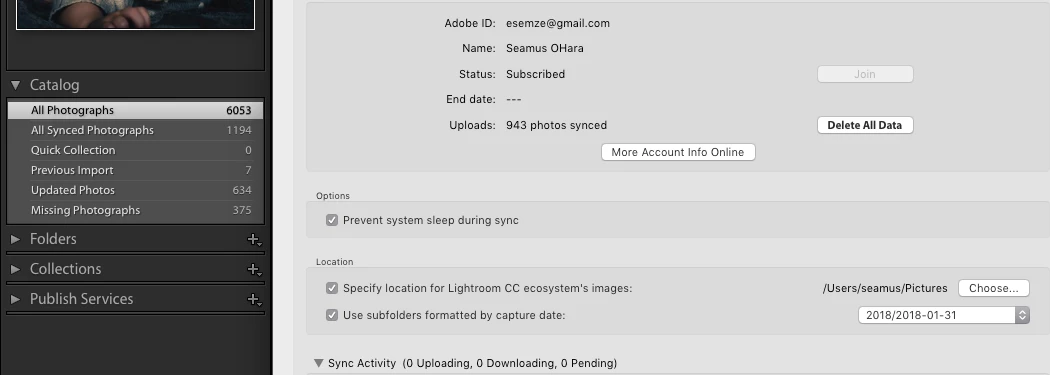
Note how the number of sync'd photographs doesn't match.

Please help this has been extremely frustrating for way too long.

Dieses Thema wurde für Antworten geschlossen.
Beste Antwort von esemze

I was able to get technical support on chat after going through 4 or 5

people. Get a chat window open with an account issue then ask for Lightroom

tech support until you get the right person. I recommend copy pasting the

issue as you might have to go through the same steps several times. Once

you get the right person they can remote control your computer and fix the

issue. For me it was a specific image file that was causing sync to fail

but I never would have found it. He had it fixed in about 5 minutes and

it's been working ever since. Took 6 months to her this resolved but has

saved my passion for photography.. I was quite lost without my workflow

hah..

On Mon, Feb 19, 2018, 11:23 AM johnm79843573, <forums_noreply@adobe.com>

6 Antworten

New Participant
November 25, 2018

I has a sync problem. The solution was to back up the catalog, and then restore it.

DdeGannes
Community Expert
Community Expert
November 25, 2018

Things you need to be aware off,

a. Lightroom Classic can only have one Catalog synced to your Creative Cloud account. If you decide to open another Catalog and sync collections from that Catalog to the cloud the previously synced smart previews in the cloud storage will be removed.

Regards, Denis: iMac 27” mid-2015, macOS 11.7.10 Big Sur; 2TB SSD, 24 GB Ram, GPU 2 GB; LrC 12.5,; Lr 6.5, PS 24.7,; ACR 15.5,; (also Laptop Win 11, ver 24H2, LrC 15.0.1, PS 27.0; ) Camera Oly OM-D E-M1.
New Participant
November 21, 2018

Totally Agree! I have the exact same problem and can get NO SUPPORT. Does anyone at Abode read these posts?

Theresa J
Community Expert
Community Expert
September 2, 2018

What do you mean that the number of synced images doesn't match? Your screen capture shows that you have 943 images synced. Are you expecting all of the photos in your catalog to sync? It doesn't work that way. If you want images that reside on your hard drive, which are part of your Lr Classic catalog to sync, you have to put them in collections and sync the collections. We can't see from your screen capture what your collections look like. Here's a video I recorded that explains this. The video was recorded before Lightroom CC and Lightroom Classic became two different apps, but the method for syncing hasn't really changed.

Lightroom Classic Mobile Sync Tutorial - YouTube

taxandbusiness
New Participant
August 17, 2018

I am having similar problems. It is not a space issue however it keeps on saying that sync has stopped due to a duplicate catalog. Should I like to choose the catalog then i need to resart and enable sync. There is no enable sync option. I have tried looking everywhere. I made a new folder and choose this folder in the preferences and still it did not work. I reinstalled LR CCC and renamed the catalogs. But I having the same problems. Please help!!!!

john beardsworth
Community Expert
Community Expert
February 1, 2018

When you had LRCC, did you "migrate" from your previous catalogue? "Migrate" is a specific term used in LRCC. If you had run it, it would prevent you syncing your catalogue again.

In your web browser go to Lightroom Web. How many photos does it show? Create a new collection in Classic and sync it - is it shown in Lightroom Web?

In that Preferences screen, hold down Alt/Opt and you should get a message about rebuilding the local sync data file. Try it.

LeonardoPraga
Known Participant
August 28, 2018

I cannot sync!!!!! suddenly it stoped working, and i need it on everyday basis!!!! Can anyone help me?

New Participant
September 1, 2018

I am having the same issue.  As of yesterday it totally stopped syncing.  I tried logging in an out, deleting the app on my iPad, reinstalling and rebuilding the sync and still nothing.

Michael J. Hoffman
Community Expert
Community Expert
February 1, 2018

Hi Seamus,

Have you tried the basics, like signing out of Lightroom and then signing back in?

What do you see when you go to lightroom.adobe.com and sign in to look at your sunced photographs?

For Lightroom Mobile, what device are you using, and what version of LR CC Mobile (hopefully the latest)?

Mike

New Participant
February 19, 2018

I too am having this issue. Nothing is syncing on my secondary computer. Everything is fine on LR web portal, but it will not complete the syncing process on the secondary PC. The usual fix of deleting and having LR rebuild the Sync.lrdata files doesn't work anymore. I have spent countless work hours trying to get this fixed and am unable to do so.

esemzeAutorAntwort
Inspiring
February 21, 2018

I was able to get technical support on chat after going through 4 or 5

people. Get a chat window open with an account issue then ask for Lightroom

tech support until you get the right person. I recommend copy pasting the

issue as you might have to go through the same steps several times. Once

you get the right person they can remote control your computer and fix the

issue. For me it was a specific image file that was causing sync to fail

but I never would have found it. He had it fixed in about 5 minutes and

it's been working ever since. Took 6 months to her this resolved but has

saved my passion for photography.. I was quite lost without my workflow

hah..

On Mon, Feb 19, 2018, 11:23 AM johnm79843573, <forums_noreply@adobe.com>