
hansv47546090
Participating Frequently
May 27, 2021
Question

Lightroom Classic op Mac Mini met M1 processor presteert slecht

  • May 27, 2021
  • 2 replies
  • 1598 views

Sinds kort heb ik een Mac Mini met M1 processor. 16 GB intern geheugen en 1 TB SSD.

De perforemance is bedroevend. Zeker ter vegelijking met mijn Mac Book Pro van 2013. Deze doet het beter.

Er gaan geruchten dat dit een serieus probleem is. Het geheugengebruik is aanzienlijk. En er wordt fors naar de SSD geSWAPt.


Ik heb een test gedaan op de Mac mini met M1 processor en mijn MacBook van zeven jaar oud. Allebei 16GB intern geheugen.

Na een nieuwe start en het opstarten van Lightroom zijn de verschillen tussen de MacBook en Mac Mini klein. Daarna heb ik op beide systemen 10 foto’s geïmporteerd. En daarop dezelfde bewerkingen gedaan. Belichting, uitsnede, aanpassen van scherpte enz.

Het resultaat is opmerkelijk.
De macBook:
Geheugengebruik 11,5 GB
Cache 2,22 GB
SWAP 1 MB

Mac Mini met M1 processor:
Geheugengebruik 13,57 GB
Cache 2,36 GB
SWAP 11,66 GB
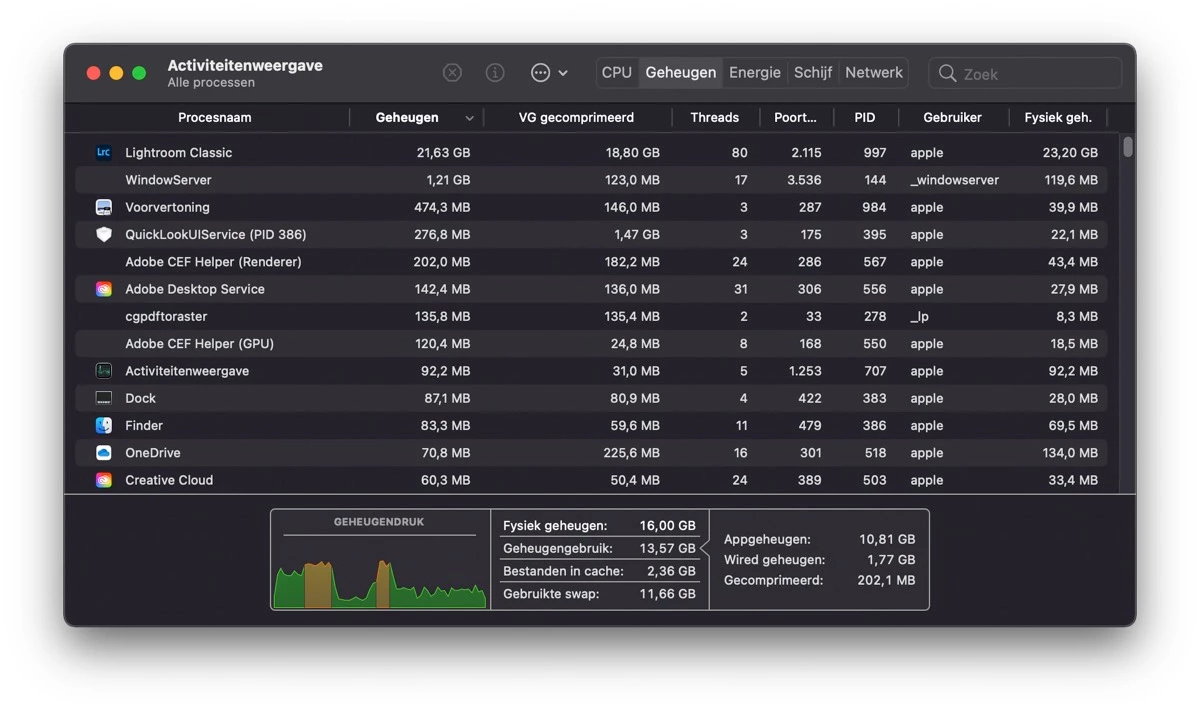
 

Zie de schermafdruk van de activiteitenweergave:
Lightroom Classic draait op de Mac M1 nog onder Rosetta 2, een emulator naar de 'oude' Intel chip.
Misschien ligt de oorzaak daar.

Als er andere gebruikers zijn van Lightroom Classic op een Mac met M1 processor zou ik graag hun ervaringen willen horen.
This topic has been closed for replies.

2 replies

GoldingD
Legend
July 11, 2021

Somehow, your posting actually got a reply from what appears to be an actual Adobe employee. That does not often occur in the community site. The community site is primarily meant for customers to communicate between one another. Not to get Adobe Tech help.


I recommend that you post your issue at the official Adobe Feedback site, where Adobe Techs are in fact paying attention.


https://feedback.photoshop.com/topics/lightroom-classic/5f5f2093785c1f1e6cc40872?cType=PROBLEM&page=1&q=m1


nikunj.m
Community Manager
Community Manager
May 27, 2021

Hi,


We're sorry about the trouble with Lightroom Classic on the M1 Mac mini. Would you mind sharing the version of macOS you're using on the Mac mini? Natively compotibility of Lightroom Classic on the M1 Macs is planned for 2021 & the app currently runs under Rosetta emulation. You can check more details here: https://helpx.adobe.com/lightroom-classic/kb/macos-big-sur-compatibility.html#AppleSiliconcompatibility


You can try the steps suggested below to ensure that Lightroom Classic has the necessary permissions:

1. Go to the System Preferences for your Mac, then Security and Privacy, then select the Privacy tab.

2. Then select Accessibility from the list to the left & check if Lightroom Classic is added to the list with a check mark in front of it.

3. If Lightroom Classic is not a part of the list, please add it by unlocking the window first using the lock at the bottom left, then clicking the + icon & navigating to the Applications folder.

4. Also, grant permissions to Lightroom Classic under Full disk access located in the same list as Accessibility.

5. Once done, restart the Mac & check if it helps.


You can also try optimizing the Preferences of Lightroom Classic using the steps suggested here: https://helpx.adobe.com/lightroom-classic/kb/optimize-performance-lightroom.html


Let us know if it helps!

Regards,

Nikunj

hansv47546090
Participating Frequently
May 28, 2021

Hi, Nikunj,


Thanks for the reply.

I am using macOS  Big  Sur  version 11.4.

I have changed the settings and added Lightroom Classic to Accessibility and Full disk access.

Wait and see if this helps.

Looking forward to the upgrade off Lightroom  Classic for the M1 processor.


Regards,

Hans

nikunj.m
Community Manager
Community Manager
May 29, 2021

Thanks for the reply! Our product team is working on the native support for Lightroom Classic but we do not have an official timeline yet.

Please feel free to reach out if you need further assistance. We would be happy to help!


Regards,

Nikunj