Participant
January 11, 2021
Answered

Lightroom White Out

  • January 11, 2021
  • 1 reply
  • 385 views

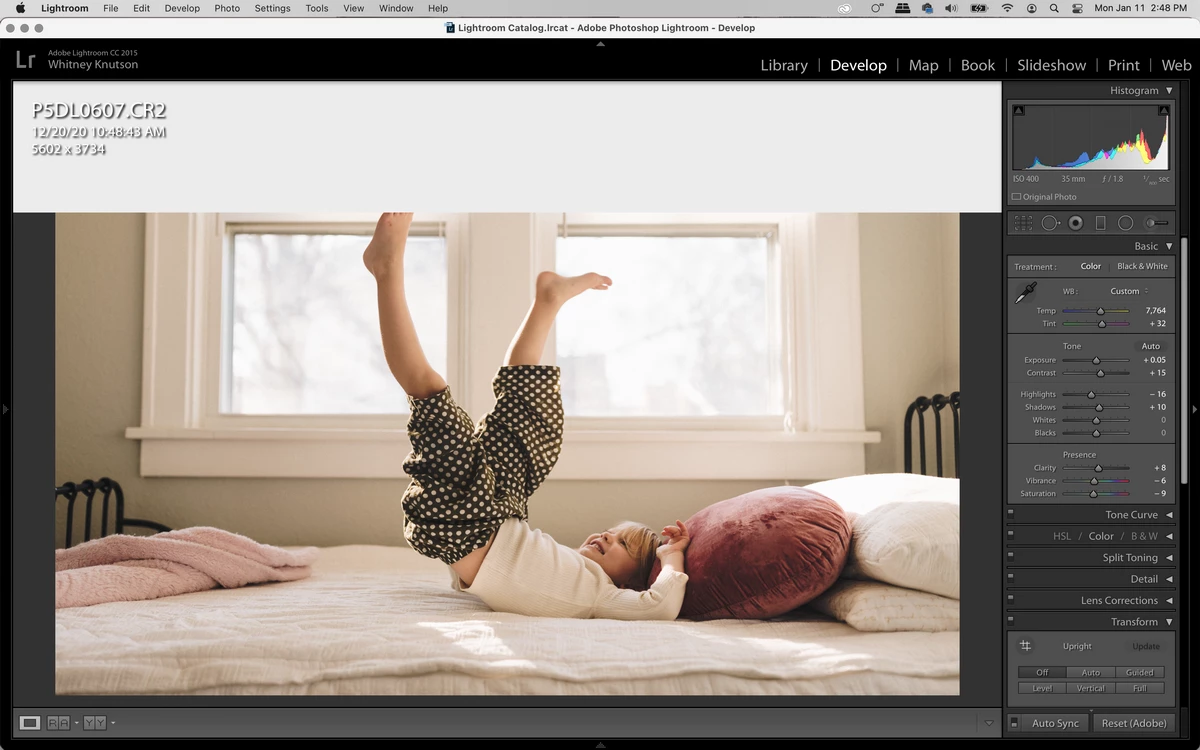
Does anyone know what's happening with my Lightroom right now? I have quit and reopened Lightroom twice and restarted my laptop. I have no idea what else to do. 

{Moved from Lightroom Cloud to Lightroom Classic Forum by Moderator} 

This topic has been closed for replies.
Correct answer Per Berntsen

It appears that you are using LR CC 2015 on Big Sur.

This version of LR is not supported on Big Sur, but since you have a Creative Cloud Subscription, you should install the latest version, which is Lightroom Classic 10. You are four versions behind.

To fix the immediate problem, press the I key on the keyboard once or twice to hide the image info overlay. 
 

1 reply

Per Berntsen
Community Expert
Per BerntsenCommunity ExpertCorrect answer
Community Expert
January 11, 2021

It appears that you are using LR CC 2015 on Big Sur.

This version of LR is not supported on Big Sur, but since you have a Creative Cloud Subscription, you should install the latest version, which is Lightroom Classic 10. You are four versions behind.

To fix the immediate problem, press the I key on the keyboard once or twice to hide the image info overlay.
