
sk12345
Participant
February 18, 2019
Question

LR8 GPS coordinates not preserved in exported JPG

  • February 18, 2019
  • 3 replies
  • 1527 views

Hello everyone,

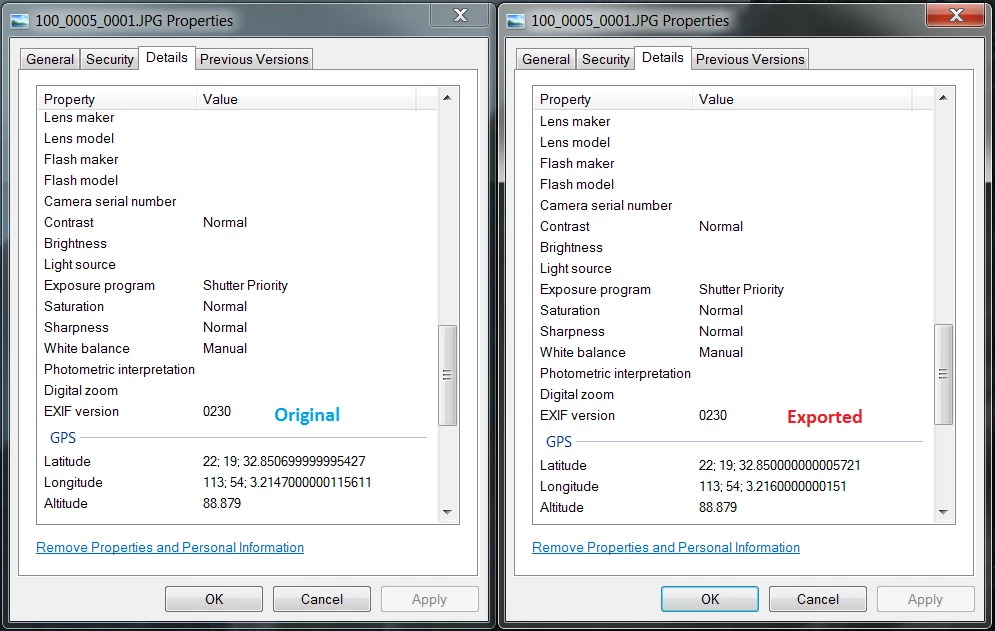
I find that LR doesn't preserve the GPS coordinates in exported JPG, and rounds/truncates them off at 3 decimal places of a second. The original coordinates also come from JPG. I'm aware that we're talking about a difference of only 1 inch, but I use LR to batch process drone pictures for photogrammetry applications so preserving GPS accuracy is essential for me. Is there any solution to this? Copy and pasting isn't practical for me because there are far too many pictures to process. Thanks!
This topic has been closed for replies.

3 replies

Participating Frequently
February 20, 2019

This bug has caused me so much grief and so much wasted time! I have been preprocessing geo referenced drone images for photogrammetry survey map work with LR and I had no idea that LR was converting my GPS coordinates to degrees, minutes, seconds and then back to rounded decimals upon exports. I have been assuming that the incorrect GPS coordinates were a result of my drone's GPS.

Adobe PLEASE FIX!

johnrellis
Legend
February 21, 2019

Please add your information to the bug report in the official Adobe feedback forum linked above. Adobe product developers read everything posted there but rarely participate here (a user-to-user forum). 

dj_paige
Legend
May 15, 2019

I experienced this irritating bug for years.  To make "album covers" for my event folders I'd make a virtual copy of (usually the 1st) an image in the event and then apply a develop preset to make it fuzzy and dark.  Then I'd export a copy which would apply a watermark  and import that directly back to the same folder. 

Anyway, every one of my covers when selected with the original would show "<mixed>" for the GPS values because of this loss of precision.  I always assumed it was a case of them using floating point, which isn't precise.  I just tried out the latest version that you said was fixed and sure enough my covers and originals now have the same GPS coordinates.  Like you, I'm stunned that a bug has actually been fixed. 


Agreeing

Adobe has developed an unpleasant reputation on these matters, that bugs can take years to get fixed, if they get fixed at all. On the other hand, I don't give Adobe much credit on this ... as a programmer myself, if you have (For example) a number with 6 digits after the decimal place, and only 3 digits are printing out, this is one of the most trivial things to fix.

So unless this is the beginning of a trend where bugs get fixed quicker, I'm not impressed.

johnrellis
Legend
February 18, 2019

I did a quick look into this. While LR preserves full precision in the catalog, it exports coordinates to a precision of just 1 part in 10,000 for minutes. That’s equivalent to about 1 part in 167 for seconds, or a little more than 2 decimal digits, or roughly 6”.

It’s a trivial bug to fix but given Adobe’s past track record with such bugs, I think it’s not likely it will get fixed any time in the next many months. So you may want to consider workarounds or using another program. I’m traveling today but tomorrow I might be able to suggest more LR workarounds in addition to the ExifTool suggestion by dj_Paige.

TheDigitalDog
Inspiring
February 18, 2019

johnrellis  wrote

I did a quick look into this. While LR preserves full precision in the catalog, it exports coordinates to a precision of just 1 part in 10,000 for minutes. That’s equivalent to about 1 part in 167 for seconds, or a little more than 2 decimal digits, or roughly 6”.

Bug or just truncating the data for some reason by perhaps design?

Author “Color Management for Photographers" &amp; "Photoshop CC Color Management/pluralsight"
dj_paige
Legend
February 18, 2019

Seems like poor coding if it's not a bug.

dj_paige
Legend
February 18, 2019

I think our metadata expert johnrellis​ needs to comment here. But as far as fixing the problem, a program like Exiftool can, in bulk, copy the GPS from the originals to the exported photos.