
Participant
July 8, 2020
解決済み

LrC 9.3, Export: LR and User Presets are greyed out.
  • July 8, 2020
  • 返信数 4.
  • 1956 ビュー

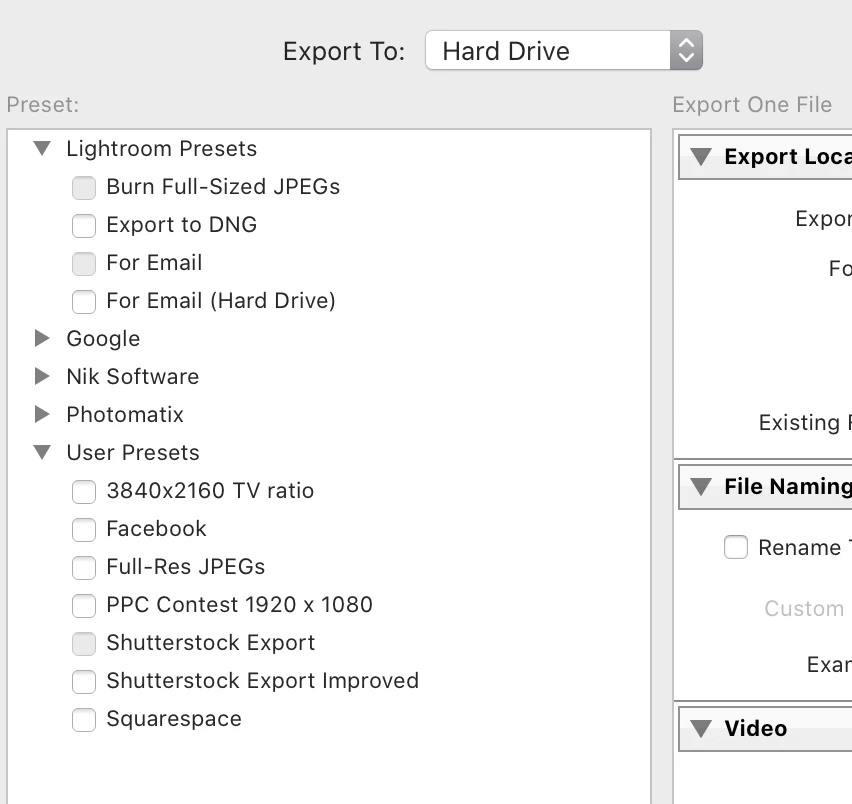
Two Lightroom export Presets are greyed out, and I'm unable to select or deselect either of them.  The Shutterstock export User Present is greyed out, and I canot select or deselect it. (See screenshot.)


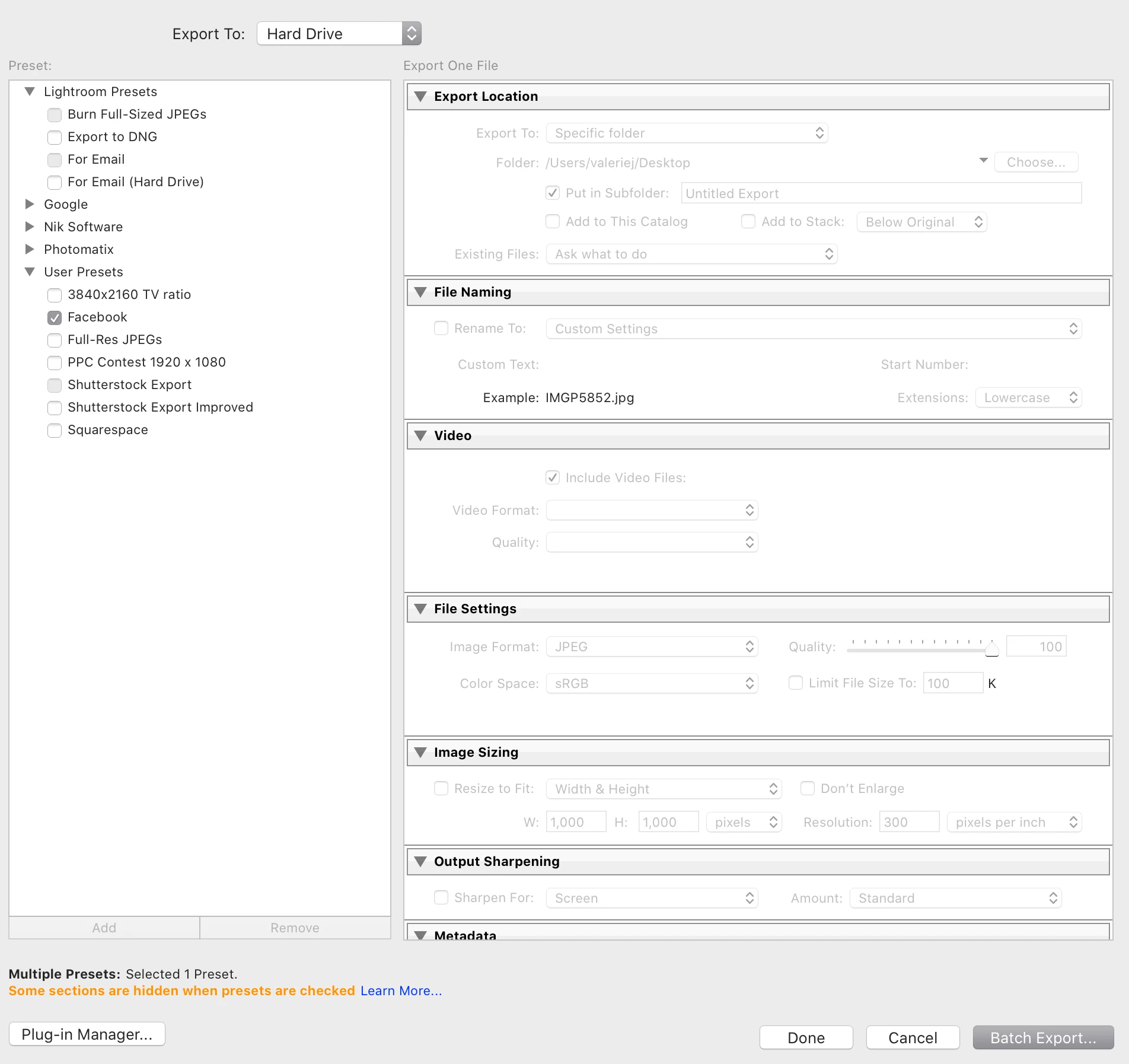
If I select Facebook, for example, it will let me export, but I have only the Batch Export option, (see screen shot), which seems like LrC thinks "Burn Full-Sized JPEGs," "For Email," and Shutterstock Export" should always be selected.  If I select Batch Export (my only choice), only one file is exported--not four.

Thanks in advance!  🙂
このトピックへの返信は締め切られました。
解決に役立った回答 Rob_Cullen

TBMK = To the Best of My Knowledge.

Don't 'Click' by placing a checkmark in any box! (unless you are batching several Presets- where allowed)

Just 'Click' on the Preset NAME only!

[Burn full-sized JPEGs] is for 'Burning' to a CD or DVD!-  In the top [Export To..] box set the destination to [Hard-Drive] then define your folder, etc in the Export dialog.

'Add' your own Presets to the User group. (I have never used the default 'Lightroom Presets'!)


返信数 4

Rob_Cullen
Community Expert
Community Expert
July 9, 2020

FYI:

Batch Multiple Presets was introduced in Classic v9.0 (Read in the Blog)

Export with Multiple Presets   https://blogs.adobe.com/jkost/2019/11/updates-to-lightroom-classic-v9.html

Modifications were added in v9.3

Multi-Preset Batch Export   https://blogs.adobe.com/jkost/2020/06/lightroom-classic-v9-3-raw-defaults-tone-curve-local-hue-editing-batch-export-updates-and-more.html

You are not the first to be confused when a preset is 'ticked' in the Checkbox. This point was often not mentioned in help files!


Regards. My System: Windows-11, Lightroom-Classic 15.0, Photoshop 27.0, ACR 18.0, Lightroom 9.0, Lr-iOS 10.4.0, Bridge 16.0 .
BoKee作成者
Participant
July 10, 2020

Thank you very much for your extra help, and providing links.  Much appreciated.  I skipped a release or two, and need to catch up!! 

Rob_Cullen
Community Expert
Rob_CullenCommunity Expert解決!
Community Expert
July 9, 2020

TBMK = To the Best of My Knowledge.

Don't 'Click' by placing a checkmark in any box! (unless you are batching several Presets- where allowed)

Just 'Click' on the Preset NAME only!

[Burn full-sized JPEGs] is for 'Burning' to a CD or DVD!-  In the top [Export To..] box set the destination to [Hard-Drive] then define your folder, etc in the Export dialog.

'Add' your own Presets to the User group. (I have never used the default 'Lightroom Presets'!)


Regards. My System: Windows-11, Lightroom-Classic 15.0, Photoshop 27.0, ACR 18.0, Lightroom 9.0, Lr-iOS 10.4.0, Bridge 16.0 .
BoKee作成者
Participant
July 9, 2020

Whaaaaaaat!  How could it be that easy?  I used to check the boxes!  And now?  Not unless doing a batch export.  Just check the name.  OK!  Thank you very, very much!

Rob_Cullen
Community Expert
Community Expert
July 8, 2020

TBMK- The 'Greyed out' Presets are ones that cannot be 'Batched'. That means you cannot select them together with other Presets at the same time. But you can still use them 'independently'.

Do NOT place a check mark in a Preset box unless you are choosing multiple (allowed) Presets for a Batch Export. The Checkmark prevents the export options from being editied (greyed out). (Changes in the v9.3 update!)

If you are only using ONE Preset just click on the Name of the Preset.


Regards. My System: Windows-11, Lightroom-Classic 15.0, Photoshop 27.0, ACR 18.0, Lightroom 9.0, Lr-iOS 10.4.0, Bridge 16.0 .
BoKee作成者
Participant
July 9, 2020

Hi Wobert,

Forgive me—I don't know what TBMK means.  🙂

My problem is that I cannot "use them 'independently.'" The greyed-out ones seen in the screen shots are unclickable.  It's as if LrC has the three grey  ones permanently selected.  I can't uncheck OR check them.  They're grey and grey only, not changeable.

For instance, I need to export a Full-Sized JPEG, but can't.  Nothing I do will allow me to select the Burn Full-Sized JPEGs.

This is the case since upgrading to 9.3.  All of my Lightroom Presets and User Presets were working fine prior to the upgrade.

GoldingD
Legend
July 8, 2020

Deleated, was confusing Develop Presets with Export Presets.