
james ca60449927
Known Participant
April 11, 2018
Answered

Merge main catalogs

  • April 11, 2018
  • 1 reply
  • 690 views

When I moved to Lightroom Classic, it started using a new catalog instead of automatically important the old one, and in fact started scanning my SSD for photos. I was really just playing around, so didn't pay much attention--I just kept using the old LR (equivalent to the new "Classic"; not the new cloud-based CC). Now I'd like to move over to Classic and I find myself with two catalogues:
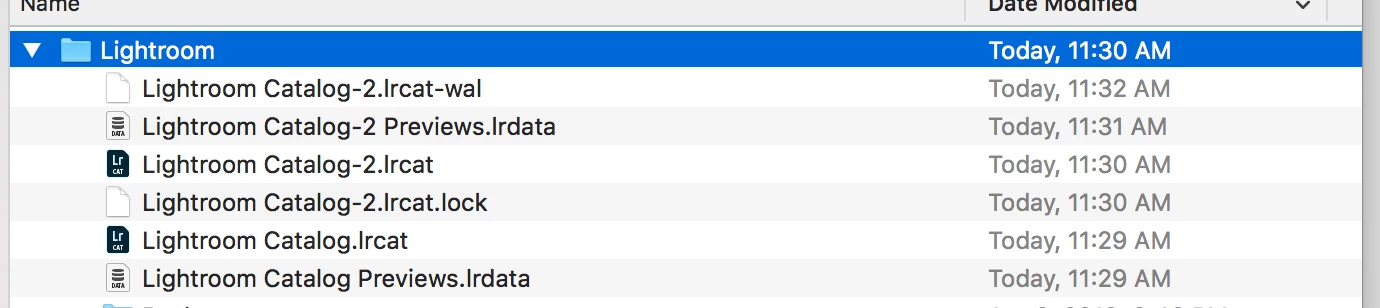
There is some redundancy. Whenever there's redundancy, I'd like to keep the version in the older catalog. What's the best strategy for merging them?

Thanks.

    This topic has been closed for replies.
    Correct answer JohanElzenga

    If you are sure these are not just the old and the new one (the fact that you have previews for both seems to confirm this), then you can do the following. Open one catalog to be your main catalog (the one with -2, for example), and then choose 'File - Import from Another Catalog' and choose the other one. That will merge both catalogs. Lightroom will scan what's in the other catalog, and if there are any differences it will offer you some options, like importing the settings from the other catalog and keeping the settings of the current catalog as a virtual copy.

    1 reply

    JP Hess
    Inspiring
    April 11, 2018

    There really isn't any redundancy that I can see in what you have shown. There are only two catalogs. The one with the -2 appended to the end is the one that was created when you started using Lightroom Classic CC. It had to be upgraded, which involved creating a new copy. All of the other files are associated with the new catalog. The files without the -2 are associated with the older version of Lightroom and can be deleted if you have removed that version and are not using it anymore.

    james ca60449927
    Known Participant
    April 11, 2018

    Sorry, I wasn't quite clear. By redundancy, I meant that there was some overlap in the contents of the two catalogs.

    JohanElzenga
    Community Expert
    JohanElzengaCommunity ExpertCorrect answer
    Community Expert
    April 11, 2018

    If you are sure these are not just the old and the new one (the fact that you have previews for both seems to confirm this), then you can do the following. Open one catalog to be your main catalog (the one with -2, for example), and then choose 'File - Import from Another Catalog' and choose the other one. That will merge both catalogs. Lightroom will scan what's in the other catalog, and if there are any differences it will offer you some options, like importing the settings from the other catalog and keeping the settings of the current catalog as a virtual copy.

    -- Johan W. Elzenga