
Participant
March 8, 2017
Answered

Missing Colour Presets I Lightroom 6

  • March 8, 2017
  • 3 replies
  • 2103 views

I recently upgraded my Lightroom 4 perpetual license to Lightroom 6 via download.  The initial download resulted in Version 6.0 only.  Nevertheless everything seemed intact including all the develop presets (both colour and B&W) included in Lightroom 4.  However, when I updated to Version 6.9 the colour presets disappeared and I can't find them anywhere.  When I go to Preferences, the Lightroom Presets folder within Develop Presets shows empty despite only the Colour Presets being missing in the side panel on Lightroom.  I note that other members of this forum have had similar problems but not quite the same as mine (e.g. all their Develop Presets have disappeared not just Colour Presets).

A solution to my particular problem would be appreciated, noting I'm only semi computer literate.
    This topic has been closed for replies.
    Correct answer MikeG2112

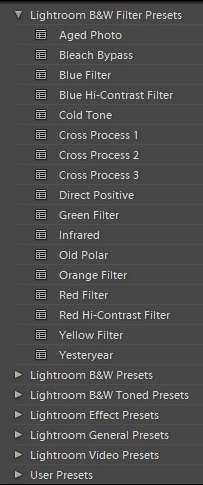
    Adobe CC downloaded a Lightroom update on my PC yesterday (2015.9), and after the upgrade, the "Lightroom Color Presets" dropdown was missing. However, I found all of the built-in Color Presets hiding under the "Lightroom B&W Filter Presets" dropdown, alongside the B&W presets that I've always had. In the screenshot below, anything that doesn't have the word "Filter" in the name is actually a Color Preset which used to be under a separate dropdown. Check to see if you find yours in the same place.

    3 replies

    Participant
    June 13, 2017

    My presets are also missing, but they are not mixed in under any other section as mentioned here. I have also tried the checking and then unhecking the store with catalog option, and nothing changed. All of my presets are gone, and i have been using them in every catalog for years. I don't know where to find them all again, and Adobe seems to only have this forum to get help, so I am hoping someone can help.

    Rob_Cullen
    Community Expert
    Community Expert
    June 13, 2017

    You will find a lot of info at this link that may provide clues- and see the page links at the base of the lenscraft article also.

    https://lenscraft.co.uk/tutorial-organizing-lightroom-presets/

    https://www.lightroomqueen.com/articles-page/lightroom-cc6-default-locations/

    Regards. My System: Windows-11, Lightroom-Classic 15.1.1, Photoshop 27.3.1, ACR 18.1.1, Lightroom 9.0, Lr-iOS 10.4.0, Bridge 16.0.2 .
    Participant
    March 30, 2017

    This is funny, I just realize too, since I used this color preset a lot with my LR Mobile.

    JSJ

    johnrellis
    Legend
    March 30, 2017

    Adobe has acknowledged this bug in 2015.9 / 6.9 and says it will be fixed in an upcoming update: Re: Color presets moved after update

    Bob Somrak
    Legend
    March 8, 2017

    I haven't noticed if I am missing built-in develop presets from the upgrade to 2015.9 as i ignore most of them but this is what I have.  I wish the others would disappear or the user could get rid of them.  I don't want to be forced to have them cluttering up my preset menu.

    M4 Pro Mac Mini. 48GB
    Participant
    March 9, 2017

    Yes, I have the same it's only the Colour Preset which is missing.  I don't use them a great deal myself but they can be useful for a quick and dirty develop.  My main concern is that features disappear without any notice/explanation.  What else has gone that I haven't noticed yet?

    Rob_Cullen
    Community Expert
    Community Expert
    March 9, 2017

    At some time in version upgrades the default 'inbuilt' LR presets provided by Adobe changed from being visible and able to be copied in the Dev Presets folder, to being 'hard-wired' into the software program (and not possible to delete!). It is possible that the Colour Presets disappeared with that change.

    Is it worth experimenting by re-installing Lr4 to see if the missing Colour Presets re-appear, and can be copied and saved with the OS for use with Lr6?

    I still have a list of 27 presets that I do not remember where they came from!

    Regards. My System: Windows-11, Lightroom-Classic 15.1.1, Photoshop 27.3.1, ACR 18.1.1, Lightroom 9.0, Lr-iOS 10.4.0, Bridge 16.0.2 .