

My photos look cooler in temperature on my iPhone than they do on my MacBook Pro
I'm having a very frustrating issue while editing my photos. I'm very particular, and once I get an edit the way I want it to look, I won't settle for anything less. I've finally got a photo the way I want it to look, and I air drop it to my cell phone. However, on my phone, the photo always looks cooler in temperature than it does on my macbook and in lightroom. I just purchased a new Macbook Pro 2020, and I never had this issue on my old 2013 Macbook Pro.
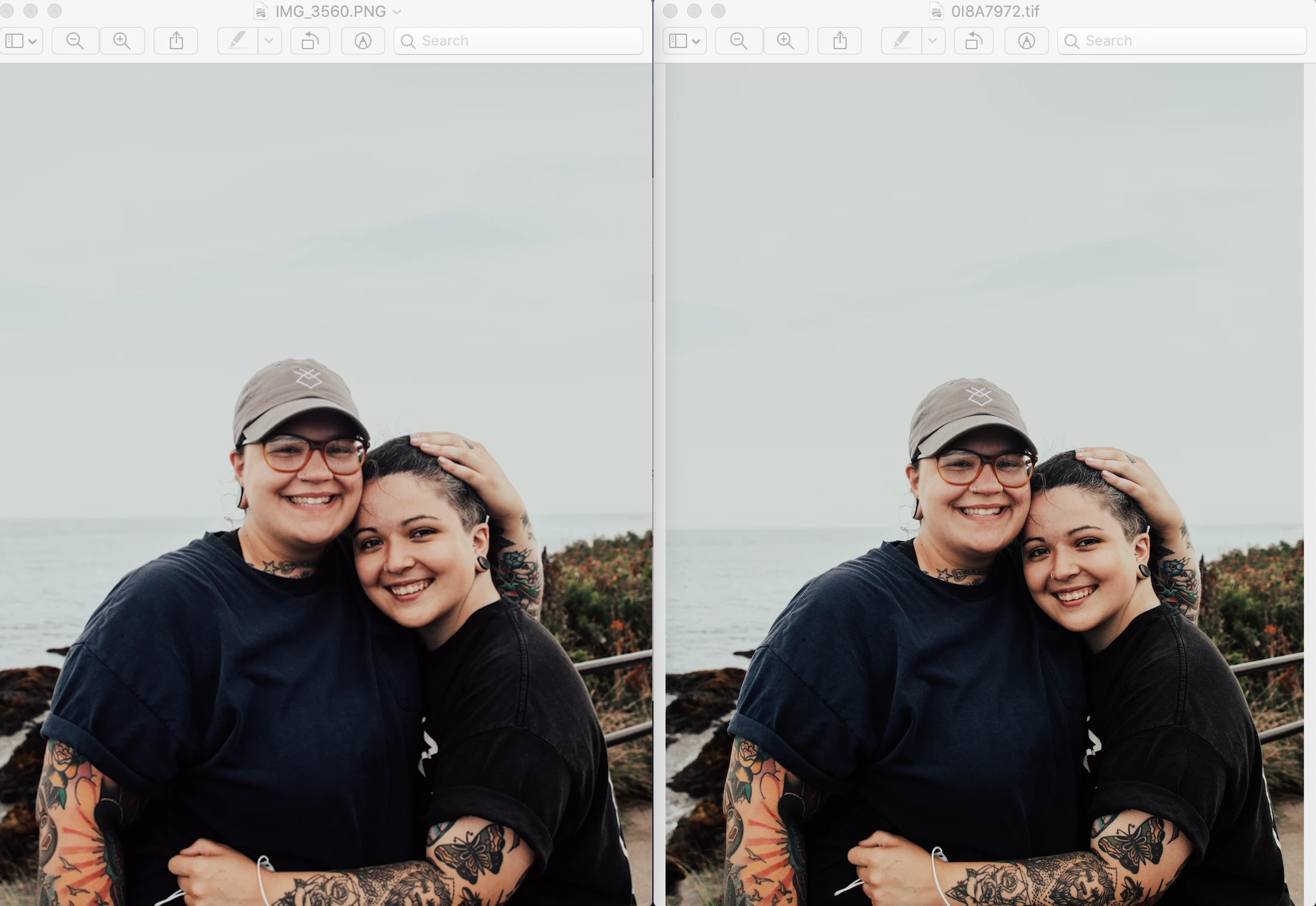
I have ensured that I have changed the color spaces in lightroom to sRGB and even have "convert to sRGB selected. My photos definitely look similar, however they always look the SLIGHTEST bit cooler on my iphone. I have checked the settings in my iphone and they are the standard settings. I'll attach a picture to show what I am seeing.
I even tried to see if maybe my Macbook display was just warmer than my iphone display, so I screen shotted the photo on my iphone, and sent it back to my Macbook via airdrop to see if the photo would look normal again - nope! It still looks cooler!
The photo on the left is a screen shot I took off of my iphone after air dropping the photo to myself. The photo on the right is the way the photo looks in my macbook. The photo on the left (iphone screenshot) is slightly cooler (you can see it best in the sky). Why is this happening?
Thanks in advance!
 AdChoices