
Inspiring
May 15, 2019
Question

Please help me identify my current LR catalog

  • May 15, 2019
  • 7 replies
  • 3107 views

I just had my Windows PC upgraded from Windows 7 to Windows 10.  It was a clean OS install, so I had to re-install all my programs.  My user data was kept intact by the upgrade. 

After re-installing LR Classic CC (version 8.3, the same version that was running prior to the upgrade) I launched the program.  Lightroom told me that it needed to upgrade my catalog.  This didn't make any sense to me, since the catalog should have been compatible, but I clicked OK. Lightroom created a new catalog called Lightroom Catalog-3.lrcat.  When LR launched after the upgrade, I could see that it must have used an old catalog, rather than finding the latest one.

So obviously, I need to open a different catalog.  The trouble is that there are a bunch of catalogs in the Pictures\Lightroom\ folder (see below) and I don't know which one to open! 
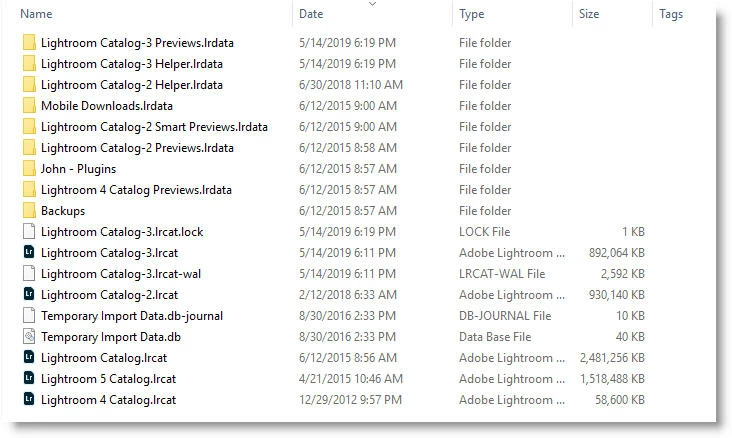
FYI Lightroom Catalog-3.lrcat was open when I made the screenshot above.

Can you help me?

I'm also troubled that Lightroom chose the wrong catalog.  Is this indicative of a deeper problem?

This topic has been closed for replies.

7 replies

GoldingD
Legend
May 15, 2019

Do not know why this got overlooked by me, but a clean install of the OS, so the registry had no entry’s for Lightroom (and other programs).  When you reinstalled Lightroom, all Lightroom may have had to figure out latest catalog was what was in your Pictures folder (That you copied from a backup or other copy?). Although, in that scenario , would it have just created a new catalog?/

Hope Adobe can clear up.

J IsnerAuthor
Inspiring
May 15, 2019

If Lightroom determined the most recent catalog by looking in the registry, you'd need administrator permission to run the program.  So it must be using a more down-to-earth method to determine "most recent."

My user data (including Pictures) lives on a separate drive from the OS, so it was not affected by the upgrade.

DdeGannes
Community Expert
Community Expert
May 15, 2019

My take would be that the most recent, would be the Catalog that you were using when you exited working in Lightroom. My experience has been that Lightroom boots where you were when you shut down.

If you have a new installation then there will be no recent.

Regards, Denis: iMac 27” mid-2015, macOS 11.7.10 Big Sur; 2TB SSD, 24 GB Ram, GPU 2 GB; LrC 12.5,; Lr 6.5, PS 24.7,; ACR 15.5,; (also Laptop Win 11, ver 24H2, LrC 15.0.1, PS 27.0; ) Camera Oly OM-D E-M1.
J IsnerAuthor
Inspiring
May 15, 2019

As I have said, the problem is not distinguishing catalogs from other kinds of files.  That's easy.  It's deciding WHICH catalog to open when there's more than one.

By the way, the screenshot below shows the Lightroom default.  It is the setting in effect when I first launched Lightroom after the reinstallation.  So Lightroom THOUGHT it was opening the most recent catalog, but in fact it opened a catalog more than a year old! I'll be surprised if this isn't a Lightroom bug.

GoldingD
Legend
May 15, 2019

And to repeat, you might just to have to open up each and everyone to look at them and see whats what.

J IsnerAuthor
Inspiring
May 15, 2019

Yep, that's definitely what I'll end up doing.  But I'd like to understand why Lightroom opened an old catalog when it should have opened the "most recent" catalog.  Is "most recent" determined using timestamps? Or by looking at a magic cookie in the lrcat file? Or some other obscure/undocumented method?  Maybe I'll start another discussion "How does Lightroom determine which catalog is the most recent."

GoldingD
Legend
May 15, 2019

Well as you probably know this is an internet forum**. This is not a support page. Actual Adobe employees rarely interact on this site. To actually contact someone at Adobe read Ref (1). Another way to get Adobe’s attention is to place your issue at REF (2)

REF (1) https://forums.adobe.com/thread/2105584

REF (2) https://feedback.photoshop.com/photoshop_family/categories/photoshop_family_photoshop_lightroom

** https://en.wikipedia.org/wiki/Internet_forum

That is you might want to post your. problem and inquiry over at the page the Adobe techs watch.

GoldingD
Legend
May 15, 2019

Lightroom catalogs have the file extension .lrcat

You can use your Windows File Explorer to search for all files ending with .lrcat

GoldingD
Legend
May 15, 2019

OK, on a PC.

One way to open Lightroom as so it will inquire about what catalog to open, and hopefully provide you with a list of recent ones is to bring up Preferences. And under General change the entry for default catalog to Prompt....

J IsnerAuthor
Inspiring
May 15, 2019

Unfortunately I hadn't configured my preferences yet. The setting I normally use is open with the catalog that was last open, since I only have a single "master" catalog on my desktop PC.  But even if Lightroom had asked, how would I know which catalog to choose?  I don't know Lightroom's catalog naming convention, and as the screenshot shows, the timestamps on the lrcat files are questionable.

GoldingD
Legend
May 15, 2019

Alternatively hold down the ALT key and clcik on the Lightroom shortcut.

Should get a screen like this (notice that they all end in  .lrcat)

GoldingD
Legend
May 15, 2019

I will have to get off my rear end and turn on a PC as opposed to this iPad. Trying to remember method of having Lightroom start with an inquiry screen that will present you with a list of recently opened catalogs (that may or may not be complete at such an upgrade)

GoldingD
Legend
May 15, 2019

first up, as you probably know, in that screenshot only three of those files are catalogs, those ending with lrcat . Not the lrcat.lock, not the lrcat-was. (both of which should get automatically deleted when you close Lightroom)

second up, as you stated Lightroom was running, and as implied “Lightroom Catalog-3’ was opened a lock file exists, I see just one (as would be normal)

Now, when you get a Lightroom update, especially since Creative Cloud, Lightroom updates any catalog you open with the new version. It names the new catalog by adding a dash and a sequence number. Heck. so the following are probably various updates of an original catalog

Lightroom Catalog.lrcat

Lightroom Catalog-2.lrcat

Lightroom Catalog-3.lrcat

Now I notice two other catalogs.

Lightroom 5 Catalog.lrcat

Lightroom 4 Catalog.lrcar

probably relates to separate catalogs created when you got LR v5 and v4?

As to what catalog was the one you were working on before the upgrade, when was that? And actually, when was it created? I suspect the file dates for the catalogs reflect either the creation date, or when the were last copied, if ever, not a modify date, makes things harder. You may need to just look at each one

GoldingD
Legend
May 15, 2019

Another issue, maybe a clue. Unless younintentially delete them to save space, the folders with the library previews should be in the same folder as the catalog. Now, you could have deleted them, no problem with that, Lightroom will just recreate them when you open the catalog.

But, I see lrdata files (especially the previews.lrdata files) for just

Lightroom Catalog-3

Lightroom Catalog-2

Lightroom 4 Catalog

none for

Lightroom 5 Catalog

and, whatever the helper files do, just for

Lightroom Catalog-3

Lightroom Catalog-2

Sure looks like Lightroom Catalog-2 was what was being worked on before.

Are you sure that no other catalogs exist elsewhere?