
Known Participant
December 25, 2020
Question

Printing in Lightroom Classic vs. Photoshop -- Same file, different results

  • December 25, 2020
  • 7 replies
  • 1656 views

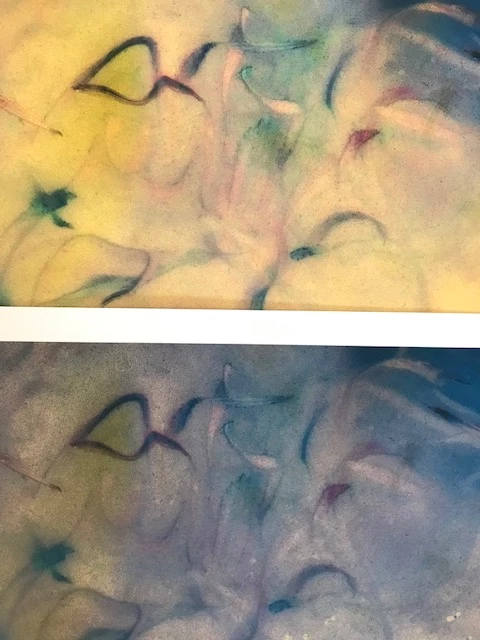
This is an occasional issue.  Sometimes when I print the same file from Lightroom and then Photoshop I do not get the same results. The Lightroom version is missing some of the colors.  In both cases, the software, not the printer, is controlling the process.  Here's a sample.  The upper image from Photoshop is good, the lower from Lightroom is missing the yellow.
This topic has been closed for replies.

7 replies

F. McLion
Community Expert
Community Expert
December 26, 2020
--- Got your issue resolved? Please label the response as 'Correct Answer' to help your fellow community members find a solution to similar problems. ---
Known Participant
December 26, 2020

thank you.  This answers a question I had about which paper profile(s) would guide the printing.

Ian Lyons
Community Expert
Community Expert
December 25, 2020

Make sure that you have also configured 'Print Settings' corrrectly. The button is at bottom of left side panel track. Below screenshot is an example that may help

KR Seals
Community Expert
Community Expert
December 25, 2020

@Just Shoot Me, my experience in printing from LrC has always been excellent. I have only printed with the Epson P800 and it's predecessor, so my experience is limited to those two models. I have printed for gallery display and customer delivery and never had any kind of issue.

I did have a close friend who had continuing issues printing in LrC when he switched to Canon printers from Epson.

Ken Seals - Nikon Z 9, Z 8, 14mm-800mm. Computer Win 11 Pro, I7-14700K, 64GB, RTX3070TI. Travel machine: 2021 MacBook Pro M1 MAX 64GB. All Adobe apps.
Just Shoot Me
Legend
December 25, 2020

In my experience I have never gotten Good results printing to any printer from LrC and or any other traditional versions of Lr.


So I have always used Photoshop to do whatever image printing I needed to do.


Known Participant
December 25, 2020

I've had fairly good success with Lightroom and the ability to easily set up templates and create collections of photographs using the same set up are very helpful for what I am doing.

F. McLion
Community Expert
Community Expert
December 25, 2020
--- Got your issue resolved? Please label the response as 'Correct Answer' to help your fellow community members find a solution to similar problems. ---
Known Participant
December 25, 2020

I wish I'd seen these when I first started using a color printer.  But, in any case, I'm at this point I'm using identical settings in Photoshop and Lightroom and getting very different results -- sometimes. Thank you.

F. McLion
Community Expert
Community Expert
December 25, 2020

You need to select the correct paper profile in LR if it has to take control.

ICC is either in Lr or in the printer driver.

Please post a screen capture of the print settings in Lr just before you print.

Also, if you let Lr manage the colors you need to turn off everything releated in the printer driver. Your writing of setting in the driver with intent tells me that this is not the case.

--- Got your issue resolved? Please label the response as 'Correct Answer' to help your fellow community members find a solution to similar problems. ---
Known Participant
December 25, 2020

You are right.  I have chosen a paper profile: Canon Pro-100 [MP] Matte 2/3.  Here's the screen shot

The Intent here is set to Relative, but I get the same results with Perceptual.

F. McLion
Community Expert
Community Expert
December 25, 2020

Are you using the same paper profile and the same settings (color intent, ...)?

Also, the printer driver settings are exactly same?

--- Got your issue resolved? Please label the response as 'Correct Answer' to help your fellow community members find a solution to similar problems. ---
Known Participant
December 25, 2020

Yes, everything is the same in the driver: Photo printing, Matte Photo Paper*, Standard Quality, Matching = none, intent = Perceptual. Changing the intent in either program does not change the results. 

*Because the software controls the printing, there are no ICC profiles involved (if I understand the process correctly).