
jean christopheb63728798
Participant
October 1, 2018
Answered

Problème clic droit avec stylet

  • October 1, 2018
  • 1 reply
  • 760 views

Bonjour à tous

Suite au fait que je suis tétraplégique, je ne peux pas utiliser de souris. J'utilise au quotidien le stylet/pen fournit avec ma Microsoft surface pro 4.

Habituellement pour effectuer un clic droit, j'appuie quelques secondes ou ms sur l'icône et ça fonctionne: photoshop et première inclus.

Sauf que cela ne fonctione pas sur lightroom.

Si vous avez une idée, je suis preneur.

Merci par avance
    This topic has been closed for replies.
    Correct answer Akash Sharma

    I don't think that the right click can be changed within the On-screen keyboard.

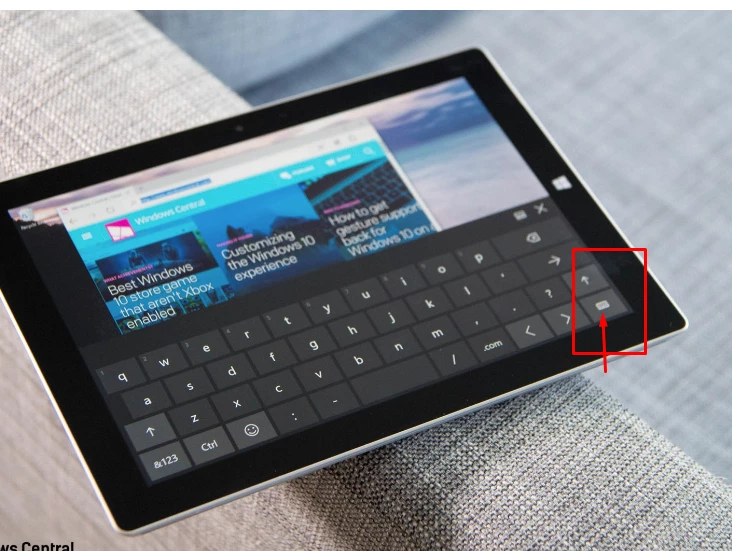
    However, you may use the "right-click" key on the On-screen keyboard to achieve this:

    ~Akash

    1 reply

    Akash Sharma
    Legend
    October 1, 2018

    Hi JeanChristopheb,

    Sorry that you caanot use your mouse while working in Lightroom.

    As I understand, you can use your tablet pen/stylus with Photoshop but it doesn't work with Lightroom as expected along with the mouse.

    • Which version of Lightroom and Photoshop are you using?
    • Which tablet device are you using? Are the device drivers updated to the latest version?

    Regards,

    Akash

    jean christopheb63728798
    Participant
    October 2, 2018

    Hi

    thanks for your response.

    i use lightroom cc 2018 and microsoft surface pro  4 without a physical keyboard but visual keyboard directly on the screen.

    Do you think i can change the right click by just one touch on the keyboard?

    thanks a lot

    regards

    Akash Sharma
    Akash SharmaCorrect answer
    Legend
    October 2, 2018

    I don't think that the right click can be changed within the On-screen keyboard.

    However, you may use the "right-click" key on the On-screen keyboard to achieve this:

    ~Akash