Participant
October 23, 2018
Answered

Seemingly random red blocks appear on images exported through Lightroom

  • October 23, 2018
  • 6 replies
  • 5162 views

Hello.

I have an issue with red blocks/artifacts appearing on images exported with Lightroom. I noticed them last week but they dissapeared when i zoomed in and out or switched between modules, so i thought nothing of it, certainly didn't expect them to show up on exported images. I now exported over 200 images I've taken at work to be used as images on ID cards, and browsing through the images i noticed these squares on 4 different images, on 4 different areas. Anyone have a clue what this could be?

I export JPGs, 100 quality, res 240
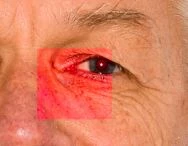
This topic has been closed for replies.
Correct answer AxelMatt

Just an idea. Please try to deactivate the GPU support -> Adobe Lightroom GPU Troubleshooting and FAQ 

and try to reset the Lightroom preferences -> https://www.lightroomqueen.com/how-do-i-reset-lightrooms-preferences/ .

If this doesn't help please post more informations about your system.

Which version of Lightroom do you use?

Which operating system do you use?

6 replies

Participant
December 7, 2018

Adding my own copy of the problem and looking forward to a solution now that it has been identified by Adobe.

MacOS Mojave, Lightroom Classic (uptodate)

johnrellis
Legend
December 7, 2018

Make sure you visit the bug report linked above and click Me Too and Follow in the upper-right corner. This will notify you when the bug is fixed.

Participant
November 22, 2018

I'm the Commercial Services Photographer at the British Library in London and I have this issue too since upgrading to CC 2019. Mac Pro 2013 running Mojave. Seems to only be in Bridge, disappears on 100% zoom and haven't noticed on any export (TIFF & JPEG). My workflow here is Capture One Pro 11 tethered then output from C1 as TIFF and further editing/viewing in ACR and Bridge.

johnrellis
Legend
November 22, 2018

Adobe has reproduced the problem with red and blue rectangular artifacts appearing on images in LR: Lightroom Classic: Red and blue artifacts randomly appear on previews and exported photos | Photoshop Family Customer Co… If you're experiencing this in LR, please add details of your issue to the bug report, and click Me Too and Follow in the upper-right corner. This will notify you when the bug's status changes.

Participant
November 17, 2018

Same issue here. About 1 in 60 images in Bridge shows the weird color box.  Bridge version 8.1.0.383 x64.

The blocks only show up in bridge. No other program displays the box in the same image.  All bridge folders display the issue, even images created by previous versions of Lightroom, going back to 2013.

In the below image, notice the blue box which shows up as red on the man's chin. This jpg was created by Lightroom about 3 weeks ago.


In the below image, notice the red box at the bottom center of the image. This jpg was created by Lightroom in 2013. The image did not display this way previously.

Participant
November 16, 2018

I have seen this same issue occur in LR CC on iPad and has happened on my iMac. Luckily the "blocks" sort of come and go and were not in delivered images. I thought it might be a fuji issue. Appears not.

AxelMatt
Community Expert
AxelMattCommunity ExpertCorrect answer
Community Expert
October 23, 2018

Just an idea. Please try to deactivate the GPU support -> Adobe Lightroom GPU Troubleshooting and FAQ 

and try to reset the Lightroom preferences -> https://www.lightroomqueen.com/how-do-i-reset-lightrooms-preferences/ .

If this doesn't help please post more informations about your system.

Which version of Lightroom do you use?

Which operating system do you use?

My System: Intel i7-8700K - 64GB RAM - NVidia Geforce RTX 3060 - Windows 11 Pro 25H2 -- LR-Classic 15 - Photoshop 27 - Nik Collection 8 - PureRAW 5 - Topaz Photo
Participant
October 23, 2018

Disabling GPU acceleration seems so have fixed the issue in Lightroom. I'm not noticing any more red blocks on images.

For the record I'm using the newest version of LR (8.0)
Windows 10 Enterprise on a HP Elitebook G5 840

I will update the thread with your answer as the correct answer later if i don't notice any more red blocks.

Participant
November 5, 2018

Experiencing similar/same issue. Random images after editing in PS will appear in LR to have blocks (usually red, sometimes other colors) as though the file is corrupted. I can re-open in Photoshop and the file is just fine, however when I save and revisit in the LR catalog, the boxes re-appear. Figured it might just be a display issue, but exporting a jpg and blocks remain!

Attempted to uninstall and reinstall, and also toggled off GPU acceleration.  Problem persists.

Running LR Classic 2018 (up to date as of the time of this post) on 2011 imac High Sierra (can't update this old imac to mojave - i hope this isn't the solution).

Example

For better visibility:

Same file opened in Photoshop:

Just Shoot Me
Legend
October 23, 2018

Please post a screen shot of the complete LR develop module window with that image zoomed to 1:1 and showing that area.

I suspect you have corrupted original images as there is no feature, option, in LR to place a square box like that in an image