


Known Participant
February 9, 2021
Question

Support for seeing long file names and titles

  • February 9, 2021
  • 3 replies
  • 1385 views

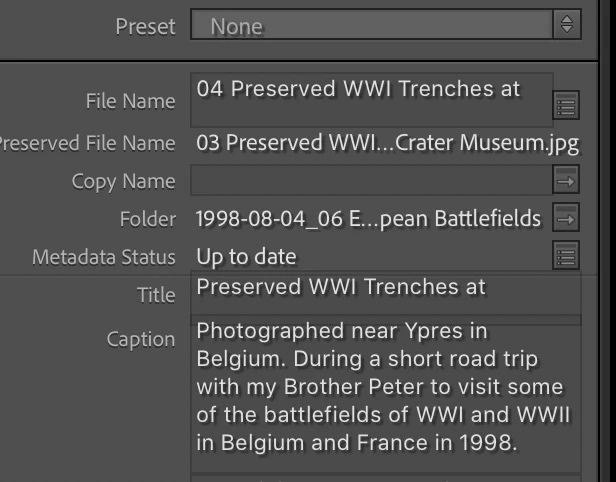
Currently in the latest version of Lightroom Classic (and all earlier versions) the fields for seeing and editing the File Name and Title are hard fixed at one line of around 30 characters. This is crazy with modern operating systems that allow for loooonnnggg file names, and for people who use long Titles. Can Adobe please allow for the entry fields to be bigger or auto adjustable in size. By comparison, the fixed Keyword Tags displayed content is massive, and the Caption field auto resizes to suit content - which is precisely what File Name and Title should do as well.  Thank you.  If no Adobe person will ever see this, where do I submit corrections for bad interface design?

Not everyone has fond memories of ye olde 8.3    XXXXXXXX.XXX   fixed file name sizes...
 

This topic has been closed for replies.

3 replies

johnrellis
Legend
February 10, 2021

Here's the bug report in the official Adobe feedback forum, where Adobe wants all product feedback:

https://feedback.photoshop.com/conversations/lightroom-classic/lightroom-classic-truncated-fields-and-font-glitches-in-metadata-panel/5f9a33ec49d3ca3d56ba9c3f?commentId=602430f7fd06b771a28a897d 


Problems have been reported for at least the last three years, and they're still occurring in LR 10.1.1 on both Windows and Mac. Please add details of your issue to the bug report, and be sure to click Like and Follow at the bottom of the first post. That will make it a little more likely that Adobe will prioritize a fix, and you'll be notified when the bug's status changes.


[Use the blue reply button under the first post to ensure replies sort properly.]

Jim Wilde
Community Expert
Community Expert
February 9, 2021

Both the File-name and Title fields DO auto-resize to accomdate entries greater than a single line (and have done in previous versions as well). Here's a screenshot from my Windows10 system:


And here's a screenshot from LrC taken on my Mac:


The reason I say "almost works as expected" on my Mac is that there seems to be a display bug which causes the last line of a multi-line entry to be hidden, but only after entering the text and then moving to another image. On return to the image the truncation occurs, as in this screenshot:


That truncation doesn't happen on my Win10 system, so I guess it's a Mac-only bug. 

Known Participant
February 9, 2021

Thanks for confirming that there IS a bug in the Mac version.  It must be some code that accidentally got mangled or commented out in an update a while back.  I wish they would ask me to Beta Test.  I find these sorts of bugs all the time in just about all the software I use...

Tony_See
Inspiring
February 9, 2021