
Known Participant
March 10, 2021
Answered

Toggle between 5x5 and 9x9 grid

  • March 10, 2021
  • 2 replies
  • 575 views

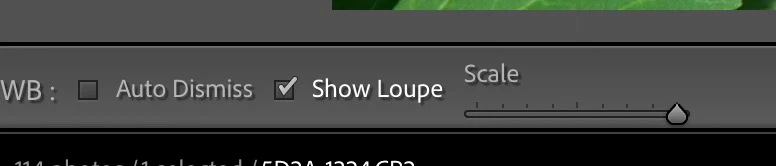
Years ago I recall the eyedropper tool had a 9x9 grid. Recently, in LR Classic, every time I used the eyedropper tool, it was a 5x5 grid. I searched in vain how to switch it to 9x9. I searched online, and it seemed on forums that it is not possible anymore. Instead, there's discussion about how the colors used depend on the zoom level yet always displaying in a 5x5 grid.

Well, it must be possible to switch to a 9x9 grid, because that's what is currently being used on my computer. I didn't do anything on purpose to switch it to 9x9, but I must have done something. What was it? If it reverts to 5x5 again, I'd like to switch it back to 9x9.
This topic has been closed for replies.
Correct answer Bob Somrak

Use the Scale slider on the toolbar or use the mouse roller while the EyeDropper is active.


2 replies

Todd Shaner
Legend
March 11, 2021

The only other option is to switch to Lab Color Values by right-clicking inside the Histogram.

Bob Somrak
Bob SomrakCorrect answer
Legend
March 10, 2021

Use the Scale slider on the toolbar or use the mouse roller while the EyeDropper is active.


M4 Pro Mac Mini. 48GB
Known Participant
March 10, 2021

Thanks. I have a love/hate relationship with features that are apparent only in certain states. 🙂

Known Participant
March 10, 2021

Is it possible to switch from RGB to some other model, like HSV on the loupe that's shown?