
Answered
Where is the Adobe Lightroom CC Adobe Stock Plugin?
I don't appear to have the Adobe Stock plugin in the Publish Services list? Where can I find it and install it?
Thanks

I don't appear to have the Adobe Stock plugin in the Publish Services list? Where can I find it and install it?
Thanks
Hi, thanks
Lightroom version: CC 2015.0.1 [ 1018573 ]
License: Creative Cloud
Operating system: Mac OS 10
Version: 10.12 [2]
Application architecture: x64
But ... No sign of the plugin?
Assuming it's called "Adobe Stock"
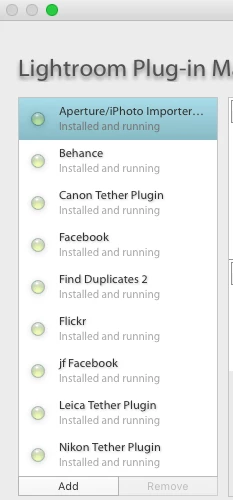
There's your answer - you have an old version of Lightroom CC 2015.0.1. For some reason the Creative Cloud app isn't detecting you need to update it.
I think the easiest way to fix this is to uninstall Lightroom from using the Creative Cloud app, then install it again.
Already have an account? Login
Enter your E-mail address. We'll send you an e-mail with instructions to reset your password.
 AdChoices