mikejlkemp
Known Participant
May 17, 2022
Answered

Find and Replace function for Bridge

  • May 17, 2022
  • 3 replies
  • 8152 views

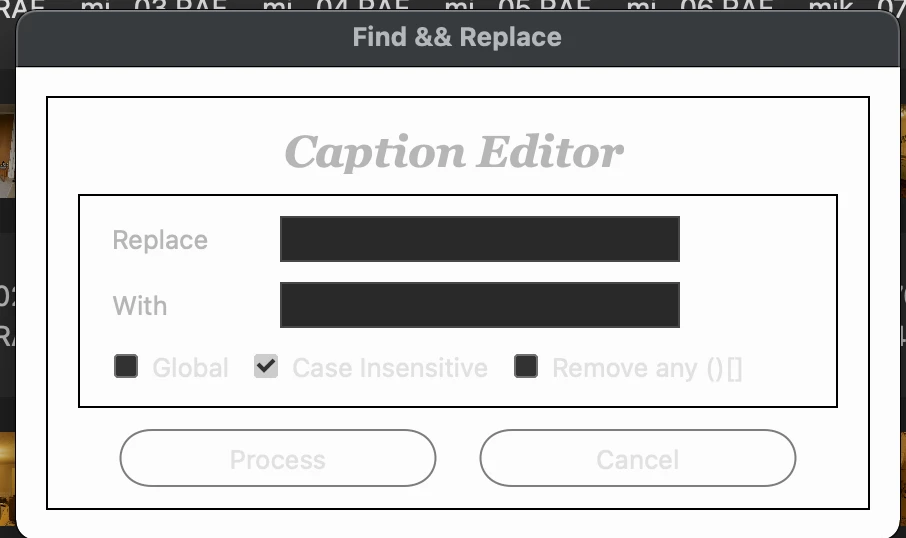
Hi there. I used to have this incredible Find and Replace function for Bridge. It meant I could strip out a given part of a caption in the description field and replace it. I used it to strip out credit information. It used to look like this. I recently had to wipe and reinstall my Mac and I have lost it. Does anyone know where I can get this and how to load it back into Bridge? Thank you!

This topic has been closed for replies.
Correct answer gregreser
Looking at Paul Riggott's original Find Replace In Description script, I noticed that it runs this command when it loads: app.document.chooseMenuItem("PurgeCacheForSelected");
 
I'm guessing that there was a problem with metadata edits not always displaying and that purging the cache solved that. Ineed, I experienced the same blank Description as @mikejlkemp after running Find Replace In Description. I then manually purged the cache and the edited Description displayed.
 
Riggott's script used a simple XMP write method:  md.description =  . It might be that this does not work well in Bridge 2022. I changed the script to use the xmp.serialize method and that seems to work better.


#target bridge
if( BridgeTalk.appName == "bridge" ) { 
ReplaceDescription = new MenuElement("command", "Find and Replace Description/Caption", "at the end of tools");
}
 // Load the XMP Script library
if( !xmpLib){
	if( Folder.fs == "Windows" ){
		var pathToLib = Folder.startup.fsName + "/AdobeXMPScript.dll";
	}
	else{
		var pathToLib = Folder.startup.fsName + "/AdobeXMPScript.framework";
	}
	var libfile = new File( pathToLib );
	var xmpLib = new ExternalObject("lib:" + pathToLib );
}
ReplaceDescription.onSelect = function () { 
var win = new Window( 'dialog', 'Find & Replace' ); 
//g = win.graphics;
//var myBrush = g.newBrush(g.BrushType.SOLID_COLOR, [0.99, 0.99, 0.99, 1]);
//g.backgroundColor = myBrush;
win.orientation='column';
win.p1= win.add("panel", undefined, undefined, {borderStyle:"black"}); 
win.p1.preferredSize=[380,100];
win.g1 = win.p1.add('group');
win.g1.orientation = "row";
win.title = win.g1.add('statictext',undefined,'Description/Caption Editor');
win.title.alignment="fill";
var g = win.title.graphics;
g.font = ScriptUI.newFont("Georgia","BOLDITALIC",22);
win.p6= win.p1.add("panel", undefined, undefined, {borderStyle:"black"}); //Replace
win.p6.preferredSize=[380,100];
win.g600 =win.p6.add('group');
win.g600.orientation = "row";
win.g600.alignment='fill';
win.g600.st1 = win.g600.add('statictext',undefined,'Replace');
win.g600.st1.preferredSize=[75,20];
win.g600.et1 = win.g600.add('edittext');
win.g600.et1.preferredSize=[200,20];
win.g610 =win.p6.add('group');
win.g610.orientation = "row";
win.g610.alignment='fill';
win.g610.st1 = win.g610.add('statictext',undefined,'With');
win.g610.st1.helpTip="Leave this field blank if you want to remove the characters";
win.g610.st1.preferredSize=[75,20];
win.g610.et1 = win.g610.add('edittext');
win.g610.et1.preferredSize=[200,20];
win.g620 =win.p6.add('group');
win.g620.orientation = "row";
win.g620.alignment='fill';
win.g620.cb1 = win.g620.add('checkbox',undefined,'Global');
win.g620.cb1.helpTip="Replace all occurrences of";
win.g620.cb2 = win.g620.add('checkbox',undefined,'Case Insensitive');
win.g620.cb2.value=true;
win.g620.cb3 = win.g620.add('checkbox',undefined,'Remove any ()[]');
win.g620.cb3.value=false;
win.g1000 =win.p1.add('group');
win.g1000.orientation = "row";
win.g1000.alignment='center';
win.g1000.bu1 = win.g1000.add('button',undefined,'Process');
win.g1000.bu1.preferredSize=[170,30];
win.g1000.bu2 = win.g1000.add('button',undefined,'Cancel');
win.g1000.bu2.preferredSize=[170,30];
win.g1000.bu1.onClick=function(){
if(win.g600.et1.text == ''){
    alert("No replace value has been entered!");
    return;
    }
 win.close(0);
var sels = app.document.selections;
for(var a in sels){
var thumb = sels[a];
// Get the metadata object 
md = thumb.synchronousMetadata;
    // Get the XMP packet as a string and create the XMPMeta object
    var xmp = new XMPMeta(md.serialize());

if(win.g620.cb1.value && !win.g620.cb2.value) var patt = new RegExp (win.g600.et1.text.toString(),"g");
if(!win.g620.cb1.value && win.g620.cb2.value) var patt = new RegExp (win.g600.et1.text.toString(),"i");
if(win.g620.cb1.value && win.g620.cb2.value) var patt = new RegExp (win.g600.et1.text.toString(),"gi");
if(!win.g620.cb1.value && !win.g620.cb2.value) var patt = new RegExp (win.g600.et1.text.toString());

        // Read existing dc:description property
        var Caption = xmp.getArrayItem(XMPConst.NS_DC,"description", 1);
        // Change existing dc:description property based on user input
        var result=patt.test(Caption.toString());
        if(result == true){
            var newCaption = Caption.toString().replace(patt,win.g610.et1.text.toString());
            if(win.g620.cb3.value)  newCaption = newCaption.replace(/["'\(\)]/g, "");
            }
		// Delete the dc:description property
		xmp.deleteProperty(XMPConst.NS_DC, "description");	
		// Populate the new dc:description property and set lang to x-default
		xmp.appendArrayItem(XMPConst.NS_DC, "description", newCaption, 0, XMPConst.ALIAS_TO_ALT_TEXT);
		xmp.setQualifier(XMPConst.NS_DC, "description[1]", "http://www.w3.org/XML/1998/namespace", "lang", "x-default");
        
/*
    // Paul Riggott's original write method
md.namespace =  "http://purl.org/dc/elements/1.1/";
var Caption = md.description ? md.description[0] : "";
if(Caption == "") continue;
var result=patt.test(Caption.toString());
if(result == true){
    var newCaption = Caption.replace(patt,win.g610.et1.text.toString());
    if(win.g620.cb3.value)  newCaption = newCaption.replace(/["'\(\)]/g, "");
    md.description='';
    md.description = newCaption;
        }
 */
 	// Write the packet back to the selected file
	var updatedPacket = xmp.serialize(XMPConst.SERIALIZE_OMIT_PACKET_WRAPPER | XMPConst.SERIALIZE_USE_COMPACT_FORMAT);
	thumb.metadata = new Metadata(updatedPacket);
    }
}
win.show();
//app.document.chooseMenuItem("PurgeCacheForSelected");
};




3 replies

PECourtejoie
Community Expert
Community Expert
October 6, 2022

I wanted to thank you all scripters for the great work you do for the community!

Stephen Marsh
Community Expert
Community Expert
May 21, 2022

OK, my MacBook is back! @mikejlkemp it looks like there may be a solution offered by @gregreser ? Have you tested it yet? If it works, please mark his reply as the correct answer. If you need further assistance, please let the forum know.

mikejlkemp
Known Participant
May 21, 2022

Hi Stephen, good news about your Macbook! Afraid the solution isn't quite there, although great of @gregreser to help. This is what it is doing:


When you use the script on one caption, the caption disappears completely, but then if you navigate away to another program and go back, the caption comes back, minus the part chosen to remove.


If you then do more than one picture, again the captions completely disappear (which is a bit worrying at the time) but then if you navigate away as previously, the caption is still gone. But if you quite bridge, and restart, the captions come back, minus their removed parts.


So, it's a bit clunky and doesn't quite instill much confidence. So need somehow to get this working without having to quit and restart Bridge. 


Cheers,


Mike

gregreser
Legend
April 13, 2023

@Shlomit Heymann I can help you with this. I'll look at the script today and see if I can find the problem.


@Shlomit Heymann I think I have fixed the problem. Your find/replace examples work now. I added a feature to show an alert when the process is complete and how many files were changed. Give this version a try on a small group of test files.

#target bridge

/*
Terms and Conditions of Use:
MIT License

Permission is hereby granted, free of charge, to any person obtaining a copy
of this software and associated documentation files (the "Software"), to deal
in the Software without restriction, including without limitation the rights
to use, copy, modify, merge, publish, distribute, sublicense, and/or sell
copies of the Software, and to permit persons to whom the Software is
furnished to do so, subject to the following conditions:

The above copyright notice and this permission notice shall be included in all
copies or substantial portions of the Software.

THE SOFTWARE IS PROVIDED "AS IS", WITHOUT WARRANTY OF ANY KIND, EXPRESS OR
IMPLIED, INCLUDING BUT NOT LIMITED TO THE WARRANTIES OF MERCHANTABILITY,
FITNESS FOR A PARTICULAR PURPOSE AND NONINFRINGEMENT. IN NO EVENT SHALL THE
AUTHORS OR COPYRIGHT HOLDERS BE LIABLE FOR ANY CLAIM, DAMAGES OR OTHER
LIABILITY, WHETHER IN AN ACTION OF CONTRACT, TORT OR OTHERWISE, ARISING OUT OF OR IN CONNECTION WITH THE SOFTWARE OR THE USE OR OTHER DEALINGS IN THE
SOFTWARE.
*/

/*
Adapted from "Find Replace In Description.jsx" by Paul Riggott

version: 2023-04-13
    - only delete existing Caption/Description if Replace value is found
    - added No file(s) selected. message;  added results Alert
    - added var replaceInputEscaped to escape special characters so they are treated as strings in regex
*/

if( BridgeTalk.appName == "bridge" ) { 
    ReplaceDescription = new MenuElement("command", "Find and Replace Description/Caption", "at the end of tools");
}
 // Load the XMP Script library
if( !xmpLib){
	if( Folder.fs == "Windows" ){
		var pathToLib = Folder.startup.fsName + "/AdobeXMPScript.dll";
	}
	else{
		var pathToLib = Folder.startup.fsName + "/AdobeXMPScript.framework";
	}
	var libfile = new File( pathToLib );
	var xmpLib = new ExternalObject("lib:" + pathToLib );
}

ReplaceDescription.onSelect = function () { 
    var win = new Window( 'dialog', 'Find & Replace' ); 
    //g = win.graphics;
    //var myBrush = g.newBrush(g.BrushType.SOLID_COLOR, [0.99, 0.99, 0.99, 1]);
    //g.backgroundColor = myBrush;
    win.orientation='column';
    win.p1= win.add("panel", undefined, undefined, {borderStyle:"black"}); 
    win.p1.preferredSize=[380,100];
    win.g1 = win.p1.add('group');
    win.g1.orientation = "row";
    win.title = win.g1.add('statictext',undefined,'Description/Caption Editor');
    win.title.alignment="fill";
    var g = win.title.graphics;
    g.font = ScriptUI.newFont("Georgia","BOLDITALIC",22);
    win.p6= win.p1.add("panel", undefined, undefined, {borderStyle:"black"}); //Replace
    win.p6.preferredSize=[380,100];
    win.g600 =win.p6.add('group');
    win.g600.orientation = "row";
    win.g600.alignment='fill';
    win.g600.st1 = win.g600.add('statictext',undefined,'Replace');
    win.g600.st1.preferredSize=[75,20];
    win.g600.et1 = win.g600.add('edittext');
    win.g600.et1.preferredSize=[200,20];
    win.g610 =win.p6.add('group');
    win.g610.orientation = "row";
    win.g610.alignment='fill';
    win.g610.st1 = win.g610.add('statictext',undefined,'With');
    win.g610.st1.helpTip="Leave this field blank if you want to remove the characters";
    win.g610.st1.preferredSize=[75,20];
    win.g610.et1 = win.g610.add('edittext');
    win.g610.et1.preferredSize=[200,20];
    win.g620 =win.p6.add('group');
    win.g620.orientation = "row";
    win.g620.alignment='fill';
    win.g620.cb1 = win.g620.add('checkbox',undefined,'Global');
    win.g620.cb1.helpTip="Replace all occurrences of";
    win.g620.cb2 = win.g620.add('checkbox',undefined,'Case Insensitive');
    win.g620.cb2.value=true;
    win.g620.cb3 = win.g620.add('checkbox',undefined,'Remove any ()[]');
    win.g620.cb3.value=false;
    win.g1000 =win.p1.add('group');
    win.g1000.orientation = "row";
    win.g1000.alignment='center';
    win.g1000.bu1 = win.g1000.add('button',undefined,'Process');
    win.g1000.bu1.preferredSize=[170,30];
    win.g1000.bu2 = win.g1000.add('button',undefined,'Cancel');
    win.g1000.bu2.preferredSize=[170,30];
    win.g1000.bu1.onClick=function(){
        if(win.g600.et1.text == ''){
            alert("No replace value has been entered!");
            return;
            }
         win.close(0);
        var matchFound = 0;
        var sels = app.document.selections;
        for(var a in sels){
            var thumb = sels[a];
            // Get the metadata object 
            md = thumb.synchronousMetadata;
            // Get the XMP packet as a string and create the XMPMeta object
            var xmp = new XMPMeta(md.serialize());
            
            var replaceInput = win.g600.et1.text.toString();
            // escape special characters so they are treated as strings in regex
            var replaceInputEscaped = replaceInput.replace(/[-[\]{}()*+?.,\\^$|#\s]/g, '\\$&');

            if(win.g620.cb1.value && !win.g620.cb2.value) var patt = new RegExp (replaceInputEscaped,"g");
            if(!win.g620.cb1.value && win.g620.cb2.value) var patt = new RegExp (replaceInputEscaped,"i");
            if(win.g620.cb1.value && win.g620.cb2.value) var patt = new RegExp (replaceInputEscaped,"gi");
            if(!win.g620.cb1.value && !win.g620.cb2.value) var patt = new RegExp (replaceInputEscaped);
            // Read existing dc:description property
            var Caption = xmp.getArrayItem(XMPConst.NS_DC,"description", 1);
            // Change existing dc:description property based on user input
            var result=patt.test(Caption.toString());
            // if the Replace value is found in the existing Caption/Description, replace dc:descrition value with newCaption
            if(result == true){
                matchFound++;
                var newCaption = Caption.toString().replace(patt,win.g610.et1.text.toString());
                if(win.g620.cb3.value)  newCaption = newCaption.replace(/["'\(\)]/g, "");
                // Delete the dc:description property
                xmp.deleteProperty(XMPConst.NS_DC, "description");	
                // Populate the new dc:description property and set lang to x-default
                xmp.appendArrayItem(XMPConst.NS_DC, "description", newCaption, 0, XMPConst.ALIAS_TO_ALT_TEXT);
                xmp.setQualifier(XMPConst.NS_DC, "description[1]", "http://www.w3.org/XML/1998/namespace", "lang", "x-default");
                // Write the packet back to the selected file
                var updatedPacket = xmp.serialize(XMPConst.SERIALIZE_OMIT_PACKET_WRAPPER | XMPConst.SERIALIZE_USE_COMPACT_FORMAT);
                thumb.metadata = new Metadata(updatedPacket);
                }
            } // close for(var a in sels)
            if(matchFound > 0){
                Window.alert("Find & Replace Complete\n"+matchFound+" file(s) changed")
                }
            else{
                Window.alert("'Replace' not found\nNo files changed")
                }
        } // close win.g1000.bu1.onClick=function    
        if(app.document.selections.length == 0){
            win.p6.enabled = false;
            win.g1000.bu1.enabled = false;
            win.title.text = "No file(s) selected. 'Cancel' then try again."
            };
    win.show();
};


gregreser
Legend
May 17, 2022

I think that script was created by Paul Riggott. You can find his scripts at https://github.com/Paul-Riggott/PS-Scripts 

The one you want is Find and Replace.jsx It looks like it has been updated from the version you have. it now allows you to edit metadata in many different fields (your version only changed Description/Caption).

mikejlkemp
Known Participant
May 17, 2022

Thank you very much for that Greg, that hopefully will do it! Do you know how I input that script into Bridge to make it work? (apologies, I am no expert.) Thanks again, Mike

gregreser
Legend
May 17, 2022

No problem. Here's how you install it:


On Github, click the green Code button, then click Download ZIP


Unzip this and look for the file Find and Replace.jsx

You will copy this file in the Bridge Startup Scripts folder. To find this folder:

In Bridge, go to Preferences > Startup Scripts > Reveal My Startup Scripts


Copy Find and Replace.jsx in this folder.

Restart Bridge and confirm you want to load the script.

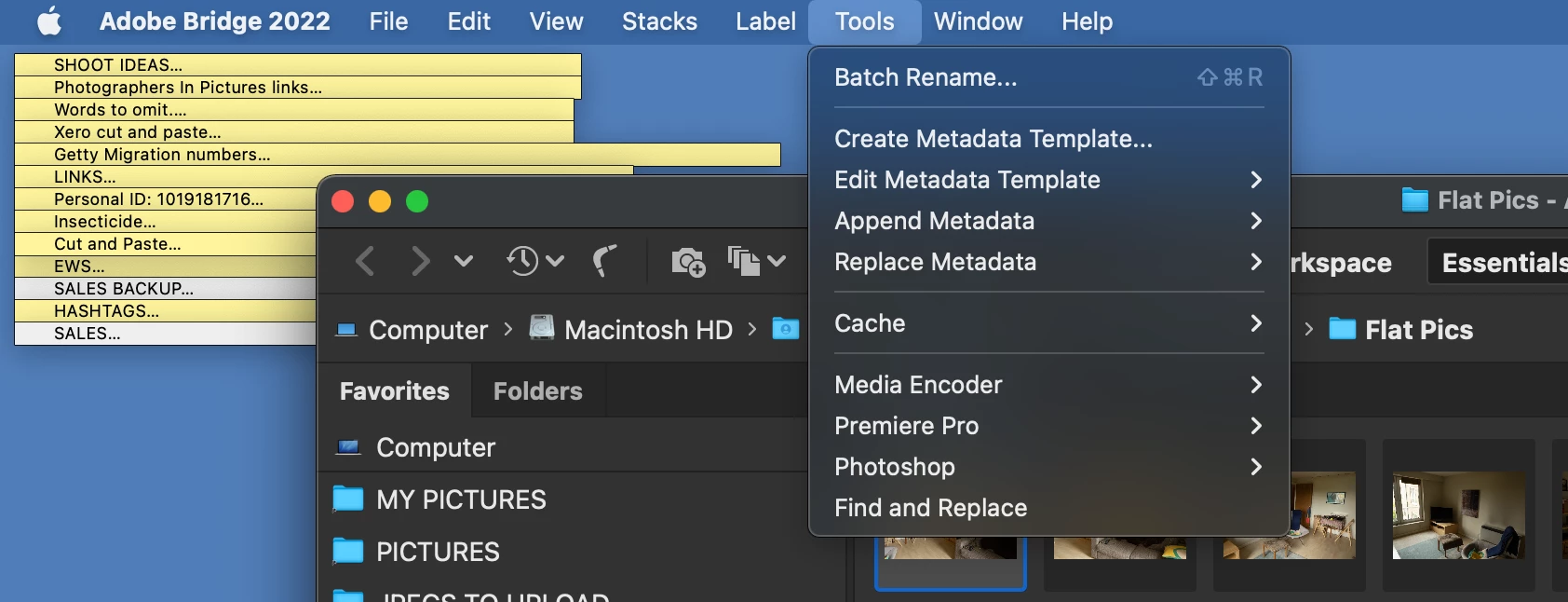
It should now appear in the Tools menu.


Let me know how it goes.