
Known Participant
August 12, 2020
Answered

Yet Another Case of Missing Camera Profiles

  • August 12, 2020
  • 3 replies
  • 1907 views

I do not use camera profiles often. But occasionally, I have a job that requires me to use custom X-Rite Color-Checker Passport profiles. Has always worked flawlessly until now. 


My profiles should be listed under Profiles ... directly beneath Camera Matching, but they are not and there seems to be NO way to import them because when I try to import one ... I receive this message:
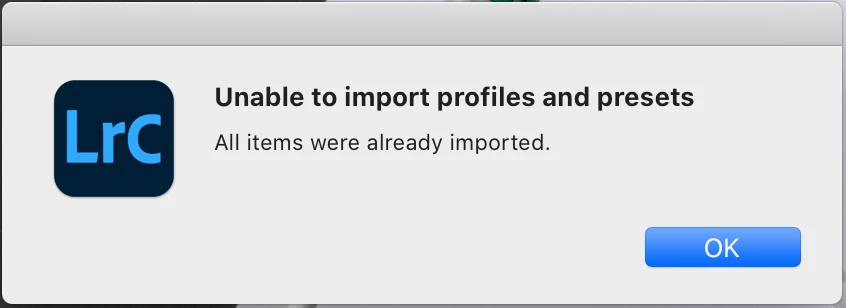


I seem to receive this message because all of my profiles are still in their proper location and seemingly imported, but hidden. I've tried duplicating, renaming to a new name and importing from a different location ... no change. 


I work from a "working" catalog. When I am finished with a shoot ... it is exported as a catalog and archived. The most recent catalog I exported and archived from a shoot for this client was in August of 2018. When I open that catalog ... what do you know ... I can see ALL of my profiles. So ... I tried importing the catalog into my working catalog. When I select a RAW file captured yesterday ... there are STILL no custom profiles listed ... but when I select a RAW file imported from old catalog ... I see ALL of the profiles.


I also tried importing yesterday's images into the old catalog ... no change.


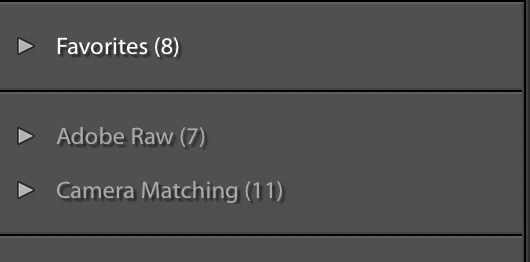
Selections available for RAW files captured yesterday 
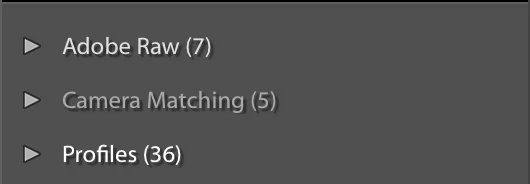
Selections available for 2018 RAW files
So ... I tried syncing ... does not copy the camera profile to new images!


I uninstalled, removed all preference and reinstalled ... no change!


I am beyond frustrated at this point ... I've wasted over two hours trying to do something that should have taken less than 10 seconds.  

This topic has been closed for replies.
Correct answer GoldingD

Ahh, you already went to the feedback site, but you fixed your issue on your own


https://feedback.photoshop.com/photoshop_family/topics/lr-cc-custom-camera-profiles-missing-mac-os


Got it working. Deleted CameraRaw folder and reinstalled. 


can you expand on that? Deleted Camera RAW folder, ok, then reinstalled, reinstalled what?


3 replies

GoldingD
GoldingDCorrect answer
Legend
August 12, 2020

Ahh, you already went to the feedback site, but you fixed your issue on your own


https://feedback.photoshop.com/photoshop_family/topics/lr-cc-custom-camera-profiles-missing-mac-os


Got it working. Deleted CameraRaw folder and reinstalled. 


can you expand on that? Deleted Camera RAW folder, ok, then reinstalled, reinstalled what?


Known Participant
August 12, 2020

Reinstalled CameraRaw. Occurred to me to try that since I found the same behavior when attempting to open a RAW file directly with Photoshop ... which I don't typically do. 

GoldingD
Legend
August 13, 2020

No clue to how that would help LrC. LrC does not use that plugin, PS does, but not LrC. The code for RAW conversion is built into LrC, oh it is the same code (or very close) but it is not used by LrC. Uninstalling the Adobe Camera RAW does not remove it from LrC.


So, odd.


Followup.  See reply by Ian_Lyons, below


GoldingD
Legend
August 12, 2020

Try posting your problem at the official Adobe Feedback site, where actual Adobe Techs pay attention:


https://feedback.photoshop.com/photoshop_family/categories/photoshop_family_photoshop_lightroom?topic-list[settings][type]=problem


please post a link to your problem in the feedback site in a reply to your posting above, as members can see that and look over at that link for a continuation of the issue.


TheDigitalDog
Inspiring
August 12, 2020

Please provide a screen capture of "Profiles (36) with down arrow. This is where you should see those X-rite profiles as I do on my end. Note, this IS filtered by camera. So if you had a custom profile for a Sony and the image you were currently selected on was a Canon, you would not see a profile for Sony. Anyway, here's what I see for my Sony:


Note the star indicates it's also a favorate. 

Author “Color Management for Photographers" & "Photoshop CC Color Management/pluralsight"
Known Participant
August 12, 2020

Here's the list. All images were captured with the same Nikon D850. 


TheDigitalDog
Inspiring
August 12, 2020

And none are those you're seeking? 

You say the raws are D850 but I see profiles named D800 etc. What are those? Did you make them? 

Author “Color Management for Photographers" & "Photoshop CC Color Management/pluralsight"