Participant
September 22, 2024
Answered

Adobe claims i need to have a monitor certified for DisplayHDR 1000 or above for HDR to work.

  • September 22, 2024
  • 2 replies
  • 1082 views

However my Surface Pro 11 with an OLED screen is HDR certified for VESA Display HDR 600 (1.1). It peaks at 660 nits. This monitor actually seem to work with Lightroom HDR. This is inconsistent with Adobe published requirements?

I want to buy an external monitor and need to know if i need to look for HDR 1000 certified monitors or if HDR 600 is good enough?

KR

Jan

This topic has been closed for replies.
Correct answer Conrad_C

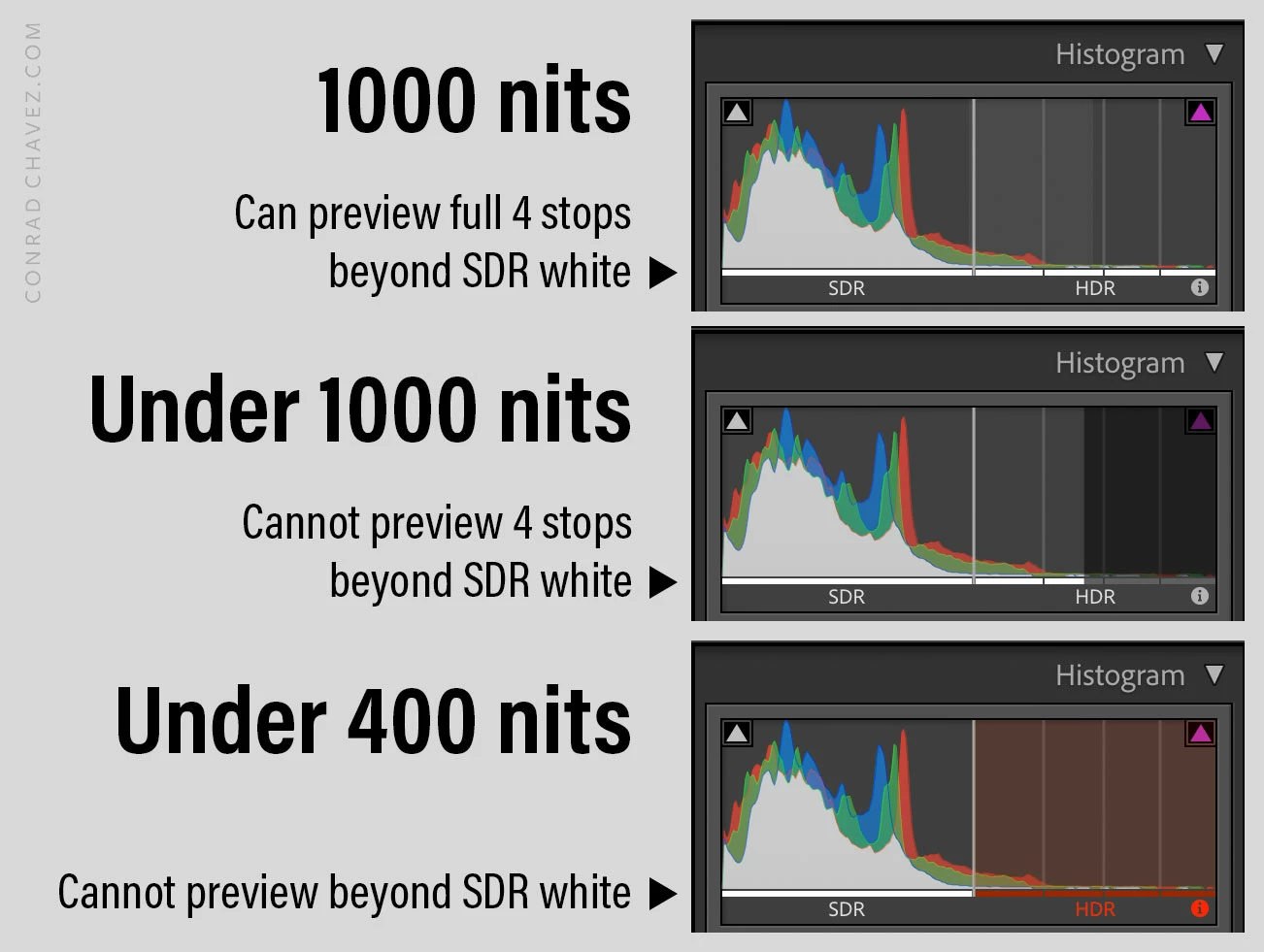
The Adobe recommendations are for being able to preview the full 4 supported stops beyond SDR white. That’s what you get with a display that can sustain 1000 nits.


If you have a display that can sustain less than 1000 nits, the number of stops you can preview beyond SDR white is limited, as shown in the picture below.


So, the answer to your question is, yes, HDR is enabled for displays under 1000 nits, but whether you think that’s OK depends on how much HDR you want. If you need to preview only a stop or so beyond SDR, then maybe 600 nits is fine, although some would argue if you’re only going that far there might not be much point in HDR. If you want to be able to preview all four stops beyond SDR, then you want 1000 nits sustained.


The Lightroom Classic histograms below are from some displays I have. The bottom one is from my normal old desktop display that peaks at around 350 nits, which is too low to reach HDR, so the HDR part of ths histogram is completely red and unusable. The middle one does not achieve 1000 nits; it doesn’t even reach 2 stops past SDR white so over half of the HDR histogram is gray (not usable). The top one is from my MacBook Pro, which can sustain 1000 nits and peak at 1600, so it can easily preview the full 4 stops beyond SDR white.

 

2 replies

Conrad_C
Community Expert
Conrad_CCommunity ExpertCorrect answer
Community Expert
September 23, 2024

The Adobe recommendations are for being able to preview the full 4 supported stops beyond SDR white. That’s what you get with a display that can sustain 1000 nits.


If you have a display that can sustain less than 1000 nits, the number of stops you can preview beyond SDR white is limited, as shown in the picture below.


So, the answer to your question is, yes, HDR is enabled for displays under 1000 nits, but whether you think that’s OK depends on how much HDR you want. If you need to preview only a stop or so beyond SDR, then maybe 600 nits is fine, although some would argue if you’re only going that far there might not be much point in HDR. If you want to be able to preview all four stops beyond SDR, then you want 1000 nits sustained.


The Lightroom Classic histograms below are from some displays I have. The bottom one is from my normal old desktop display that peaks at around 350 nits, which is too low to reach HDR, so the HDR part of ths histogram is completely red and unusable. The middle one does not achieve 1000 nits; it doesn’t even reach 2 stops past SDR white so over half of the HDR histogram is gray (not usable). The top one is from my MacBook Pro, which can sustain 1000 nits and peak at 1600, so it can easily preview the full 4 stops beyond SDR white.


Inspiring
September 22, 2024

I have an HDR600 monitor and I can edit images in HDR (I use Lightroom Desktop), but whites are clipped above about 1.5 stops. I assume an HDR1000 monitor would go somewhat higher than that before clipping. I wasn't aware that there was an Adobe requirement for HDR1000 but I could well understand it being a recommendation because, in my case anyway, HDR600 is obviously limiting the potential of HDR. In short, my experience is that HDR600 works, but in a limited way.


If I were buying a new monitor now for use with Lightroom I would probably be looking for HDR1000, but I don't suppose they come cheap. My existing monitor works well enough for me to explore HDR editing, but at the moment the benefits of HDR are not enough to persuade me to replace it with a HDR1000 device. When HDR gains wider acceptance I may think again - perhaps by then higher-performance monitors will have come down in price. Meanwhile, although I occasionally experiment with HDR edits, most of my work is in SDR.