RogerG40767081
Inspiring
February 17, 2020
Answered

Backup prompt not showing on exit anymore.

  • February 17, 2020
  • 2 replies
  • 5582 views

In the past every time I exited LR I was asked if I wanted to backup, usually on a weekly basis.  I don't seem to get the prompt anymore and my latest backup is some weeks ago.  Has anything changed in the last update to stop the prompt?  In my LR prefs it says weekly backups.  I am running LR 9.2 on Mac OS Catalina.

This topic has been closed for replies.
Correct answer Rob_Cullen

Thanks for screen-clips.

 it is set up for a weekly backup.

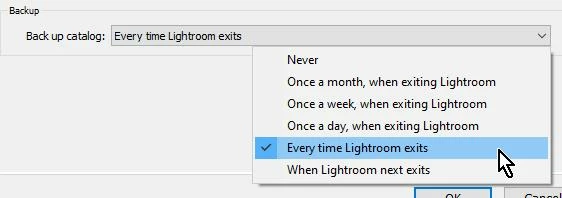
Change it! The drop-down menu will give you the options. I personally prefer the "every time Lr exits" as you do get a choice to "Skip the backup" if little work has been done.
"...the latest backup is 8th Jan although I have exited LR today so should be todays backup, yes?

You should see at least a 'weekly' one, I would think.

BUT-More Importantly! You should NOT be backing up the catalogs to the same drive/folder location as your Master Catalog. If the drive fails you have lost everything. Catalog backups MUST go to a separate physical drive!

AND- maybe you have been doing this which might explain why you do not see any after 8th Jan.

The choice for Backup location is within the Backup dialog when you close Lr.


I did optimize yesterday - whatever that does!

In general terms- Tidies up the catalog, removing un-necessary data, possibly compacting it. Check it to do so in the Backup dialog.

 

2 replies

Rob_Cullen
Rob_CullenCorrect answer
Community Expert
February 18, 2020

Thanks for screen-clips.

 it is set up for a weekly backup.

Change it! The drop-down menu will give you the options. I personally prefer the "every time Lr exits" as you do get a choice to "Skip the backup" if little work has been done.

"...the latest backup is 8th Jan although I have exited LR today so should be todays backup, yes?

You should see at least a 'weekly' one, I would think.

BUT-More Importantly! You should NOT be backing up the catalogs to the same drive/folder location as your Master Catalog. If the drive fails you have lost everything. Catalog backups MUST go to a separate physical drive!

AND- maybe you have been doing this which might explain why you do not see any after 8th Jan.

The choice for Backup location is within the Backup dialog when you close Lr.


I did optimize yesterday - whatever that does!

In general terms- Tidies up the catalog, removing un-necessary data, possibly compacting it. Check it to do so in the Backup dialog.


Regards. My System: Windows-11, Lightroom-Classic 15.0, Photoshop 27.0, ACR 18.0, Lightroom 9.0, Lr-iOS 10.4.0, Bridge 16.0 .
RogerG40767081
Inspiring
February 19, 2020

Thanks.  I changed the backup frequency to "every time Lr exits" as you suggested and it then showed the prompt.  I shall now keep it as that as you say.  

However I don't understand the following.

"BUT-More Importantly! You should NOT be backing up the catalogs to the same drive/folder location as your Master Catalog. If the drive fails you have lost everything. Catalog backups MUST go to a separate physical drive!"

Sorry I do not understand this point. What do you mean by "Master Catalog"? Are you saying that I create a folder on an external drive for all backups to be saved in but keep the "data folders" etc on the main LR folder?  Also all my existing backup files. Do they need to be copied across?  Will this still work? But then what if the external drive fails?  Surely this carries the same risk?

I apologise for my lack of understanding on this and appreciate your advice.

RogerG40767081
Inspiring
February 19, 2020

After a search I found this 

https://www.youtube.com/watch?v=QJ2bj1Jal2Q 

Very interesting but a bit overwhelming, but I now get some of the gist of what I think I should do and also answers some of my questions.  Just got to buy another external drive now and follow all your advice.

Rob_Cullen
Community Expert
February 18, 2020

From the Main Menu- check your catalog Settings.  (is that [Cmd+Alt+,] on a Mac? )

Change the option for Backup frequency there.

Regards. My System: Windows-11, Lightroom-Classic 15.0, Photoshop 27.0, ACR 18.0, Lightroom 9.0, Lr-iOS 10.4.0, Bridge 16.0 .
RogerG40767081
Inspiring
February 18, 2020

Thank you.  

Catalogue settings below.  As you see it is set up for a weekly backup. But as you can also see in the second screen grab that the latest backup is 8th Jan although I have exited LR today so should be todays backup, yes?  I did optimize yesterday - whatever that does! Is there any way you can physically do a LR backup to get around all this?  I always used to get a prompt when exiting asking if I wanted to backup or not, but don't get this anymore.  Totally confused!  Appreciate any help.