
Ken Nielsen
Legend
December 9, 2020
Answered

Can the Radial Filter be reversed in Lightroom? How is that done?

  • December 9, 2020
  • 1 reply
  • 2026 views

The radial filter in Lightroom starts out with a darker center and lighter to the outside... I think this is the default or at least I am hoping so and that it can be reversed to lighter center and darker to the outside or 'nothing' to the outside really is what I want.

Is any of this possible? can I make the center lighter without affecting what is to the outside of the circular filter?

TIA,

Ken
This topic has been closed for replies.
Correct answer Rob_Cullen

Two ways do it for me in Lightroom v4 (on Desktop -WIndows)-

1)  Press the keyboard ['] quote key.

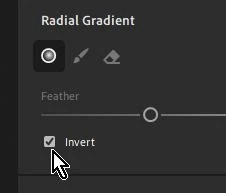
2) Click on the Invert box-


1 reply

Rob_Cullen
Community Expert
Rob_CullenCommunity ExpertCorrect answer
Community Expert
December 12, 2020

Two ways do it for me in Lightroom v4 (on Desktop -WIndows)-

1)  Press the keyboard ['] quote key.

2) Click on the Invert box-


Regards. My System: Windows-11, Lightroom-Classic 15.1.1, Photoshop 27.3.1, ACR 18.1.1, Lightroom 9.0, Lr-iOS 10.4.0, Bridge 16.0.2 .
Ken Nielsen
Legend
December 12, 2020

Incredible! How very thankful I am that you revealed this WobertC. Amazing good to now know this.